PoE (Power over Ethernet): What it is and how to power Wi-Fi antennas
and cameras through the network cable (without a power outlet)
In the previous chapter we agreed that the best, professional Wi-Fi
solution is to place Access Points (APs) in the center of the ceiling.
The same goes for security cameras, which go high up on the walls under
the eaves.
Here comes the practical problem of installation: How are you going to
power these devices? Installing a classic 230V power outlet on the
ceiling of the living room next to the Access Point, or externally next
to each camera, is aesthetically unacceptable, expensive for the
electrician and often dangerous.
The solution to this impasse is PoE (Power over Ethernet) technology. It
is one of the most intelligent and life-saving inventions of networks.
Let's see how exactly a simple internet cable manages to become a power
cable, and what "traps" you should avoid in order not to burn
your equipment.
1. What is PoE (The "Magic" of One Cable)
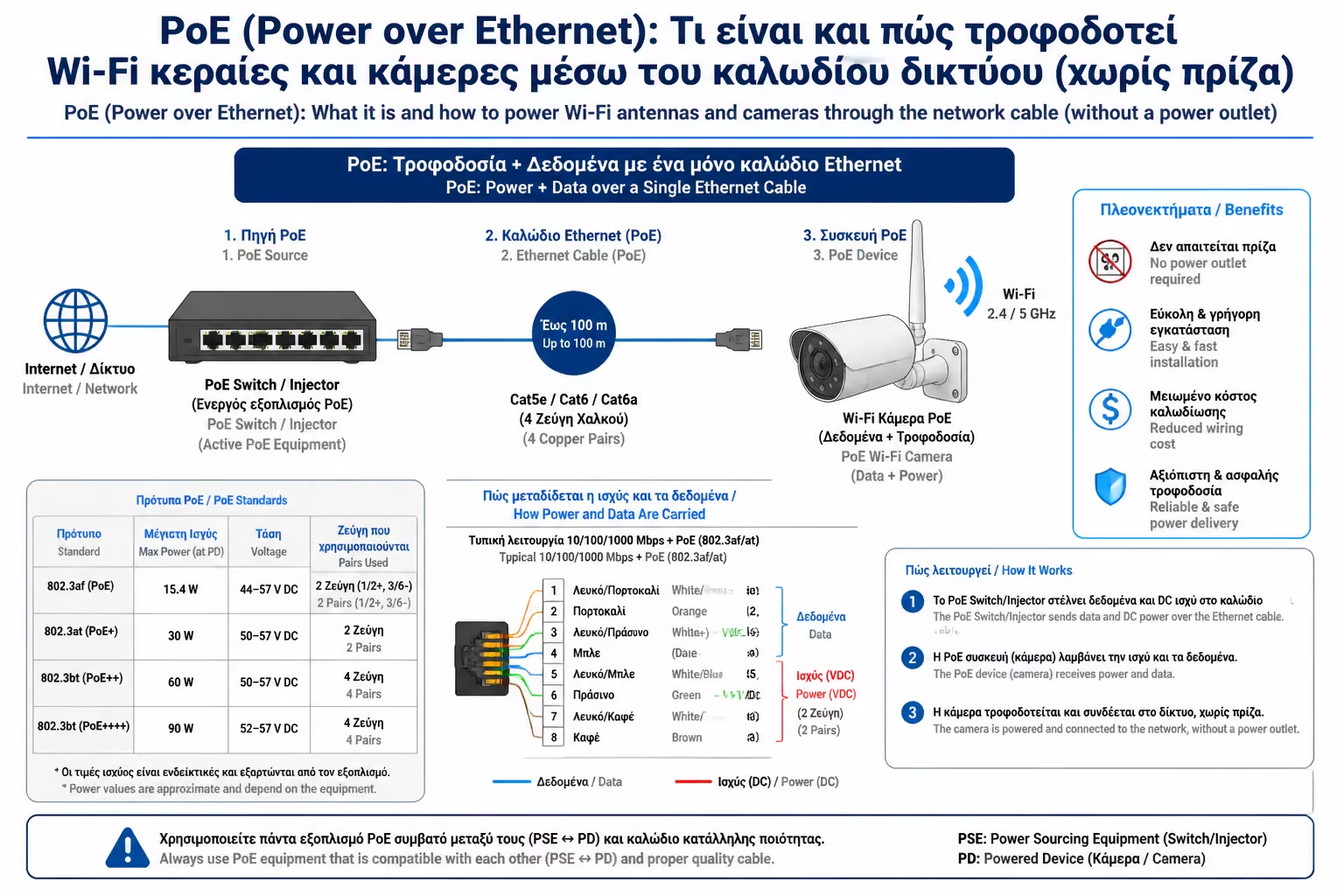
The acronym PoE means exactly what it describes: Power over Ethernet.
This technology allows the classic network cable (e.g. Cat6 or Cat6a)
to carry both digital data (internet) and electrical energy (current)
to the terminal device at the same time.
How is that possible? As we have said, the UTP cable has 8 small
wires inside it (4 pairs). In 10/100 Mbps networks only 2 pairs were
used for data, leaving the other 2 free for power. In modern Gigabit
networks, all 4 pairs are used simultaneously for both data and
power (via a technique called phantom power).
The result is that with a single cable, the Access Point in your
ceiling "turns on" and enters the network, without any
external power supply.
2. How do we give PoE? (The 2 Solutions)
The cable itself, of course, has no current. A machine at the other
end (in the Rack or main panel) must "throw" power to it.
There are two ways:
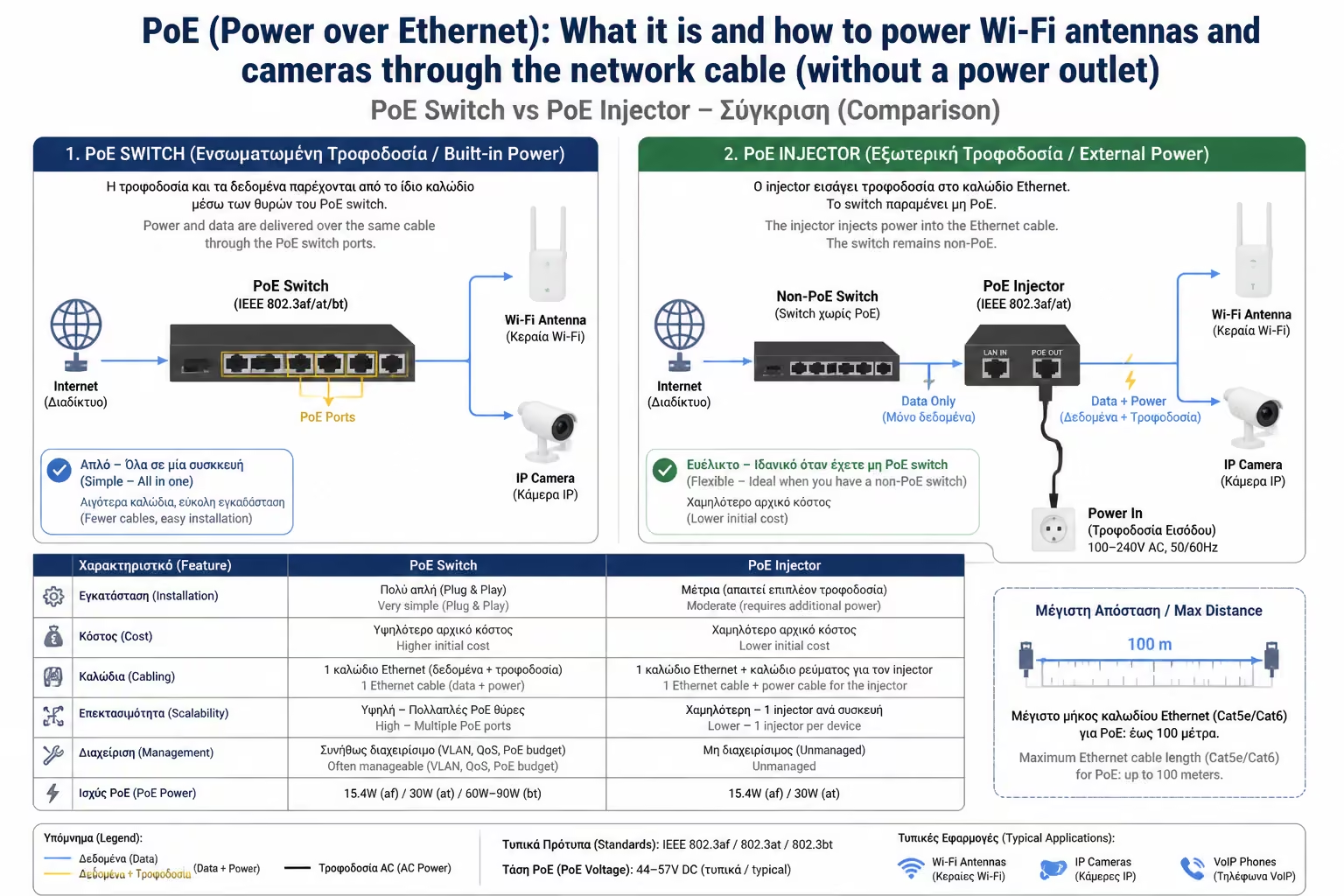
A. The PoE Switch (The Professional Solution)
Instead of buying a simple Switch to share the internet, you buy a
PoE Switch. This Switch has a large power supply built in. When you
connect the camera or antenna to it, the Switch itself understands
that the device needs power and sends it to it. It is ideal when you
have multiple devices (eg 4 cameras and 3 Wi-Fi antennas).
B. The PoE Injector (The Economical Solution for 1-2 devices)
If you have an old Switch (that doesn't output power) and you only
want to put in one Wi-Fi antenna, you don't need to change the whole
Switch. You are using a PoE Injector. It's a small "brick"
(like a laptop power supply) that plugs into the outlet. It has two
ports: One port ("Data In") connects to your old Switch to
get internet. The other port ("PoE Out") outputs the same
internet but it has been "injected" (injected) and
current! From there starts the cable that goes to the ceiling.
3. The Generations of PoE (How much power do we need?)
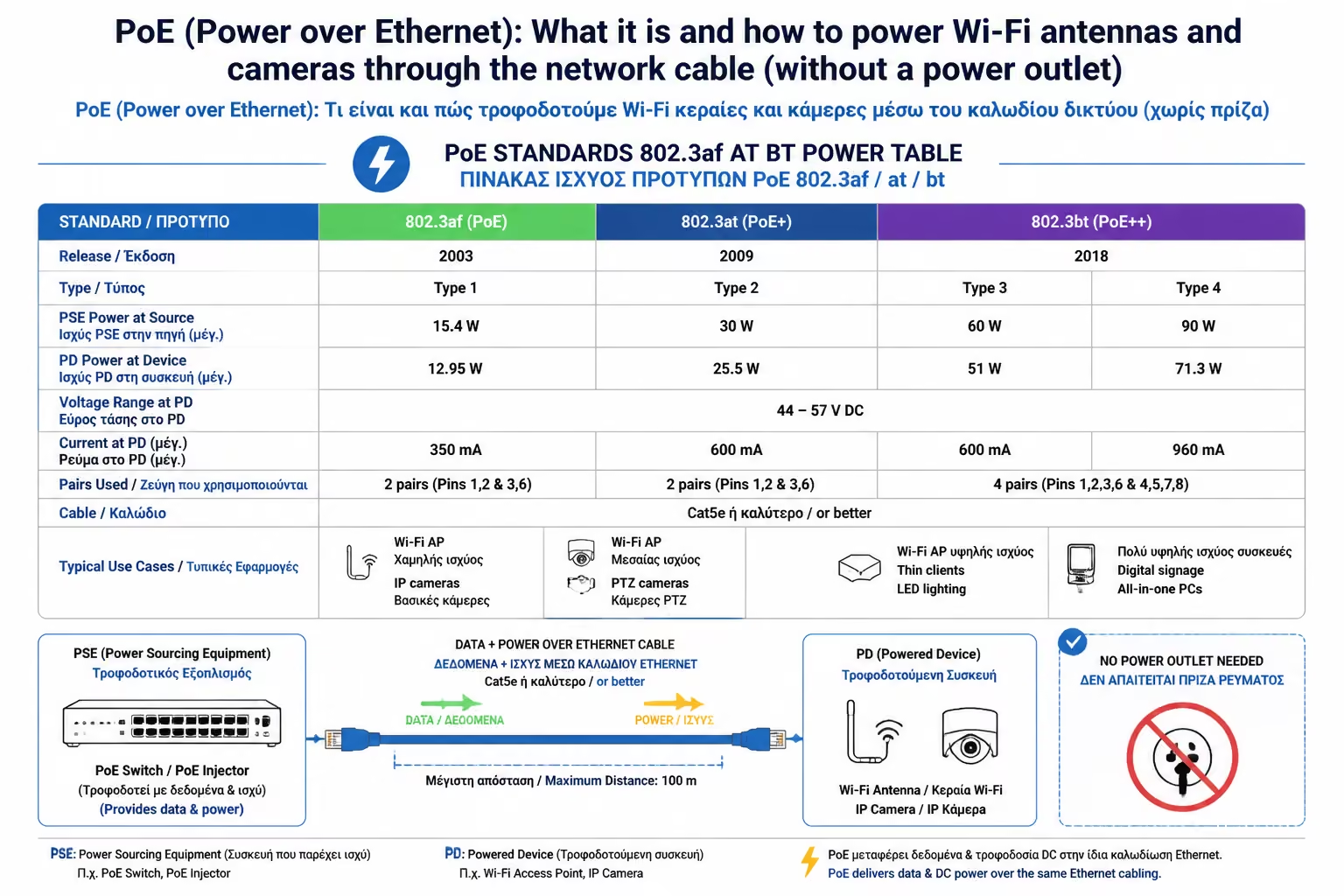
Not all devices "burn" the same current. A simple camera
consumes very little, while an Access Point with built-in speakers and
lights needs a lot of power. Thus, 3 generations of standards were
created:
PoE (802.3af): The first generation. Provides up to 15.4 Watts.
Enough for simple office phones (VoIP) and basic security cameras.
PoE+ (802.3at): Today's absolute standard. Provides up to 30 Watts.
It is absolutely necessary for modern Access Points (Wi-Fi 6) and
for PTZ cameras (those that rotate with wheels).
PoE++ (802.3bt): The "monster". Delivers 60 Watts up to 90
Watts. It is used to power entire TV screens (PoE Displays),
computers, smart LED lighting and the long-awaited Wi-Fi 7 Access
Points.
Tip: When purchasing a PoE Switch, check the Total PoE Budget (the
total power of its power supply). If the Switch has a Budget of 60W
and you put 4 antennas on top that ask for 20W each (80W total), the
last antenna will just never turn on.
4. Active vs. Passive PoE (The trap that "burns" devices)
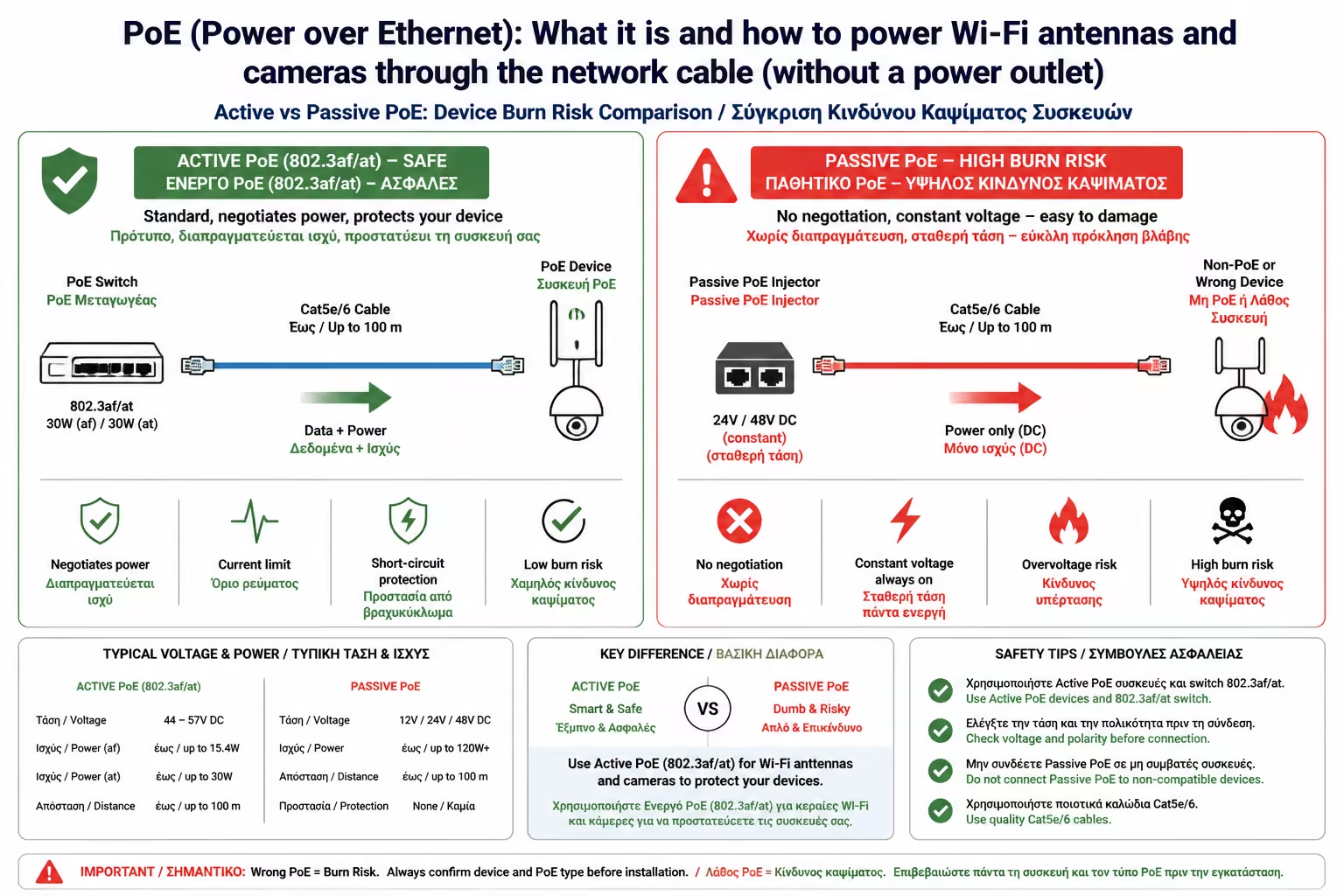
This is where beginners make the biggest mistake, literally
"baking" their equipment. There are two power supply
philosophies:
Rule of thumb: Always buy equipment that says
"802.3af/at/bt" standards. Avoid the anonymous "Passive
PoE Injectors" unless you know exactly what you're doing. Also,
for this reason we are forbidden to use aluminum cables (CCA): PoE+
current melts aluminum due to overheating. Only pure copper (Bare
Copper)!
Active PoE (Active / Standard)
It's the standards we mentioned above (802.3af/at/bt). They are
completely safe. When you connect a device to the Switch, the Switch
first sends a minimal control current (Handshake). The machine
"asks": "Are you a PoE device? How much power do you
want?". If the device (eg your laptop) says "No, I'm just
a computer", the Switch does NOT send power, protecting your
port.
Passive PoE (Passive / "Blind")
It's a cheap, old method (usually at 24V). Injector or Switch
doesn't ask anything. It sends current (24 Volts) non-stop down the
wire, no matter what you plug into the other end. If you
accidentally connect your computer's network card or TV to a Passive
PoE port, the current will instantly "fry" its
motherboard.
Summarizing
PoE dramatically simplifies the installation of the Smart Home. It
eliminates the need for expensive electrical work, cuts the number of
cables in half and allows you to place cameras and Access Points in the
most inaccessible places. By investing in a good PoE+ Switch, you create
a central "heart" that will feed life to your digital
ecosystem for many years.
Next Step: We talked about powering the antennas. But which antennas
should we choose today, when technology changes every two years?
We continue to the next analysis: Wi-Fi 7 and Wi-Fi 6E: What
infrastructure is required in the walls (Multi-Gigabit Ethernet) to
support the new, super-fast standards.