Network Switches (Unmanaged vs. Managed vs. PoE): How to Calculate Your Total PoE Budget to Power All Your Cameras and APs

All the UTP cables in your house are nicely terminated in the Patch Panel. Now, they need to connect to the "brain" of your local area network (LAN): the Network Switch.

If the Router is the "door" that takes you out to the Internet (to the outside world), the Switch is the "traffic warden" inside your home. This decides how the TV will talk to the NAS (server), and your phone to the camera.

There are €20 Switches and €2,000 Switches on the market. Choosing the wrong Switch will not only drop your speed, but can leave your security cameras without power. Let's break down the categories and see how engineers calculate their strengths.

1. The "Mind": Unmanaged vs. Managed Switches

The first big decision is the level of control you want to have over your network.

Illustration for 1. The "Mind": Unmanaged vs. Managed Switches

A. Unmanaged Switches (The "Dumb" Worker)

They are the cheap Switches you find everywhere. How they work: Plug & Play. You plug them in, clip the cables and... they work. They have no menu, no IP address, no settings at all. Why choose them: If you have a very simple network (eg you just want to give internet to 4 computers and 1 TV), they are great. * The Disadvantage: If a device (eg a broken network card) starts sending garbage to the network (Broadcast Storm), the Unmanaged Switch will not understand anything, it will block and all your internet will "go down" until you unplug it.
B. Managed Switches (The "Strict" Traffic Policeman)

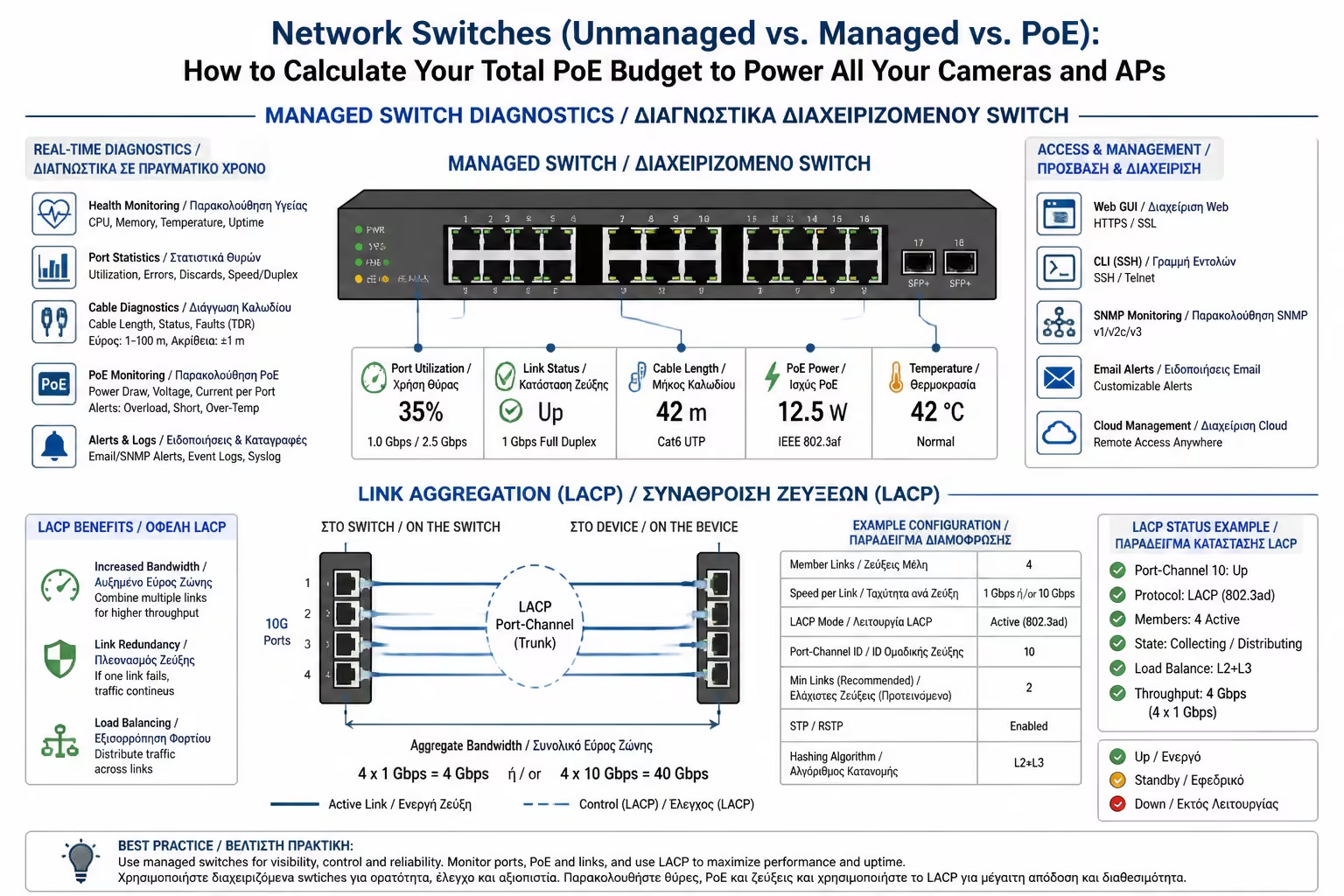
This is where we get into professional equipment (IT Infrastructure). Managed Switches have their own operating system (usually you access them through a Web Interface or a Controller).

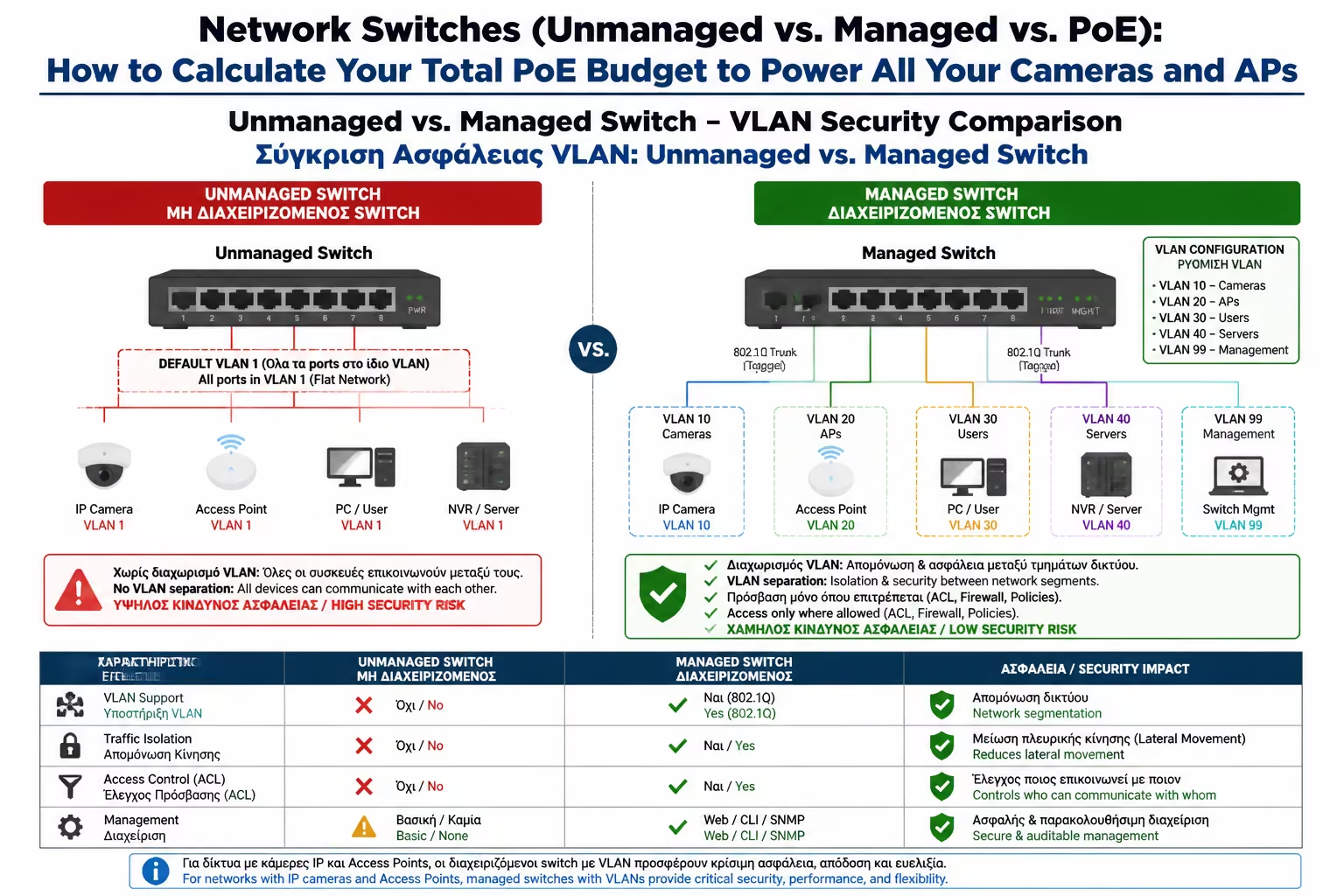
VLANs (Virtual LANs)

This is the #1 reason we buy them. With VLANs you can "cut" your Switch into multiple, invisible, separate networks.

Example of Security

You put all Chinese IoT devices and cameras on "VLAN 2" (so they don't have any access to the internet or your computers), and your computers on "VLAN 1". If a hacker hacks the camera, they can't see your computer files!

Link Aggregation

You can join 2 or 3 cables from your NAS to the Switch, doubling or tripling your file transfer speed.

Troubleshooting

If a cable is cut, the Managed Switch tells you exactly: "On port 8, the cable is cut at 12 meters".

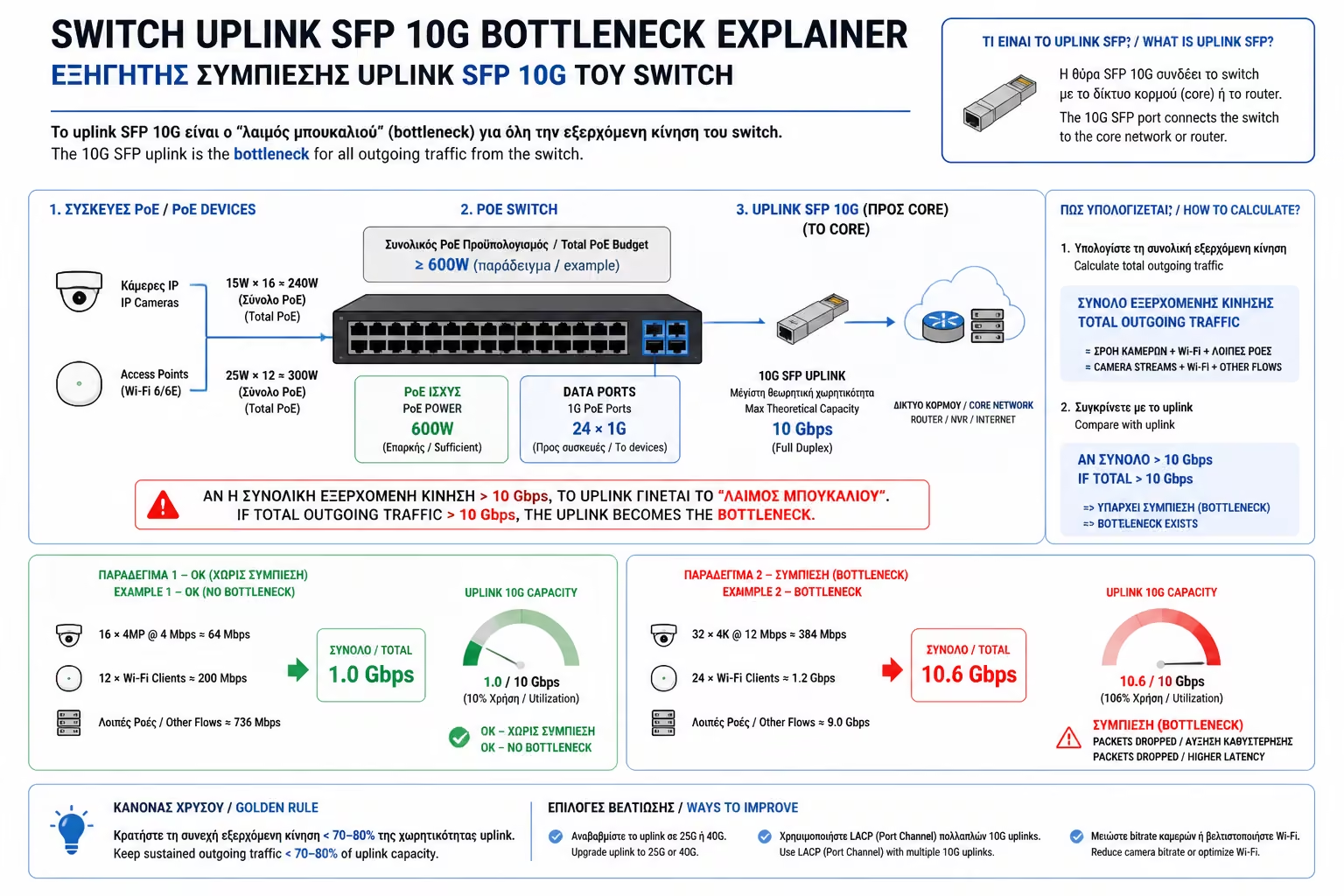
2. Speeds (The Uplink Bottleneck)

Illustration for 2. Speeds (The Uplink Bottleneck)

Obviously, all ports for the rooms must be at least 1 Gigabit (1000 Mbps) or, if you followed the Wi-Fi 7 guide, 2.5 Gigabit.

But there is one critical port: The Uplink. This is the port that connects the Switch to the main Router or to a second Switch. If you have a 24 port (Gigabit) Switch and all computers are downloading files at the same time, the one 1 Gigabit line to the Router will be "clogged". Therefore, good switches have SFP or SFP+ Ports (sockets for optical fibers or special copper modules) which operate at 10 Gigabit (10G), acting as a huge "boulevard" that never blocks.

3. PoE (Power over Ethernet): The "Budget" Risk

As we saw in Class C, the Switch is what will power the cameras and Wi-Fi antennas (Access Points) over the UTP cable.

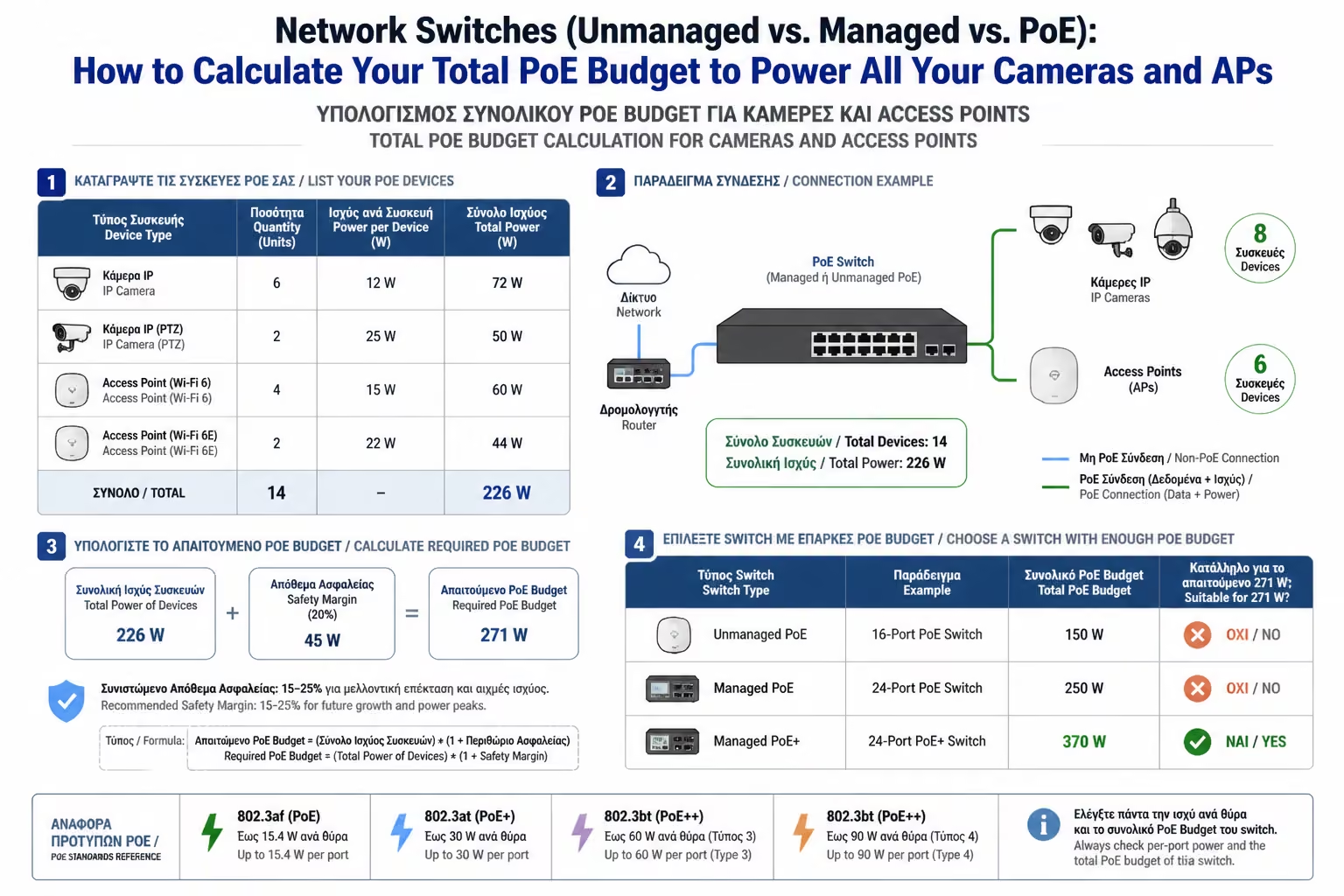
The biggest mistake buyers make is this: They read in the specs "8-Port PoE Switch" and assume they can put 8 heavy devices on it (like Wi-Fi 6/7 Access Points or panning PTZ cameras). Error. This is where the concept of PoE Budget comes in. The PoE Budget is the total power (in Watts) that the Switch's power supply can output simultaneously to all ports.

What devices do you have to connect?

Total Requirement: 45 + 28 = 73textW. Switch budget: 60textW.

The Result: When night falls, the cameras will turn on their infrared lights, ask for more power, the Switch will "run out" of power, and the last camera (or Wi-Fi) will suddenly shut down!

The Engineer's Rule for PoE Budget: Add up the Max Power Consumption of all the PoE devices you plan to connect. To this number, add a +20% as a margin of safety. In the example above (73W), you had to buy a Switch with a PoE Budget of at least 90W or 120W (eg the biggest 8-port switches on the market give 130W to 150W budget).

Illustration for 3. PoE (Power over Ethernet): The "Budget" Risk

How to Do the Calculation (The Mathematical Example)

Let's say you find a nice, cheap 8-Port PoE+ Switch. You read the fine print: Total PoE Budget: 60W.

3 x Wi-Fi 6 Access Points

Each requires 15 Watts (Maximum). 3 times 15 = 45textW.

4 x Security Cameras (IP Cameras)

Each one with infrared (IR) LEDs at night requires 7 watts. 4 times 7 = 28textW.

Summarizing

Illustration for Summarizing

For a modern, "smart" home, a Managed PoE+ Switch is now the bare minimum. It enables you to isolate dangerous devices via VLANs and have full control over what happens inside your cables. Before making the purchase, strictly calculate the sum of Watts consumed by your cameras and antennas, always leaving a safety "cushion" in the PoE Budget for future additions.

Next Step: All that power (PoE) and data processing creates something very dangerous for your cabin: Massive heat.

We continue with a crucial chapter for the longevity of your equipment: Ventilation & Temperature (Cooling) inside the Rack: How many fans are needed and how the airflow is calculated so that the systems do not "burn".

Related Articles

Preview