Band Steering and Roaming (802.11k/v/r): How to move from floor to floor
without dropping your WhatsApp or Viber call
Imagine the following common scenario: You have installed three
excellent Access Points in your home (eg one in the living room and one
in the bedroom). They all have the same name (SSID) and the same
password. You are talking on Viber sitting in the living room. You get
up and walk towards the bedroom.
As you enter the bedroom—right under the second antenna—your
interlocutor's voice begins to interrupt (robot) and eventually the call
drops. You look at your mobile and see that the Wi-Fi signal has only
one "line", even though you are next to the Access Point!
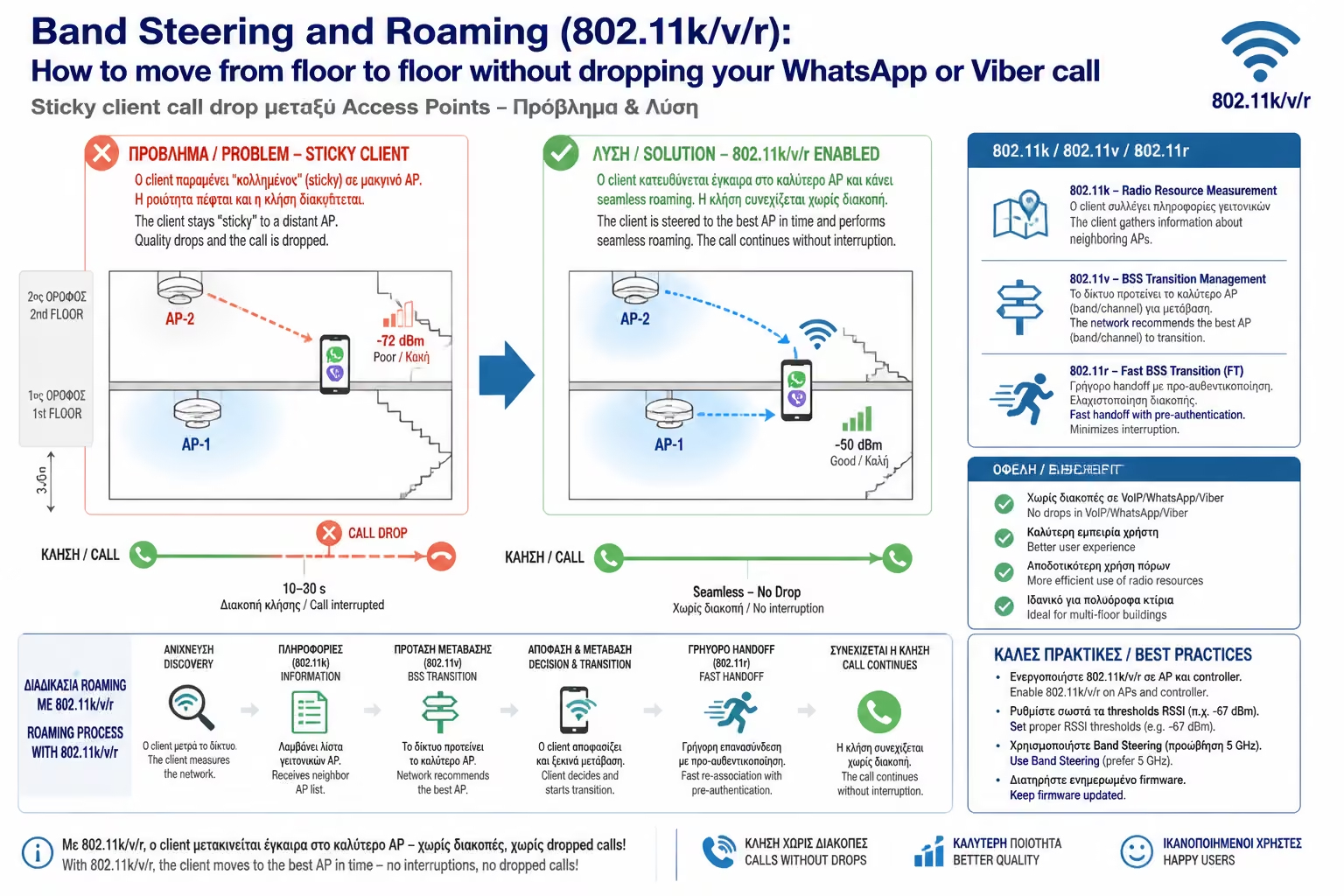
Why is this happening? This is the infamous "Sticky Client"
problem. In this article, we'll see why simply placing multiple antennas
isn't enough, and how engineers use Roaming and Band Steering protocols
to force your devices to behave intelligently.
1. The "Sticky Client" Problem (Who Makes the Decision?)
The biggest secret (and biggest misconception) in Wi-Fi networks is
this: Each Router/Access Point does NOT decide which antenna you
connect to. The decision belongs exclusively 100% to your device
(mobile or laptop).
Many devices (especially older smartphones, smart TVs or IoT devices)
are extremely "lazy".
When you connect to the Access Point in the living room, the mobile
"hooks" on it.
As you walk towards the bedroom, the signal from the living room
fades. Your phone sees the powerful antenna in the bedroom, but
refuses to roam because it thinks, "I still have even a tiny
bit of signal from the living room, I'm not bothering to disconnect
and reconnect elsewhere."
This "laziness" keeps your device connected in a distant,
dead zone, dropping speed across the network, until the signal is
completely lost and the call is dropped.
2. The Solution: Seamless Roaming (802.11k/v/r Protocols)
To solve the Sticky Client problem, we need a Unified Network (Managed
Network) controlled by a central "Brain" (Hardware or
Software Controller). The Controller uses three "magic"
protocols (commonly called Fast Roaming), which help (or force) the
mobile to switch antennas instantaneously.
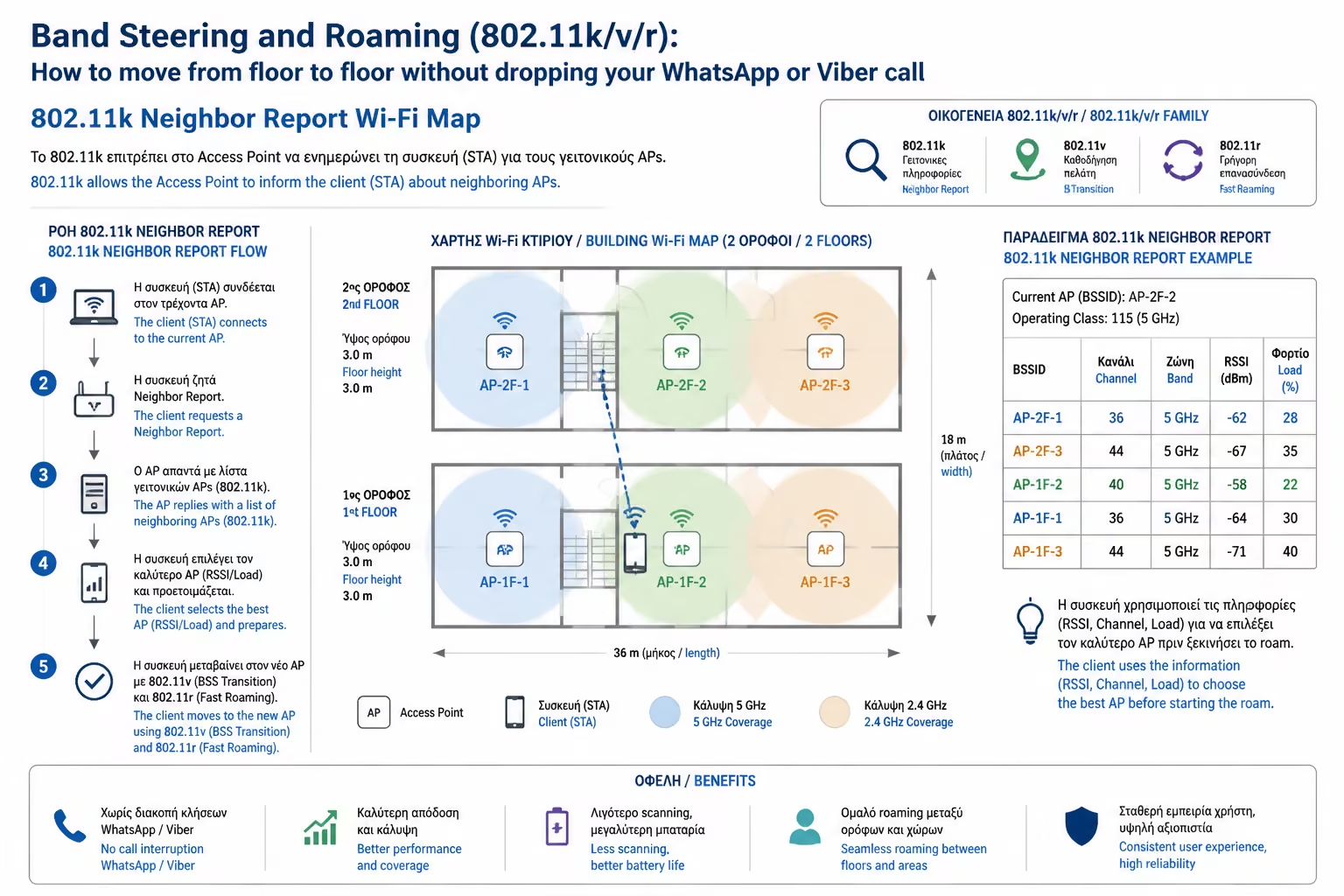
A. 802.11k (The Map)
Without it, when the signal drops, your phone has to stop what it's
doing and blindly "scan" all frequencies to find another
antenna. This takes time. The 802.11k protocol constantly sends your
mobile an updated list (map) of neighboring Access Points. So the
mobile knows exactly where to look before it even needs to change.
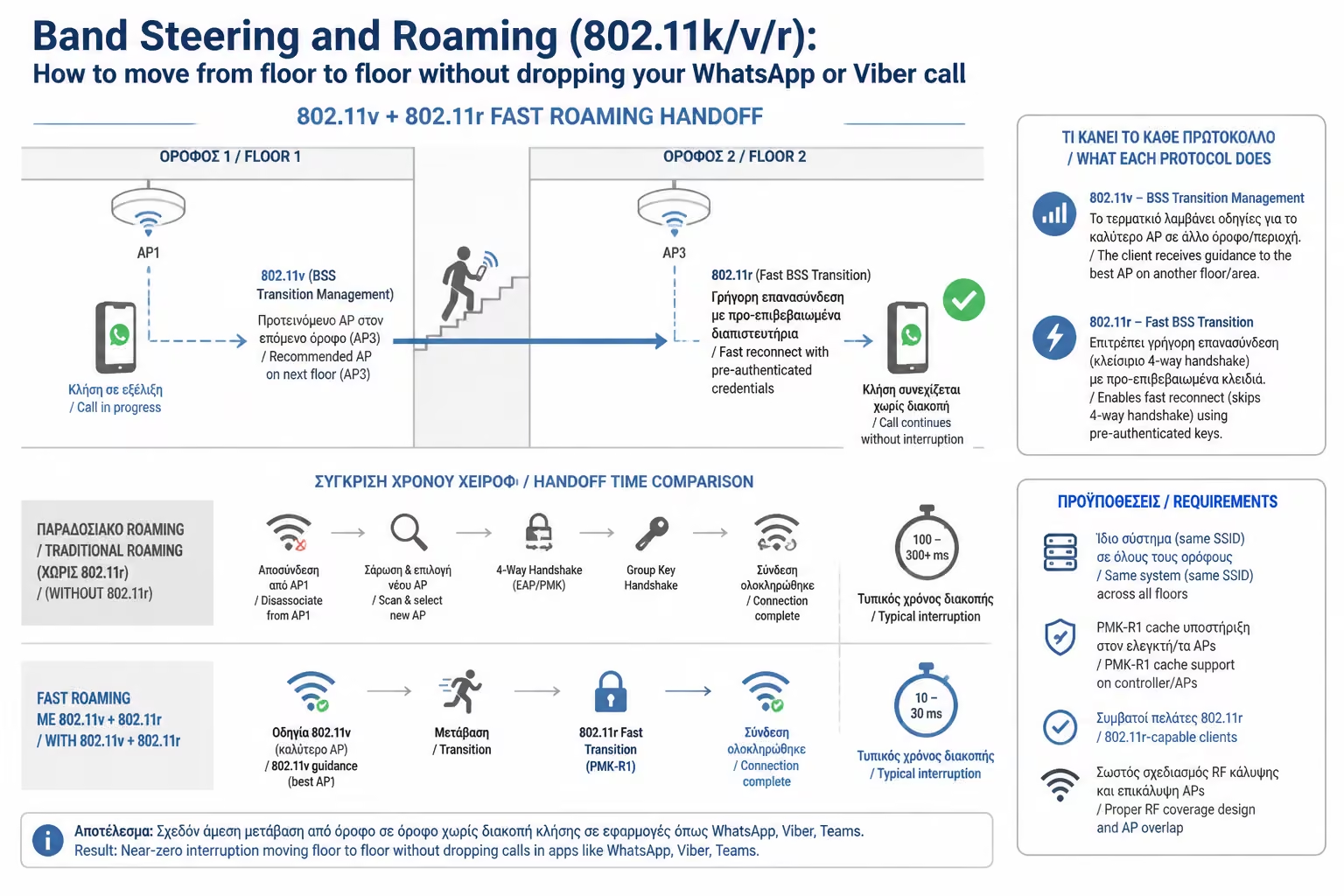
B. 802.11v (The Traffic Warden)
This is where the network takes control. The Access Point
"sees" that your signal has dropped too much and sends a
message to your mobile saying: "Our connection sucks. I see
that the bedroom antenna has a perfect signal for you. Please switch
now". 802.11v practically politely "nudges" the
Sticky Client to disconnect.
C. The 802.11r (The Relay)
This is most critical for WhatsApp and Viber. When a mobile changes
antenna, it normally has to do the "security greeting"
again (give the WPA2/WPA3 code). This process takes about 1 second
(enough for the call to drop). 802.11r (Fast BSS Transition) allows
antennas to share your "keys". When you go to the bedroom,
the new antenna already knows you. The change is done in less than
50 milliseconds (<50ms). You (and your app) don't even realize
you've switched antennas!
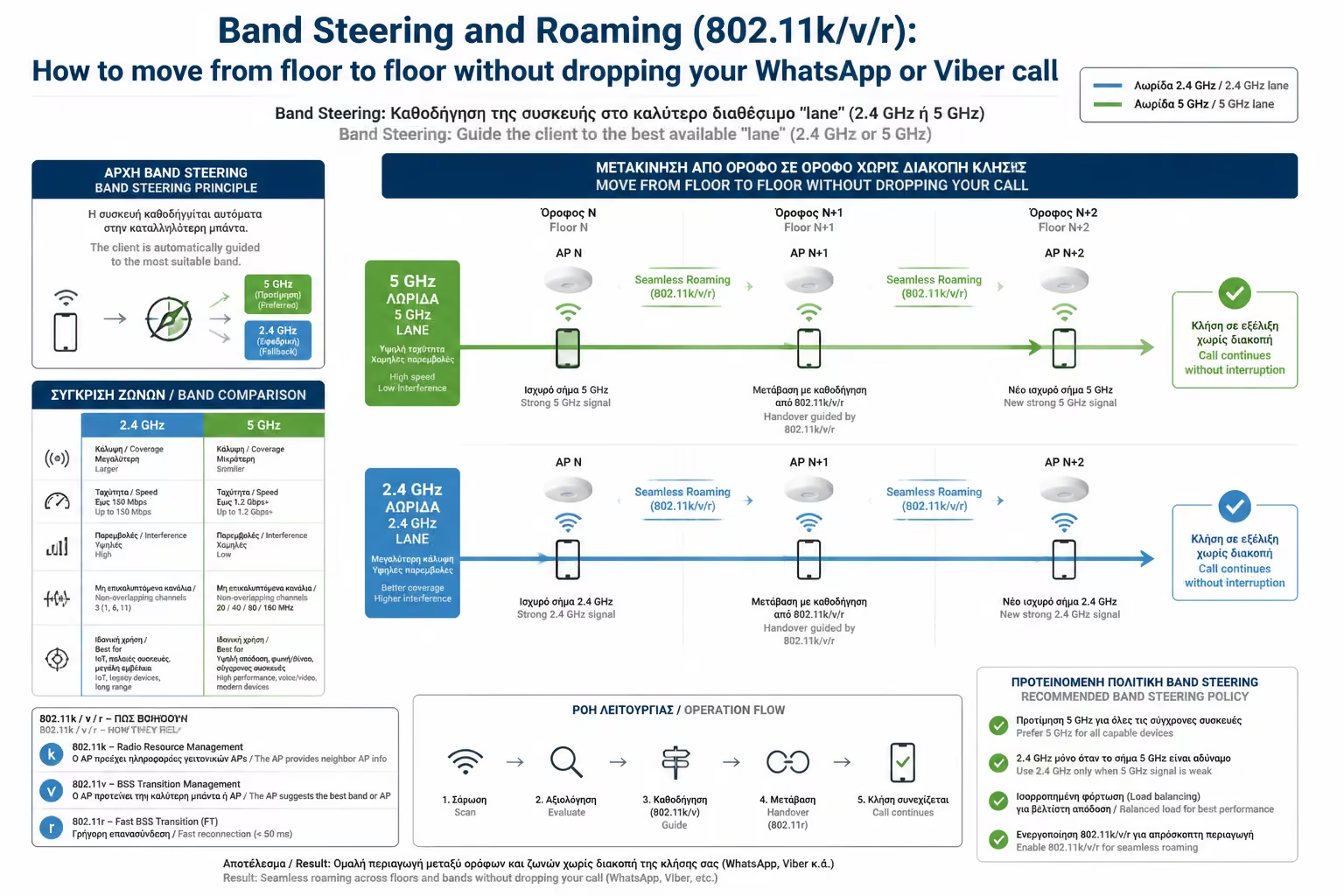
3. Band Steering: Steering in the Fast Lane (5GHz & 6GHz)
Another huge problem is frequency selection. In modern networks, Wi-Fi
broadcasts with the same name (SSID) simultaneously on 2.4GHz (slow
but goes far) and 5GHz / 6GHz (super-fast but doesn't go through
walls).
Often, mobiles out of habit connect to the 2.4GHz "slow
band", even if you are 2 meters from the antenna, losing all your
VDSL/FTTH speed.
Band Steering is a clever trick of the Controller: When the Access
Point hears your mobile trying to connect to 2.4GHz, it purposely
ignores it for a few milliseconds. At the same time, it tells him:
"Try talking to me on 5GHz." The mobile tests the fast
frequency, the antenna accepts it, and thus your device
"locks" to the maximum speeds without you doing anything
manually.
4. Why the 3 "Simple" Routers do not Roam
Many people ask: "If I buy 3 cheap routers from the store, put
them at home and give them the same Name and Password, won't I have
Roaming?"
The answer is DEFINITELY NO. This is the most common mistake. Just
having the same network name will completely confuse your mobile. It
will stick to the first router (Sticky Client) and when the connection
finally drops completely (drops to 0), it will search from the
beginning and connect to the second one. During this change, your
video will freeze and your calls will hang up.
To have true Seamless Roaming (11k/v/r), Access Points must talk to
each other. They must belong to the same "Ecosystem" (eg
TP-Link Deco Mesh, Ubiquiti UniFi, Omada, Aruba) and be managed by a
common Controller.
Class C (Wi-Fi) in a nutshell
Gone are the days when Wi-Fi was just "an antenna with light
bulbs". Today, the wireless network of a large home or business is
an orchestra. Correct positioning on the ceilings ensures that the
signal reaches everywhere, and the Controller (via 802.11k/v/r protocols
and Band Steering) takes on the role of conductor, always directing your
devices to the fastest, nearest antenna, giving you complete freedom of
movement.