-30dBm
You are literally next to the Router (Perfect).
You have chosen the best equipment, bought the most expensive Access Points and placed them correctly in the ceilings. And yet, you go into the next bedroom, close the door, and the Wi-Fi "lines" on your phone drop by half. What went wrong?
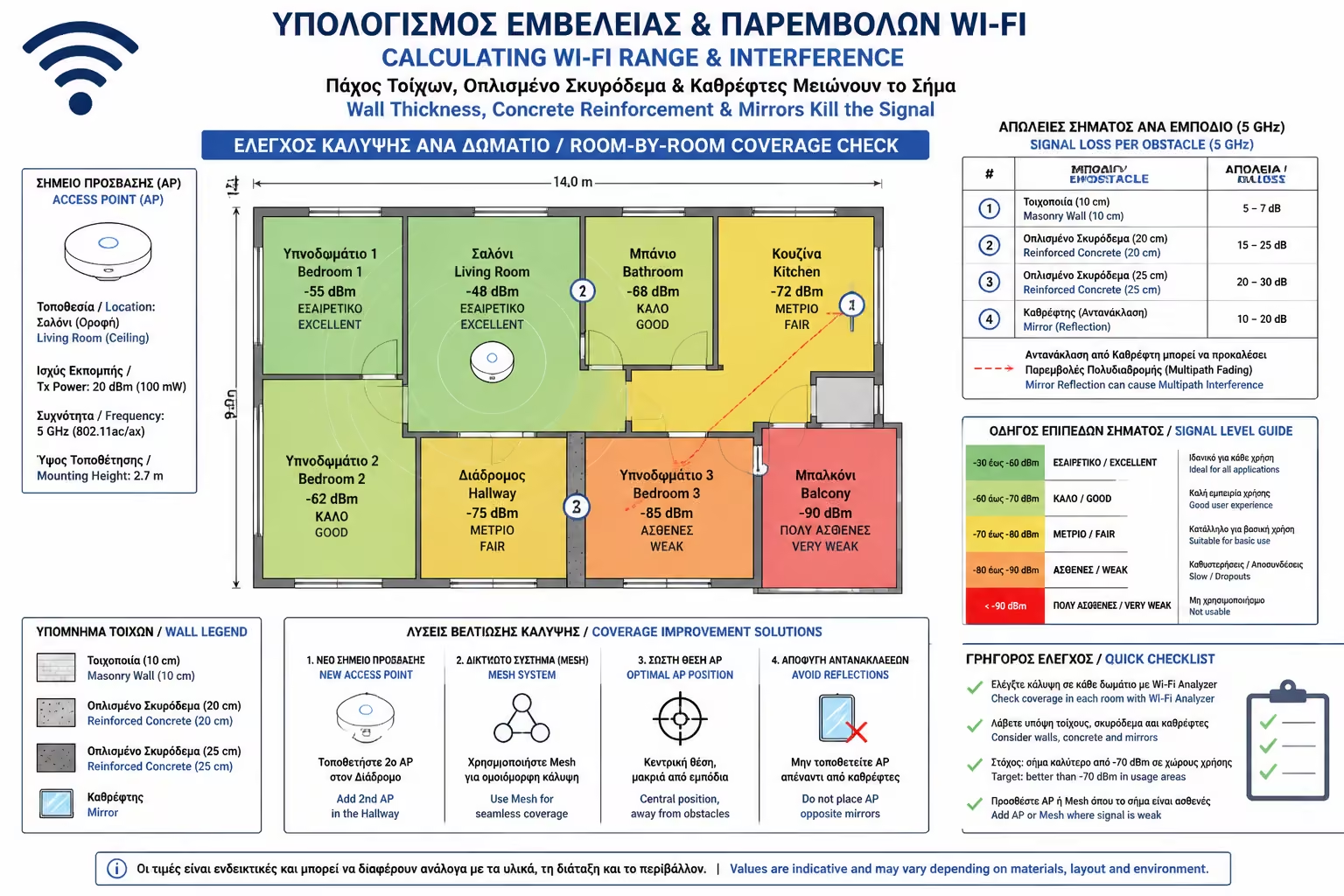
The biggest mistake that homeowners (and many technicians) make is to plan the network by looking at the floor plan of the house on a blank piece of paper, as if there were no walls. But Wi-Fi isn't magic. They are radio waves (Electromagnetic Radiation). As these waves try to travel through the physical world, they collide with the building materials of your home, are absorbed, reflected and "die".
As engineers, we call this loss Attenuation. Let's see how it's measured, which materials in your home are the "absolute killers" of the signal, and why mirrors and underfloor heating require special attention.
Wi-Fi power is measured in Decibel-milliwatts (dBm), and the scale is always negative. The ideal is to be as close to zero as possible.
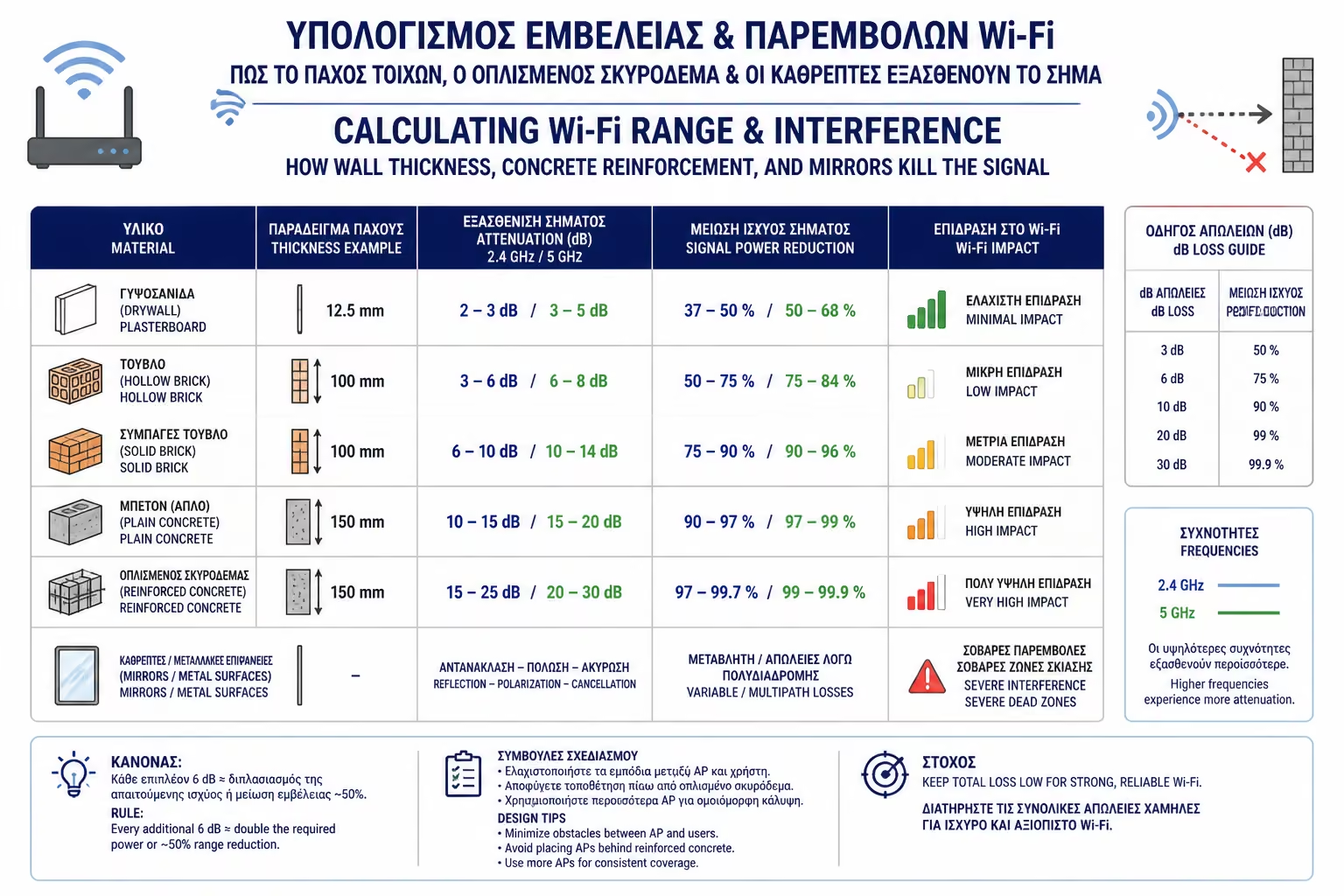
Every time the signal passes through an obstacle, it loses some dB (Decibels). Let's see what each material costs him.
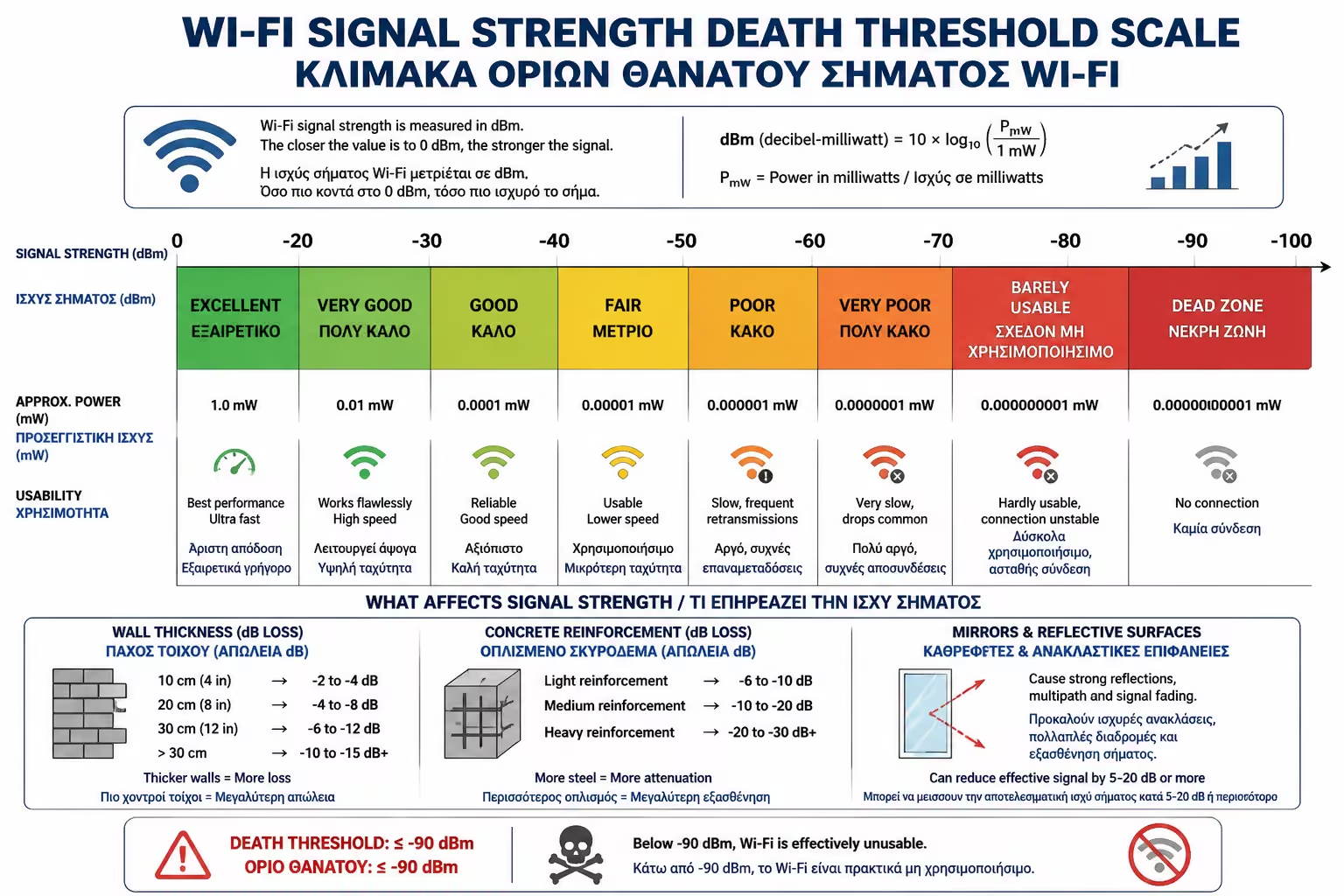
You are literally next to the Router (Perfect).
Excellent signal for comfortable 4K streaming and gaming.
The signal is getting tired. Speed drops noticeably.
You are in a "dead zone". Constant disconnections.
If you have drywall partitions, you're in luck. Light, porous materials are almost "transparent" to radio waves. Loss: About -2 to -3 dB. An Access Point can comfortably cover 2 or even 3 rooms separated only by plasterboard or wooden doors.
The classic Greek double road wall (brick - insulation - brick and plaster) has enough thickness and density. Loss: About -6 to -10 dB (depending on wall moisture). Depending on the distance, the signal can go through ONE such wall and still be satisfactory, but if two walls are in between, Wi-Fi (especially 5GHz) will "kneel".
The columns, beams, walls of the elevators and floors (slabs) are made of concrete that has a dense mesh of thick irons (rebar) in it. Loss: Can exceed -15 to -25 dB. The Faraday Cage Effect: The iron mesh inside the concrete acts as a shield that traps and cancels electromagnetic radiation. If you have the Router on the ground floor, don't expect the signal to go through the ceiling plate to get good reception on the 1st floor.
A mirror is not just glass. On its backside there is a metal coating (silver or aluminum). Metal wardrobes, large refrigerators and bathroom mirrors do not absorb the signal, they reflect it. When Wi-Fi hits the mirror, it bounces back, collides with the new incoming signal, and creates "noise" (Multipath Interference). Placing a Router behind a large wardrobe mirror is like putting a bulletproof vest on it.
The 2.4GHz frequency of Wi-Fi is exactly the same frequency that your Microwave Oven uses to heat the water molecules in the food! Water absorbs radio waves. What does this mean in practice? Large aquariums are absolute walls for Wi-Fi. Underfloor Heating (which is pipes filled with water, under the floor) creates an inaccessible, "water shield" between floors.
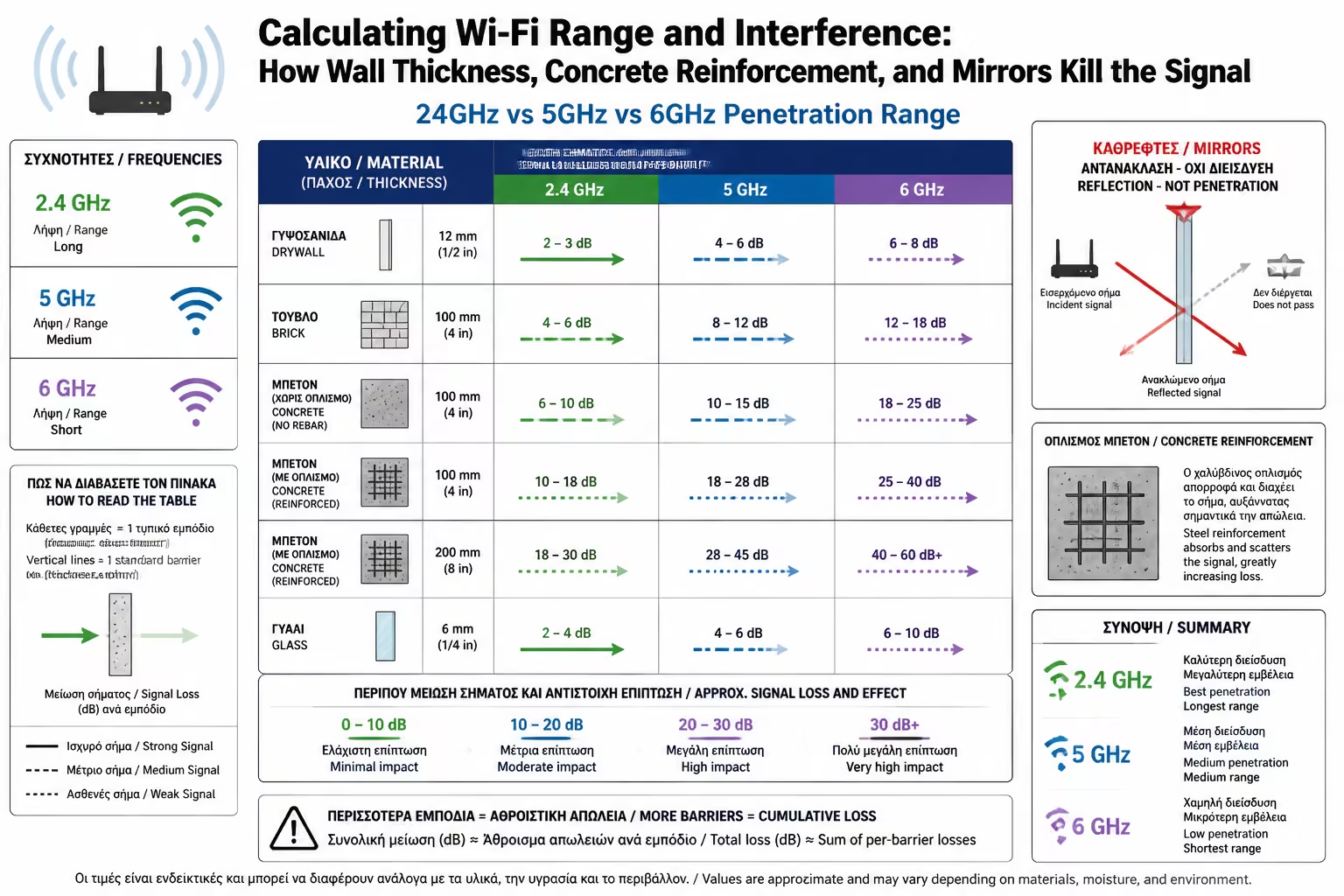
Not all Wi-Fi speeds are affected in the same way by obstacles. The laws of physics are inexorable: The higher the frequency, the shorter the range.
In professional design, we don't roll the dice on where the antennas go.
In designing for 5GHz speeds, we estimate that the user should never be more than one (1) wall away from the Access Point. If it wants to pass a second wall, we add a second Access Point.
Because of the metal reinforcements in the concrete slabs, each floor (even in small maisonettes) must have its own, dedicated Access Point, connected by Ethernet cable to the central panel (as we learned in PoE).
To enjoy seamless internet, you need to see your home through the eyes of... physics. Avoid hiding Access Points behind TVs, aquariums or mirrors. Recognize that concrete, pillars and thick bricks are impenetrable barriers to the high speeds of 5GHz and 6GHz. Placing more (and strategically placed) Access Points is the only solution to defeat the weakening of building materials.
Next Step: We solved the problem of coverage inside the house. But, in the summer we all want internet in the garden, on the grill or next to the pool. Using "indoor" antennas outside is a recipe for disaster.
Moving on to the ultimate outdoor guide: Outdoor Wi-Fi Access Points: Installation, IP proofing and grounding for gardens, pools and outdoors.
Return to category.
Go to categoryReturn to the central guide.
Go to guide