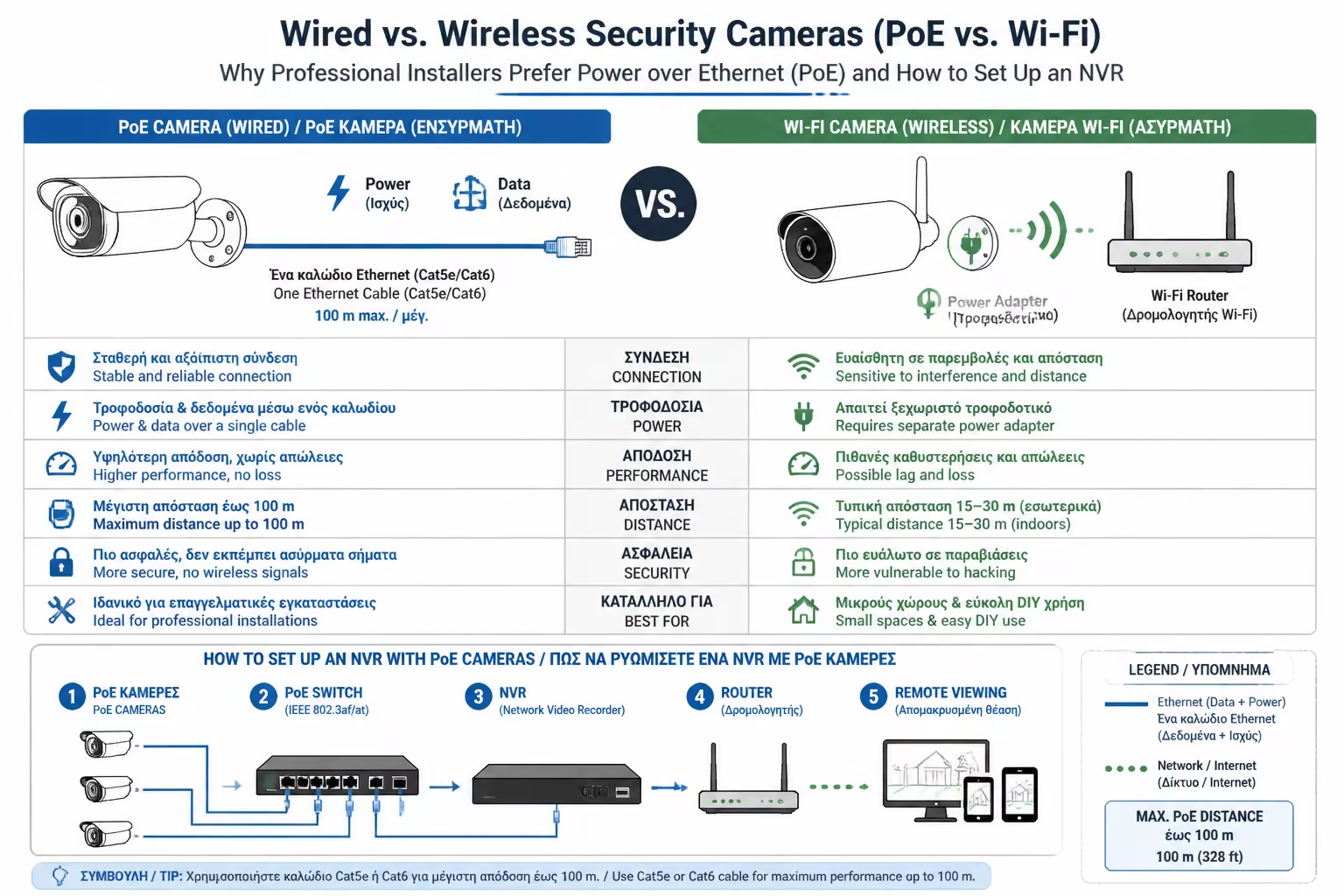
Wired vs. Wireless Security Cameras (PoE vs. Wi-Fi): Why Professional
Installers Prefer Power over Ethernet (PoE) and How to Set Up an NVR
When you decide to shield your home with cameras, your first impulse
might be to go to an e-shop and buy 3-4 cheap wireless Wi-Fi cameras.
They look easy to install, require no cables and promise high
resolution.
But if you ask any security engineer (Security Installer) what they
would put in their own home, the answer will be unanimous, categorical
and without second thought: Wired PoE cameras with local video recorder
(NVR).
Why is there such a huge gap between what the general public (DIY) buys
and what professionals consider "real security"? Let's break
down the myth of Wi-Fi, the dangers it hides and explain the standard
that dominates all serious installations worldwide: Power over Ethernet.
1. The Wi-Fi Camera Trap
Wi-Fi cameras are great for watching your pet in the living room, but
when it comes to outdoor security, they have three fatal drawbacks:
The Power Problem (The Wireless "Lie")
If the camera does not have a battery, it needs to be plugged in. So
"wireless" is only in data; the power cord remains, and
often requires you to drill a large hole in the wall to get the
bulky transformer through. If it has a battery, you have to climb
the ladder every 2-3 months to charge it.
The Bandwidth Nightmare
A 4K camera captures a huge amount of data. If you have 4 Wi-Fi
cameras constantly sending video to your Router, your home network
will be brought to its knees. Netflix will freeze and pages will be
slow to open. That's why Wi-Fi cameras usually don't record 24/7,
but only when they catch motion.
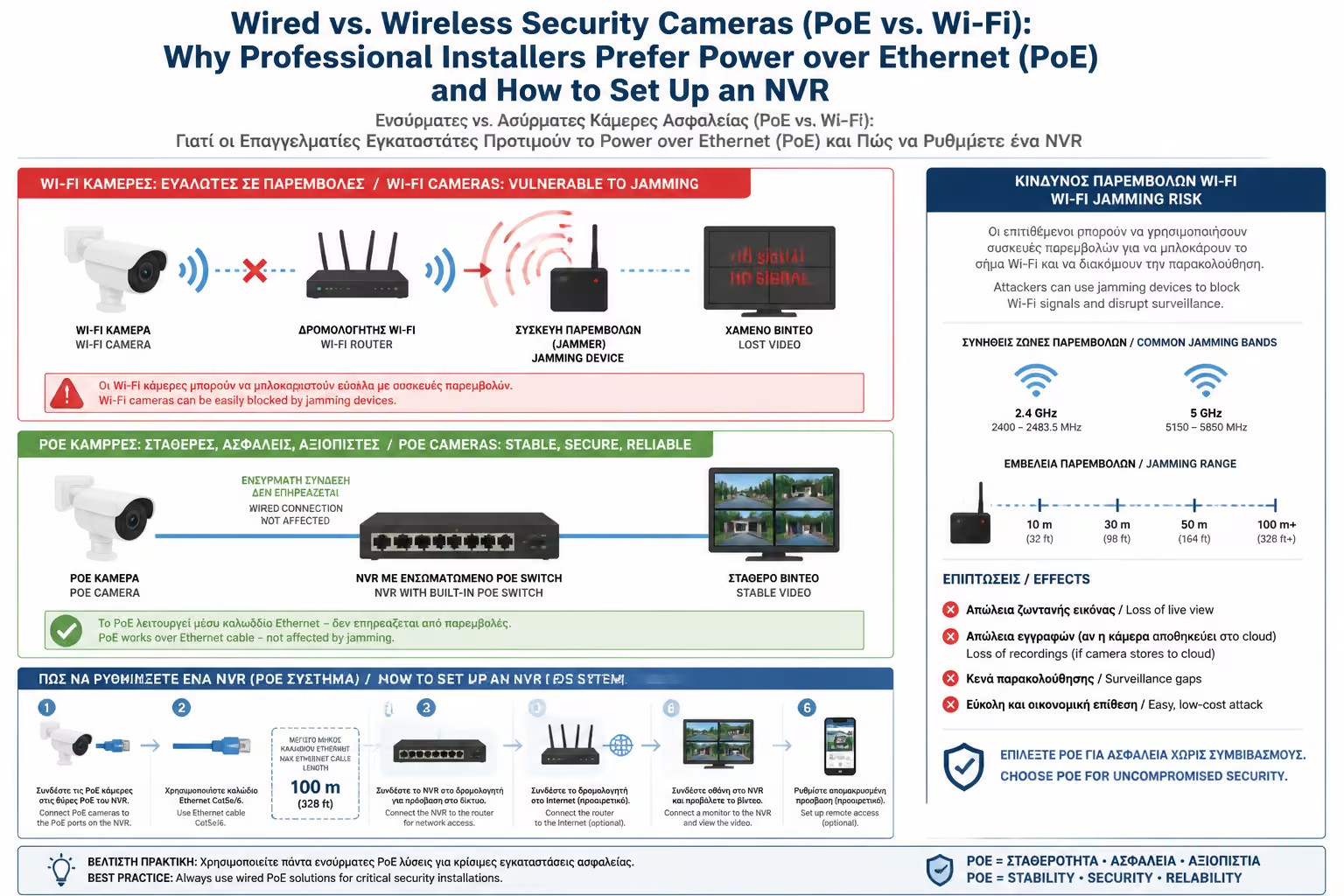
The Danger of Jamming
Herein lies the greatest weakness. Modern burglars use cheap,
illegal devices called Wi-Fi Jammers. These emit "noise"
at the 2.4GHz frequency. With the push of a button, your Wi-Fi
cameras instantly lose connection to the Router. The intruder gets
through unmolested, and you just get the "Camera Offline"
message.
2. The Professional Standard: What is PoE?
The solution to all of the above is called PoE (Power over Ethernet).
It is a technology where a single network cable (the classic UTP Cat5e
or Cat6) undertakes to do two jobs at the same time:
To send Data (high resolution video) at Gigabit speeds, with
absolutely no delay (Zero Lag).
To send Power (typically 48V DC) to operate the camera, its infrared
LEDs (Night Vision) and its motors.
Why does it dominate? Because the cable is not hacked with Jammers.
The signal never drops, no matter how bad the weather. The camera
works non-stop, 24 hours a day, 365 days a year. And most importantly:
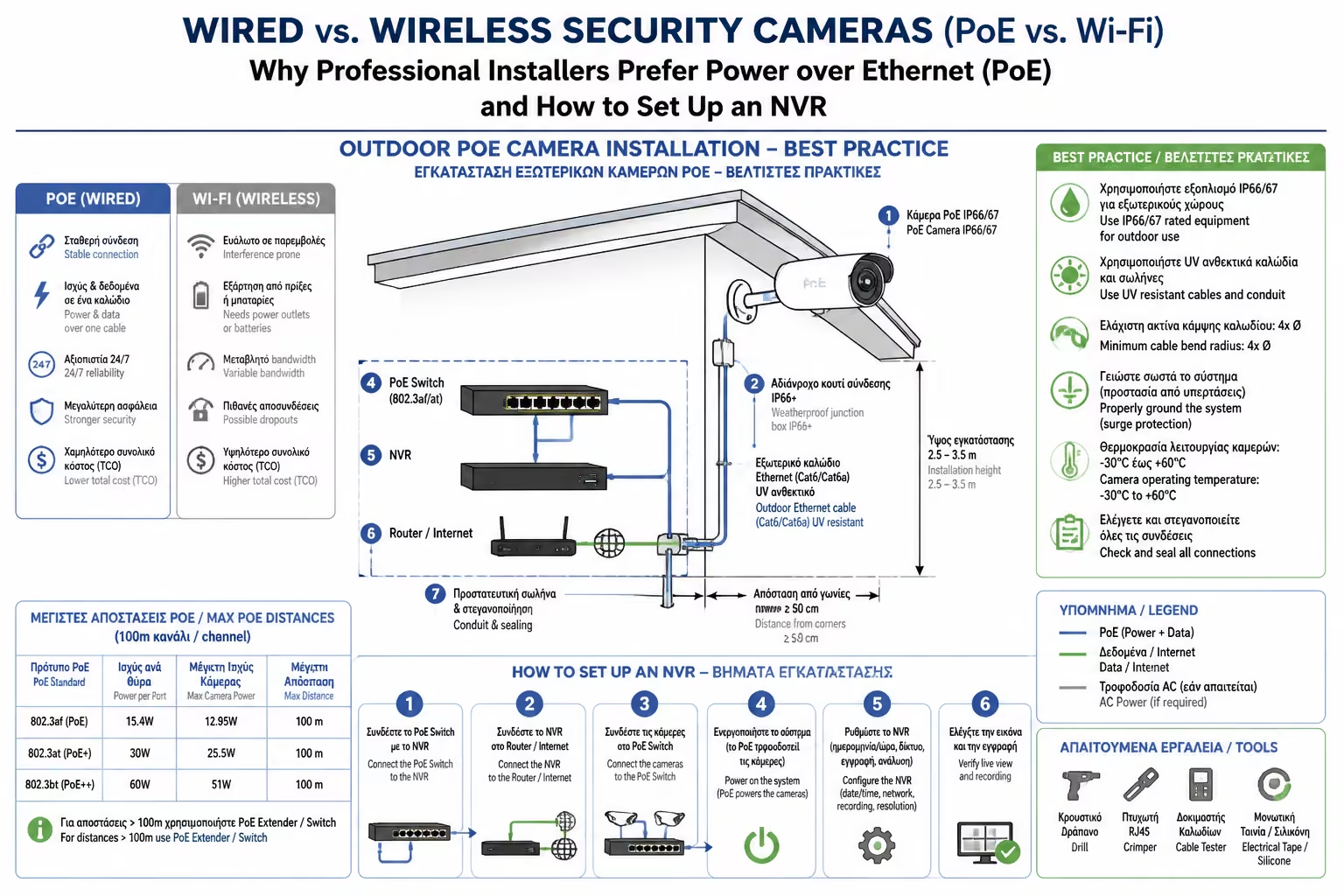
No need for a power socket (230V) on the external walls. The
electrician drills a hole in the wall with just a 6mm drill bit, pulls
out only the thin UTP cable, and the installation is spotless.
3. How to set up the System: The NVR Recorder
In Wi-Fi cameras, the video is usually stored on a small SD card
inside the camera (if the thief rips the camera, they take the video
with them!) or in a Cloud with a monthly subscription.
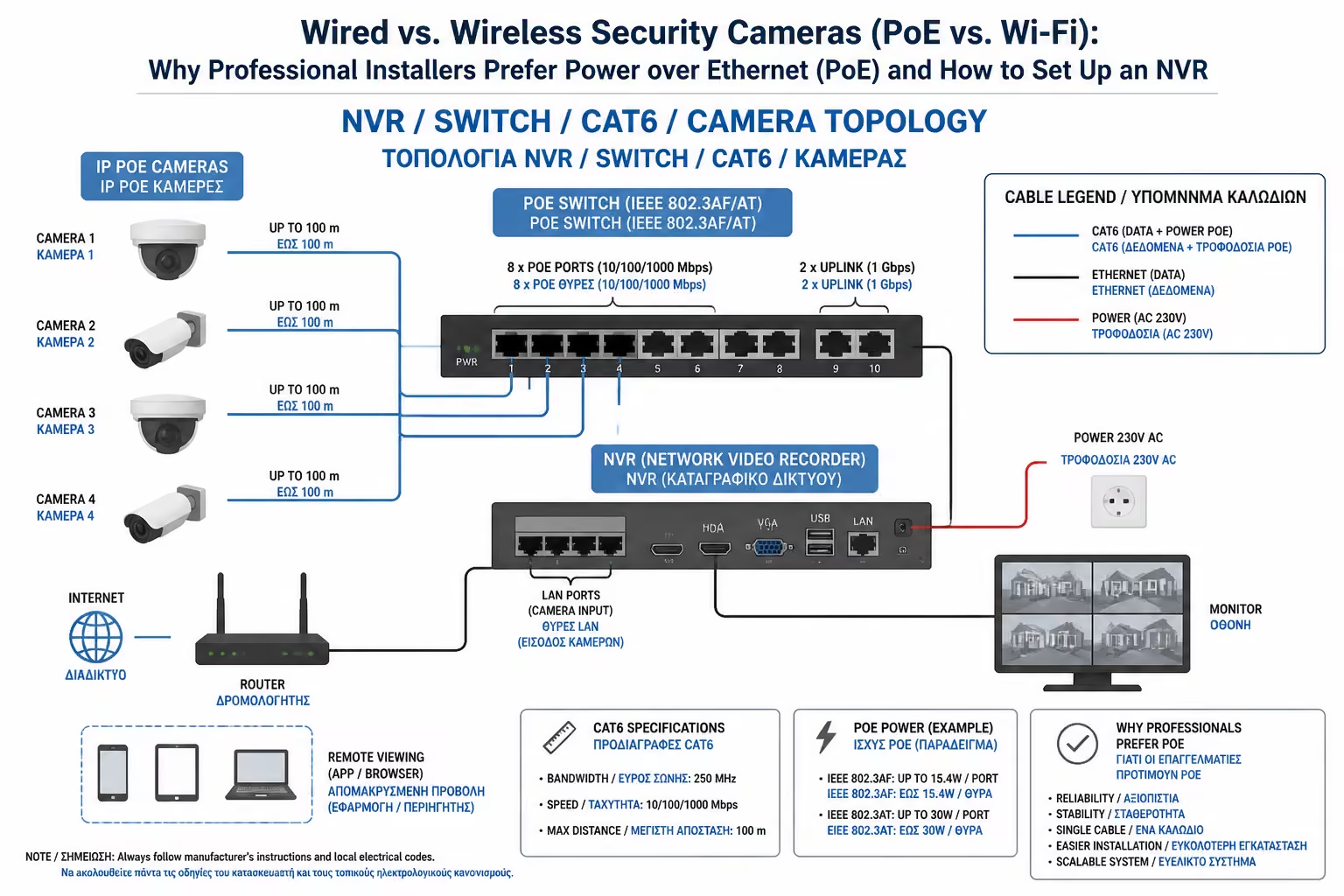
In the PoE system, the "heart" is the NVR (Network Video
Recorder). It is a metal "box" (looks like a DVD player)
that is placed in a safe place in the house (eg on a shelf or in the
Rack together with the Router).
Built-in Switch
On the back of the NVR there are several network ports (4, 8 or 16).
You nail the camera cables directly there. The NVR immediately
powers up the cameras and starts receiving video.
Local Hard Drive
Inside the NVR is a special recording hard drive (eg Western Digital
Purple series, designed to work non-stop). That's where the video is
stored locally. You don't pay any Cloud subscription. A 2TB or 4TB
disk can keep continuous (24/7) several weeks of history for 4
cameras, writing the new videos over the old ones (Loop Recording).
Mobile Application
The NVR is connected with a cable to your home router. So, through
the official application of the company (eg Hikvision, Dahua,
Reolink), you see all the cameras live on your mobile, see the
recordings and receive notifications, absolutely free, anywhere in
the world.
4. Cybersecurity & VLANs
Another huge advantage of the wired NVR system (which IT engineers
love) is privacy.
Many cheap IP cameras (usually from Asia) are "famous" for
security holes. If you connect such a camera to your Wi-Fi, you are
practically exposing your home to the internet. With the NVR, the
cameras connect directly to the recorder (on an isolated, closed
subnet). They don't have access to the internet themselves, so they
can't be hacked from the outside. Only the NVR has access to the
internet (on controlled ports), offering a firewall between the
cameras and the outside world.
Summarizing
If you're renting and can't drill into walls, a good Wi-Fi camera with a
battery is your only realistic (compromise) option. But if you are
building, renovating, or have the ability to run UTP cables through
eaves and walls, there is only one choice: PoE cameras with NVR
recorder. It's a one-time investment, requires no subscriptions, is
unaffected by Jammers, and offers video quality that can actually
recognize faces and license plates when you need it.
Next Step: So far we have focused on home security (intercoms, NVRs,
smart locks). But what if our field of action is a business premises, an
office or a multi-employee building where the keys are just...
dangerous?
We continue to the next specialist guide: Access Control Systems:
Electrical requirements for door locks, magnetic locks and card readers
(RFID) in offices.