Smart IP Video Doorbells: How to see and answer your door from your
mobile, wherever you are in the world
We officially enter Category D, the pillar of Safety. Here the Smart
Home stops being just "convenient" and becomes the guardian of
your property and family. And of course, security always starts at the
first line of defense: The front door.
For decades, our experience at the door was limited to a simple doorbell
or, at best, an analog intercom with a small, black-and-white screen on
the living room wall. If you were missing from home, you had no idea who
looked for you.
Today, Smart IP Doorbells (Video Doorbells), pioneered by companies such
as Ring (Amazon), Google Nest, Eufy and Reolink, have changed the rules.
Let's take a look at how they work, what to look out for before you buy,
and the eternal dilemma: Battery or Cable?
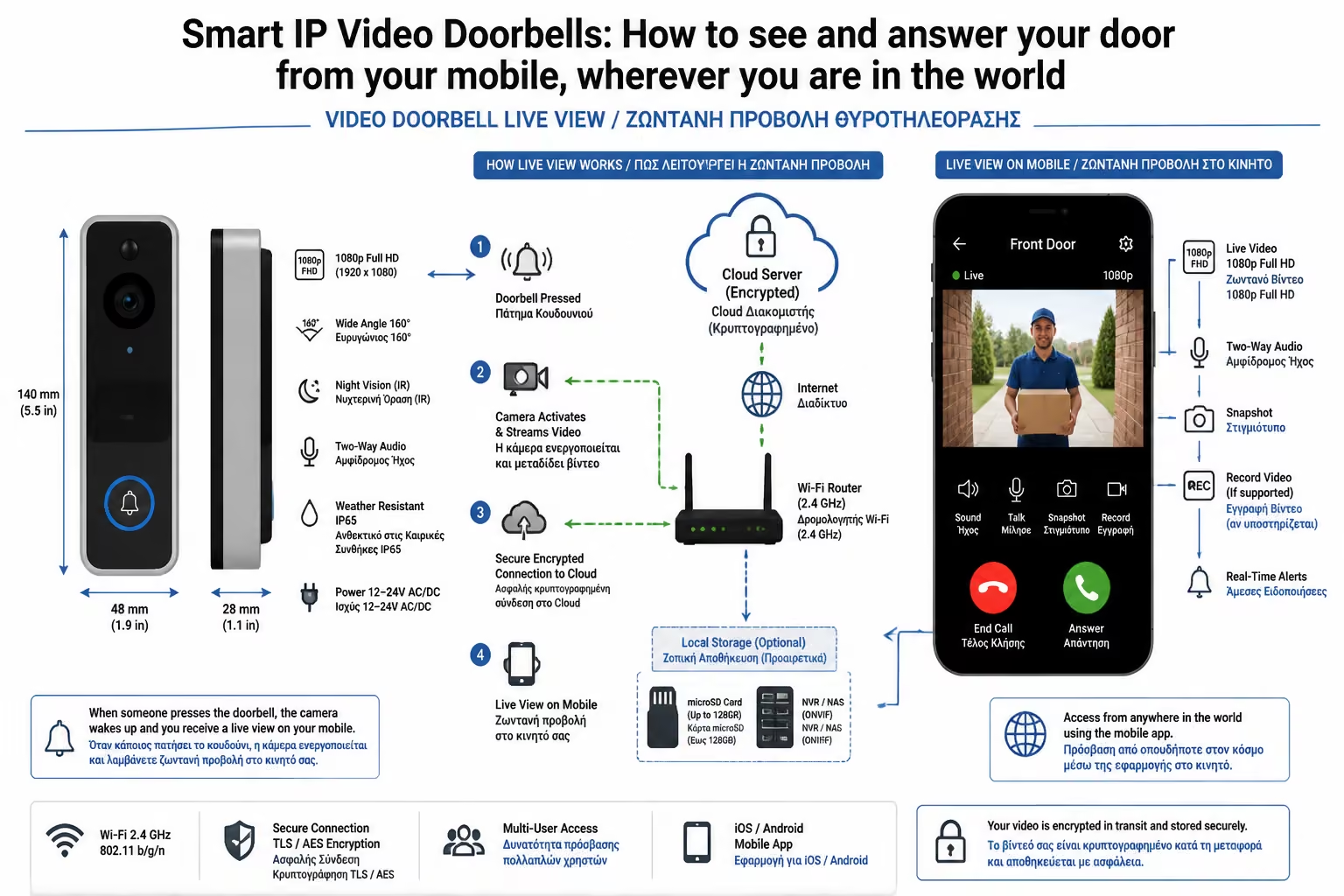
1. What is Video Doorbell (and how it changes everyday life)
The Video Doorbell is, in effect, an advanced security camera,
microphone, speaker and call button all squeezed into a sleek device
next to your door. It connects to your home's internet and turns your
mobile (or tablet) into the "middle" screen.
The main usage scenarios:
Remote Response
You're at the office (or on holiday abroad) and the doorbell rings.
Your phone rings like a video call. You see the courier, talk to him
(Two-way audio) and tell him to leave the package at the door. He
doesn't know if you're talking to him from the sofa in the house or
from another continent.
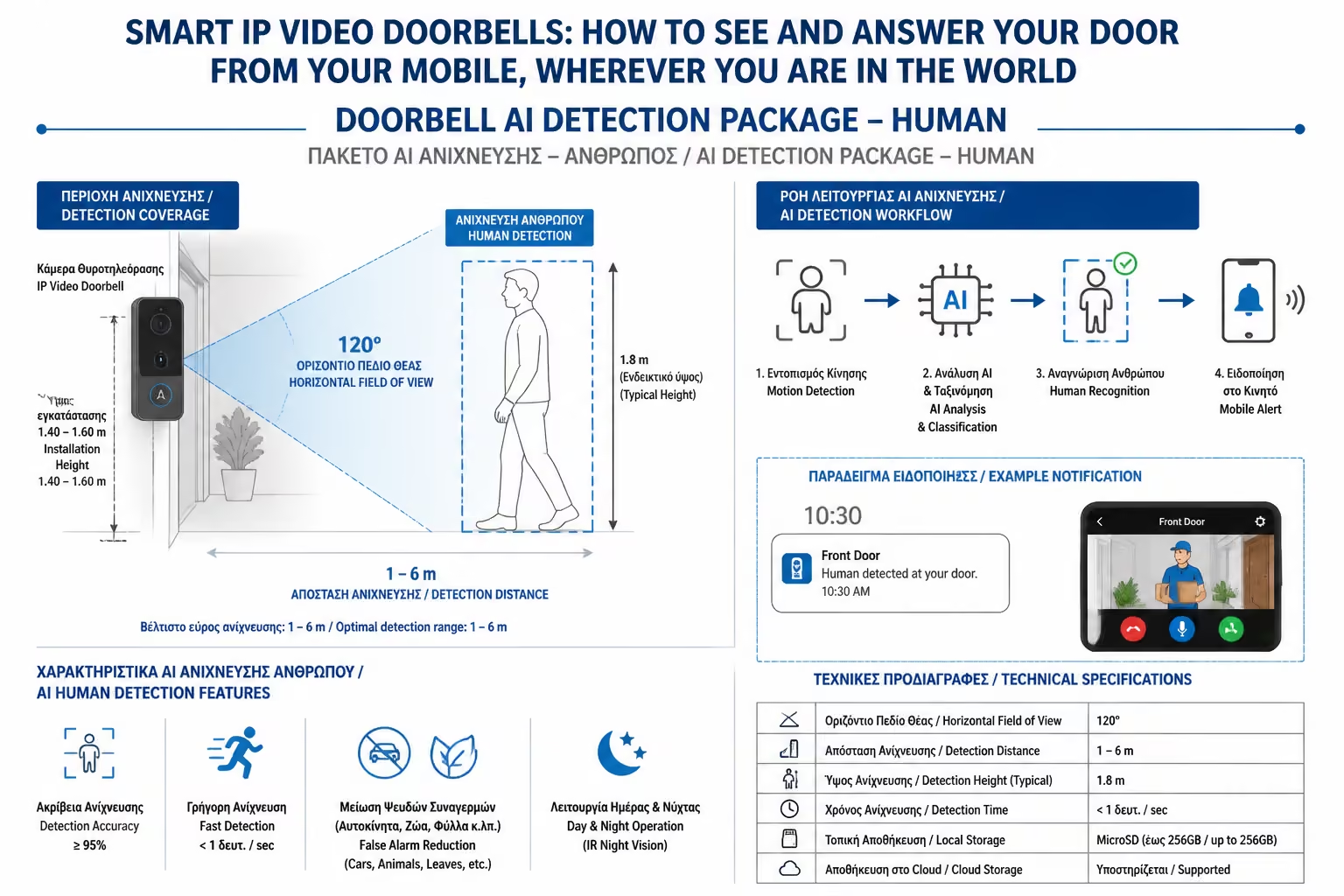
Proactive Security (Motion Detection)
No one needs to ring the bell to register. The camera has motion
sensors. If someone "picks" your lock in the middle of the
night, your mobile phone will send you a notification and record the
video silently.
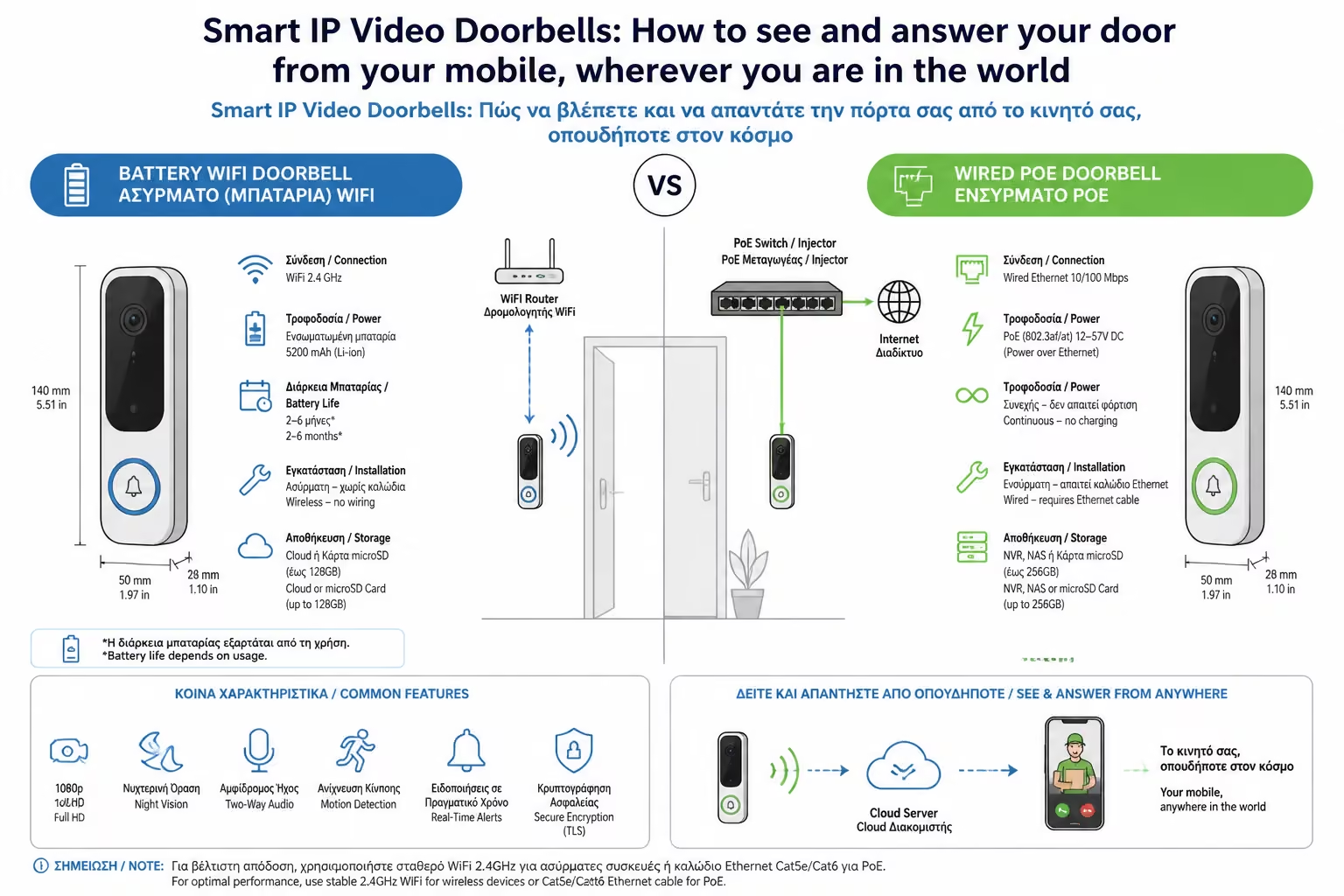
2. The Dilemma: Wireless (Battery) vs. Wired
As engineers, the first question we ask when asked to propose a system
is, "Do you have wires in your door?"
A. Wireless Video Intercoms (Wi-Fi & Battery)
They are the most popular with the general public (DIYers) and
renters, because installation takes 5 minutes. How they work: You
screw the base to the wall, snap the device on, and it connects to
your Wi-Fi. It works with a built-in, rechargeable battery. The
Pros: No need for an electrician. Ideal if there is no waiting for a
power cord at the front door. * Cons: You have to charge them every
2-4 months. Due to battery saving, they are in "deep
sleep" (Sleep mode). When someone passes in front, they often
take 2-3 seconds to "wake up", as a result of which they
sometimes register the... back of the departing visitor (Lag).
B. Wired intercoms (Power over Ethernet - PoE or 2-Wire)
This is the permanent, professional solution (Mission Critical). How
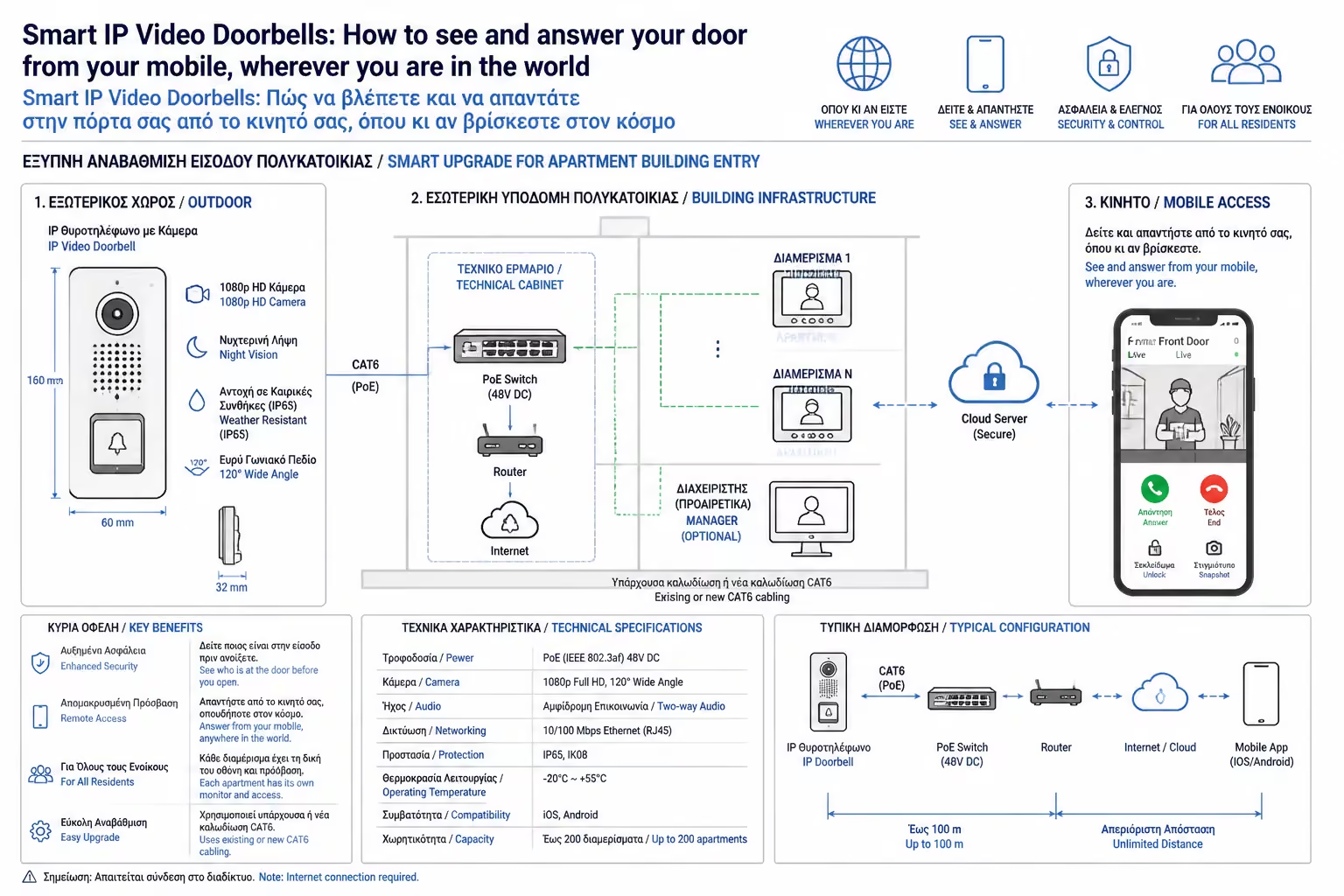
they work: They take direct current. In new builds, we use PoE
(Power over Ethernet). A single network cable (UTP) provides both
power AND wired internet to the device. If you are renovating and
have the old 2 wires of the old bell, there are 2-Wire IP systems,
which send data and power over the old copper! The Pros: Instant
response. Zero Lag. They record video 24/7 (Continuous Recording)
365 days a year, since they don't worry about the battery. Zero
Wi-Fi disconnections. * Cons: Requires installation by a technician
(or careful wiring during build).
3. Features - Keys (What to look out for)
Before you buy, don't just look at Megapixels. The really critical
features are three:
1. The Aspect Ratio: The old cameras were horizontal (16:9). Today,
you want a video intercom with a vertical or square lens (eg 3:4 or
1:1). The reason? You want to see the visitor from the top of the head
to the shoes so you can see the package the courier just left on the
doormat. 2. AI & Package Detection: Inexpensive cameras sound an
alarm at every moving leaf or passing dog. Modern IP video intercoms
have AI processors (Artificial Intelligence) that distinguish whether
the movement is a Human, Vehicle, Animal or... Package, sending you
the correct, specialized notification. 3. The "Hidden" Cost
of Subscriptions (Cloud vs. Local): Companies like Ring (Amazon) and
Nest (Google) store the videos on their own servers. To see a video of
what happened yesterday, they require a monthly subscription (about
3€-5€/month). If you want to avoid subscriptions, choose companies
like Eufy or Reolink, which store videos locally (Local Storage),
either on an SD card inside the device, or on your own recorder (NVR)
inside the house.
4. The Ecosystem: When the Doorbell meets the Smart Home
What happens inside the house when someone rings the doorbell?
If you have Smart Speakers (Alexa / Google Assistant), you can set
them to work as digital "chimes". There's a knock on the
front door, and Alexa in the living room announces, "Someone is
at the front door." If you have a speaker with a screen (like the
Google Nest Hub), the door video automatically appears on the screen
next to your couch!
Even better, through central Hubs (SmartThings, Home Assistant), you
build protection routines:
"If the intercom detects movement (person) after 00:00 at
night, immediately turn on the outside porch lights to 100% to scare
them."
Summarizing
The Smart IP intercom is the device you will use more than any other in
your Smart Home "arsenal". It offers invaluable peace of mind,
removes the stress of lost parcels and acts as the ultimate deterrent to
would-be burglars. If you can, run a network cable (PoE). If not, a good
battery-powered device with Local Storage is the next best,
"smart" investment.
Next Step: We saw who is at the door and talked to him. But what if it's
the cleaner, a relative who arrived earlier, or your Airbnb guest, and
you want to open the door for them while you're gone?
We continue to the next guide: Smart Locks (Smart Locks) & Airbnb:
Installation guide, operation with PIN codes, fingerprint and Bluetooth
access.