Access Control Systems: Electrical requirements for door locks, magnetic
locks and card readers (RFID) in offices
Until now, we have focused on home security, where a Smart Lock is more
than enough. But what happens when our field of action is a professional
space?
In an office with 20, 50, or 100 employees, using physical keys is an
administrative nightmare (and a huge security risk). Keys are lost,
employees leave, and there is no record of who entered the Server Room
at midnight.
This is where Access Control Systems come into play. As engineers, we
design these systems to control who gets in, where they get in, and when
they get in. Let's see what components such a system consists of, what
the locking mechanisms are and, most importantly, what cables you should
anticipate when renovating your office.
1. The Architecture: How Access Control Works
A typical, professional system consists of 4 main parts:
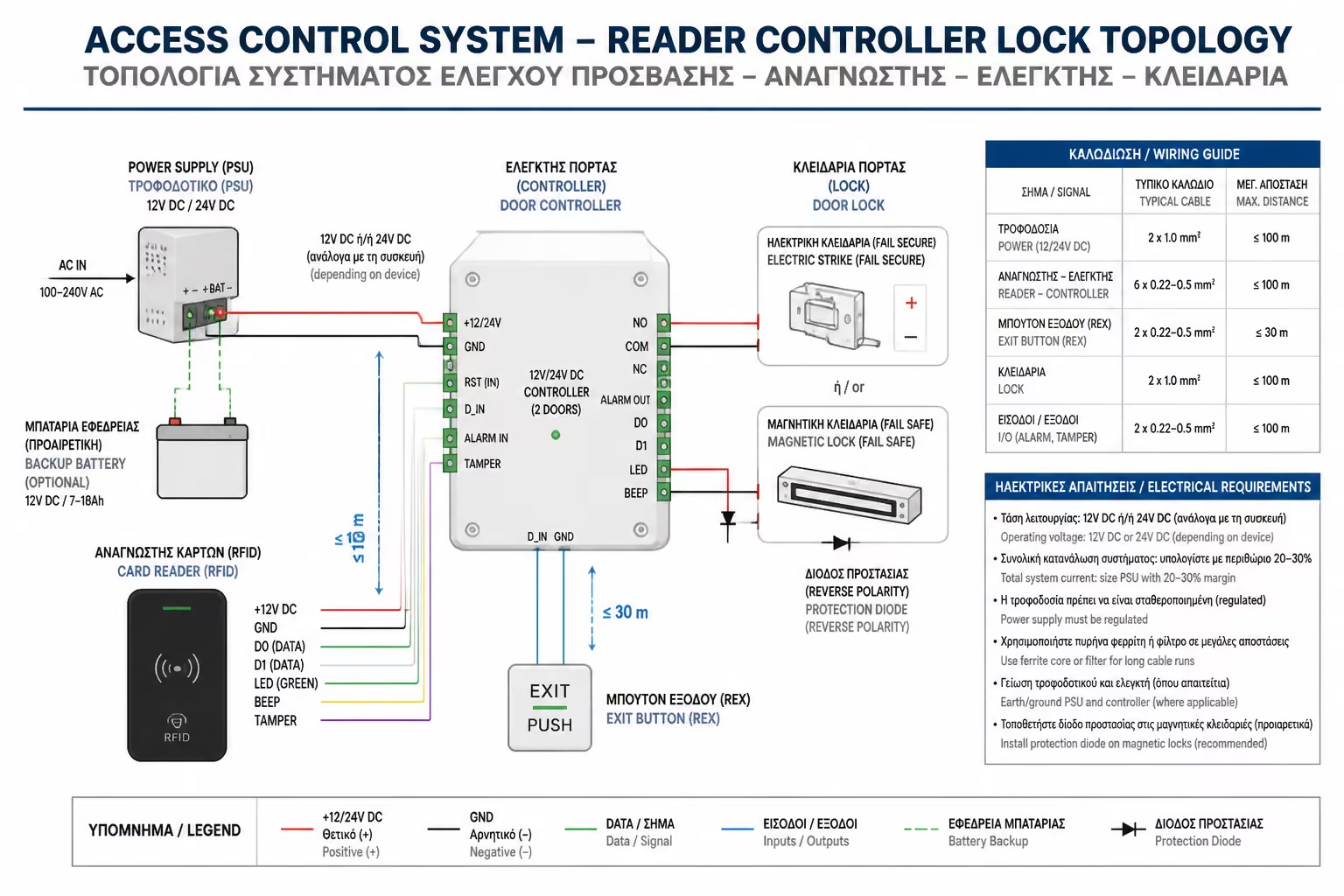
The Brain (Controller): It is a metal board, usually hidden in the
central panel or IT Rack. It stores the database with the users and
decides whether to open the door.
The Reader: The device that enters outside the door (eg card reader,
keyboard, or fingerprint scanner).
The Locking Mechanism: The electrical component that keeps the door
closed (Cypri or Magnet).
The Exit Button (Request to Exit - REX): A button on the inside of
the door. When you want to get out, you press it to cut the power
and release the door.
2. The Locking Mechanisms (The "Muscle" Power)
Depending on the type of door (wooden, aluminum, glass) we use
different locking technology. Here we come across two critical terms:
Fail-Secure (Stays locked if power goes out) and Fail-Safe (Unlocks
automatically if power goes out).
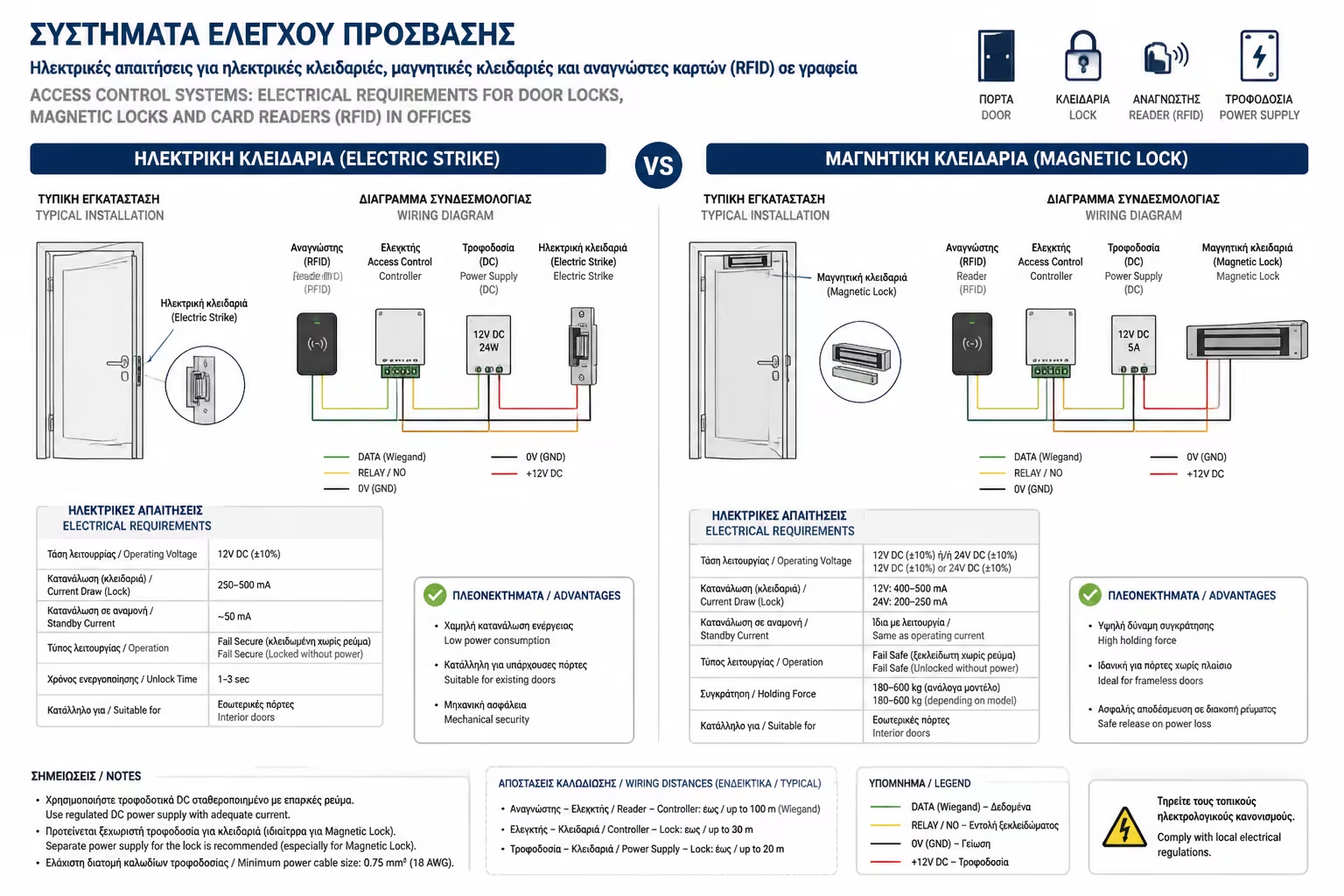
A. Electric Strike
It is the mechanism that goes into the door frame, directly opposite
the "tongue" of the lock. Where it fits: In classic wooden
doors or aluminum doors. How it works: When we give it power
(usually 12V DC), it releases its "lip". So you can push
the door without turning the knob. Security: Usually set as
Fail-Secure*. If the power goes out in the building, the door
remains locked from the outside (protecting the space). From the
inside, the knob always opens it mechanically.
B. Maglock
It is a huge electromagnet that is screwed to the top of the case,
while a metal plate (armature plate) is screwed to the door leaf.
Where it fits: Ideal for heavy, glass entrance doors (Securit) or
fire doors. How it works: As long as current is applied (usually 12V
or 24V), the magnet "pulls" the plate with enormous force
(often 300 or 600 kg of holding force). No man can push it open. *
Security: It is mandatory Fail-Safe. If the power goes out, the
magnet is deactivated and the door opens freely. This is critical
for safe evacuation in the event of a fire.
3. Credentials: Cards, PIN or Mobile?
How does the employee "prove" his identity to the Reader?
RFID cards (Mifare/Desfire)
The classic solution (plastic cards or key fobs at 13.56 MHz). They
are cheap but can be given to a colleague (Buddy punching) or copied
if an encrypted protocol like Mifare Desfire is not used.
Biometrics (Fingerprint/Face)
Absolute safety, since the finger is not borrowed. However, in
Europe there is strict GDPR legislation for storing employee
biometric data.
Mobile Access (NFC / Bluetooth)
The modern trend. The employee has the digital key on their mobile
phone (in Apple Wallet or Google Wallet). He simply holds his phone
closer to the reader.
4. Electrical Requirements (The Wiring)
If you are preparing a new office, the Access Control wiring must be
done at the plasterboard stage. Wireless systems are not recommended
here for stability reasons. All cables start at the door and end at
the Central Controller (Star).
What cables do we drop per door:
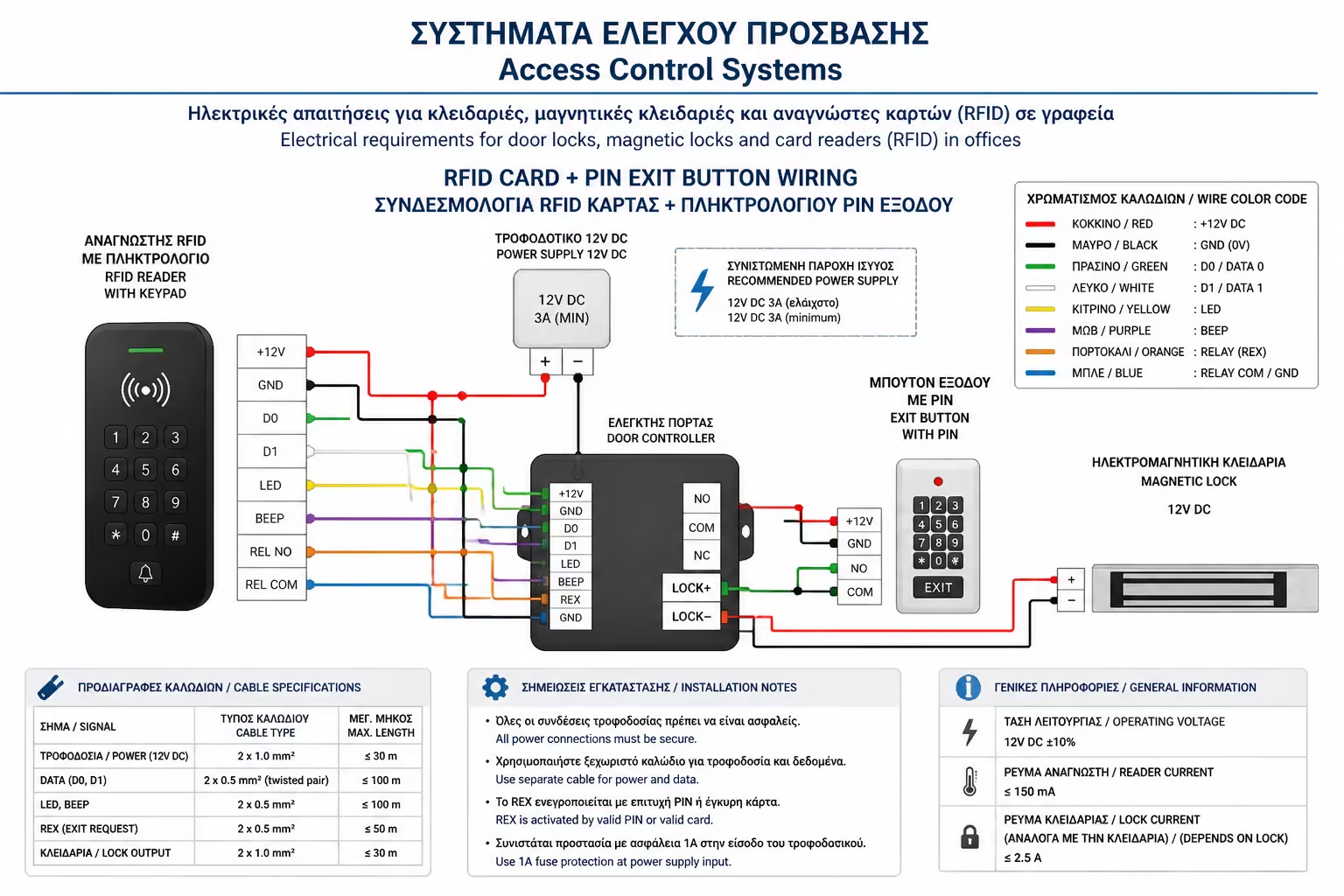
For the Reader: We usually use Wiegand communication protocol or the
newer, encrypted OSDP (via RS-485). A UTP cable (Cat6) or
specialized alarm cable (eg 6x0.22mm²) is required.
For the Lock (Cyprid/Magnet): Locks draw quite a few Amperes when
activated. We need a larger cross-section power cable, usually 2 x
1.0mm² or 2 x 1.5mm², to avoid voltage drop, especially if the
Controller is tens of meters away.
For the Exit Button (REX): A simple 2-strand wire (eg 2x0.50mm²) is
sufficient, as it simply carries a dry contact command.
Door Contact (Door Contact): For the system to know if the door was
left open (Door Forced / Door Held Open alarm), we drop a wire
(2x0.22mm²) for a magnetic contact.
5. The Absolute Rule: Fire Safety
This is where the biggest mistake is made by unskilled installers. If
you put a Magnetic Lock on a central escape exit, you create a
"death trap" in the event of a fire if employees panic and
can't find the exit button.
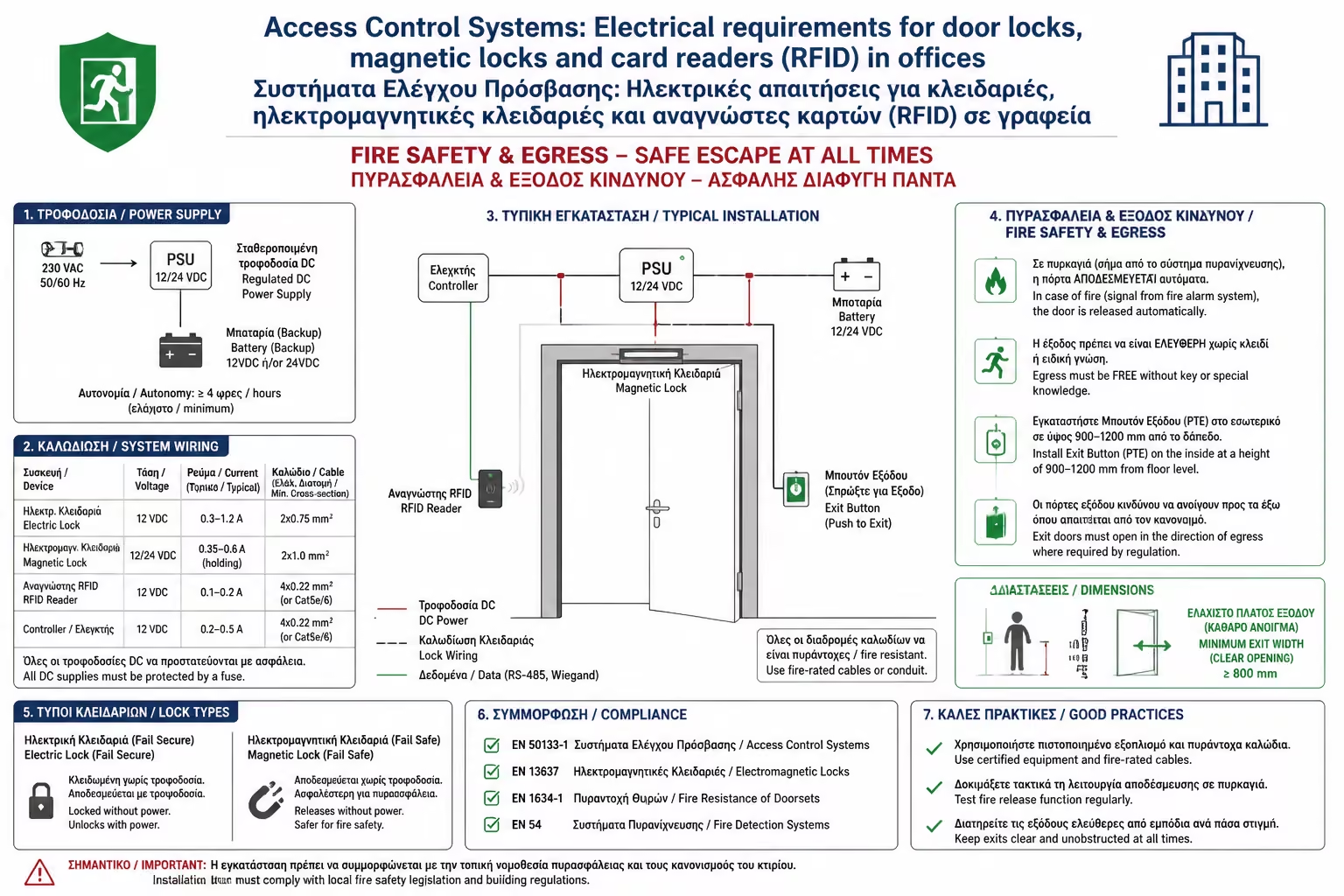
The law (and the common sense of engineers) dictates: The current
(supply) that feeds the electromagnets must pass through a Relay of the
Central Fire Detection Panel. When the fire alarm goes off in the
building, the fire panel instantly cuts power to the locks. All building
doors are automatically released for unimpeded evacuation.
In addition, next to the door (from the inside), there is always a green
emergency break button (Break Glass), which cuts the current to the
magnet mechanically, bypassing any electronic Controller.
Summarizing
Access Control transforms your office from a simple space to a
controlled infrastructure. Know who's in, deny access to sensitive
rooms, and add/remove permissions in seconds with a click. If you plan
to install it, correctly predicting the wiring (lock current, UTP reader
and connection to the fire detector) is 90% of the success of the
project.
Next Step: We solved the office issue. We now return to home (and small
business) security, to solve the problem of "What if I didn't run
wires when I built the house?".
We continue in one of the biggest revolutions of the last decade: Modern
Wireless Alarms (eg Ajax Systems): Reliability, battery life,
anti-jamming and connection to a Signal Receiving Center (SRC).