Smart Climate Control (A/C & Heat Pumps): From simple Smart IR
controllers to advanced KNX/Modbus thermostats
Welcome to Category C, where technology stops being just a saving
mechanism and turns into the ultimate orchestrator of your daily comfort
(Comfort).
The biggest energy load—but also the most critical system for your
well-being inside the building—is air conditioning (Cooling/Heating).
Whether we are talking about an old 15-year-old split room air
conditioner, or a state-of-the-art air-to-water Heat Pump, the goal of
Smart Home is to control them remotely and integrate them into
automation.
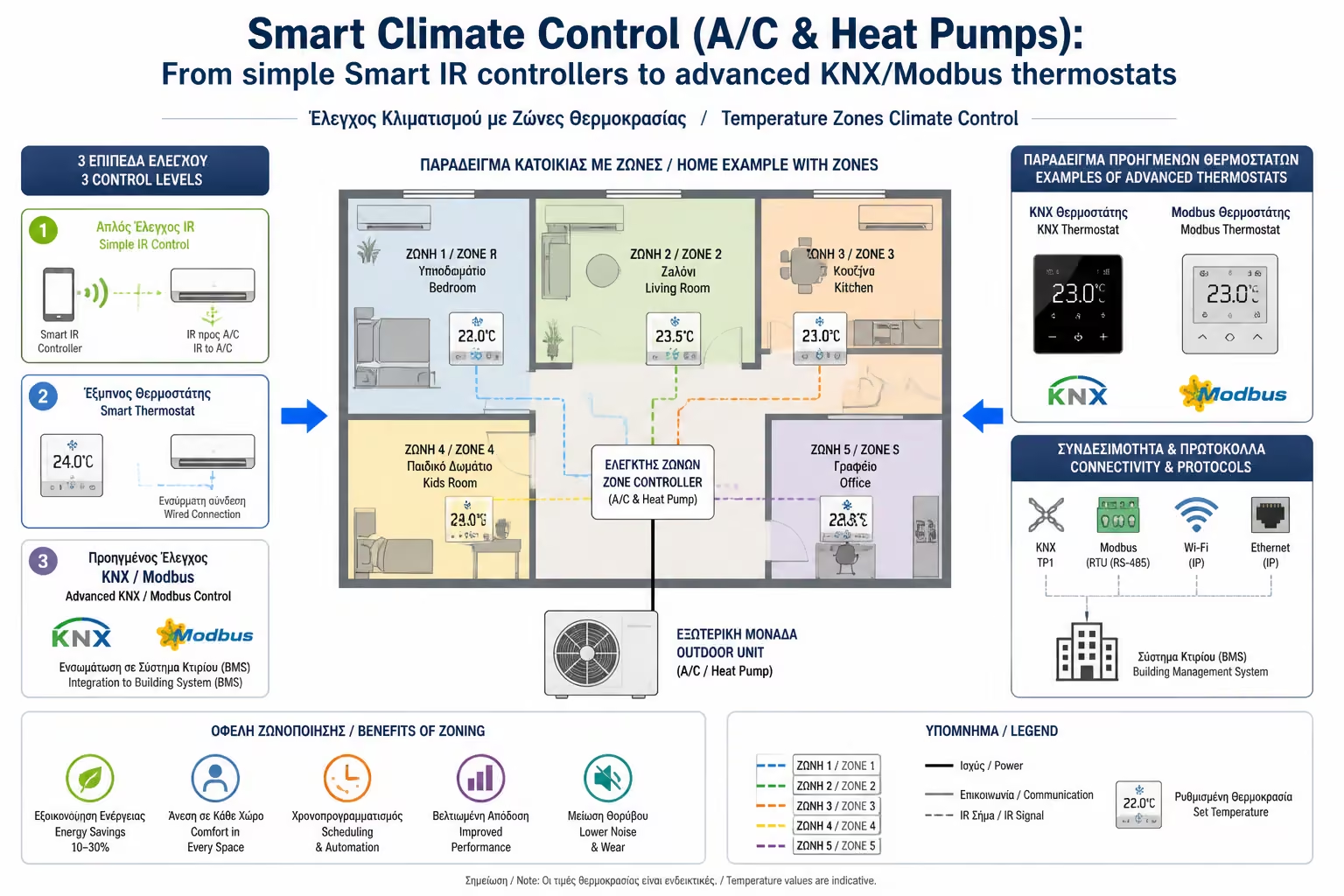
As engineers, we divide air conditioning control into three different
levels, depending on your budget and the capabilities of your machinery.
Let's see how we go from the cheap "illusion" of control to
ultimate, two-way communication.
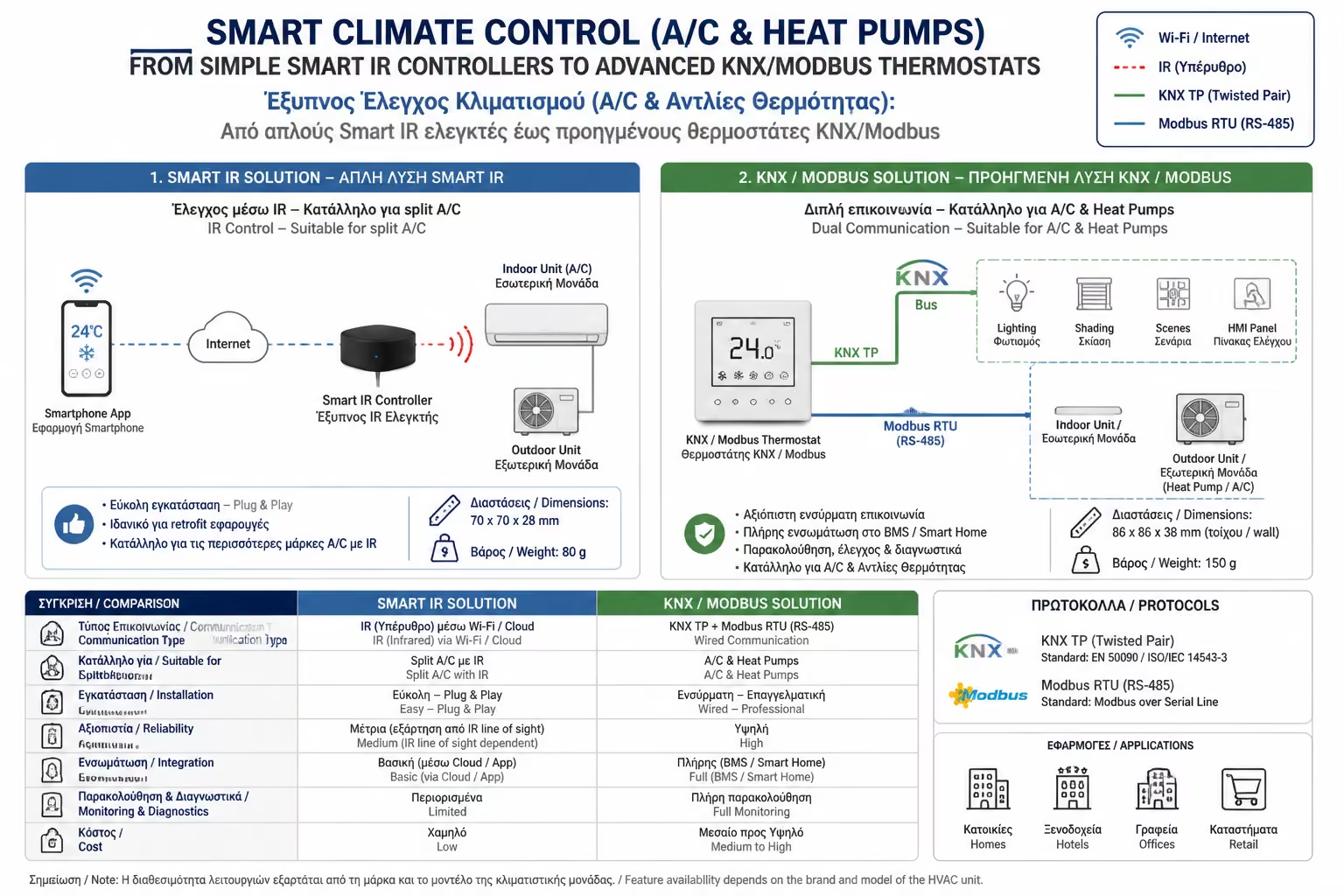
1. The Basic Level (DIY): The Smart IR Controllers
This is the most well-known and economical solution (cost around €15 -
€30) to make any old wall air conditioner "smart", as long
as it works with an infrared remote control.
How it works
You buy a small device (eg Broadlink RM4, Sensibo, SwitchBot Hub)
and put it on a shelf, opposite the air conditioner. You connect it
to your Wi-Fi. This device "duplicates" (clones) the
signals of your original remote control. When you press "22°C
Cooling" on your mobile, the device emits an infrared signal
and the air conditioner thinks you pressed the physical remote
control.
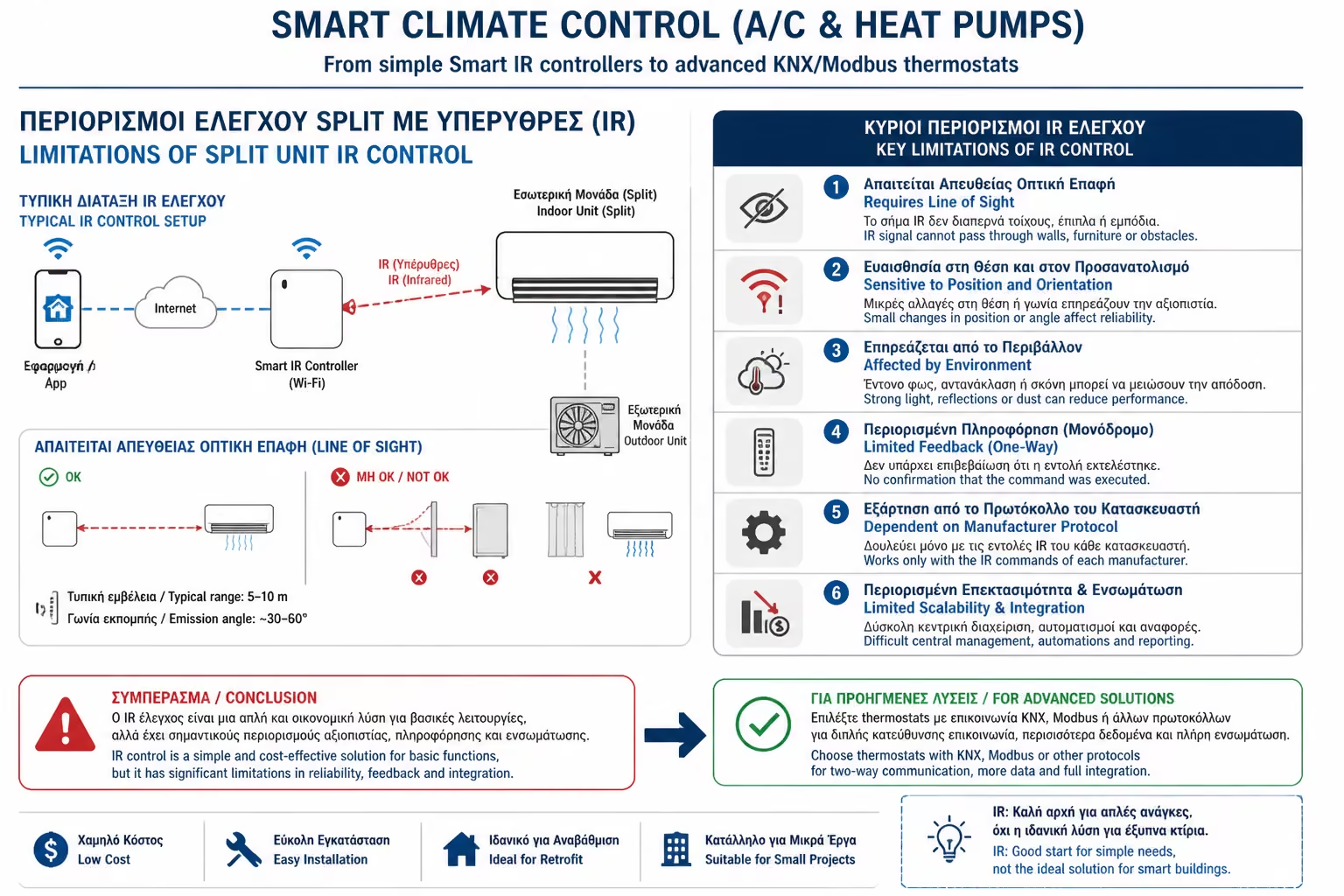
The Huge Drawback (Blind Audit)
Infrared (IR) technology is "one way". If you turn on the
A/C from the mobile, but then your roommate comes and turns it off
with the physical remote, the app on your mobile will still show
that the machine is working! Your Smart Hub is "blind" to
the actual state of the device.
2. The Middle Level: Wi-Fi Dongles & Cloud APIs
All modern air conditioners are now sold "Wi-Fi Ready" or
have built-in Wi-Fi. They use applications from the manufacturers (eg
Daikin Onecta, Midea SmartHome, Gree+).
How it works
The device connects directly to your Router. The communication takes
place through the Cloud Servers of each company.
The Advantage (Two-Way Communication)
This is where the IR problem is solved. The air conditioner
"talks" to the app. If you change the temperature with the
physical remote control, the reading on your mobile will be updated
immediately.
Integration
You can connect these Cloud accounts to Google Home or Alexa for
voice control. If you have Home Assistant, you can pull the
manufacturer's API and put the A/C into your scripts (eg "Turn
on the Midea when I open the door").
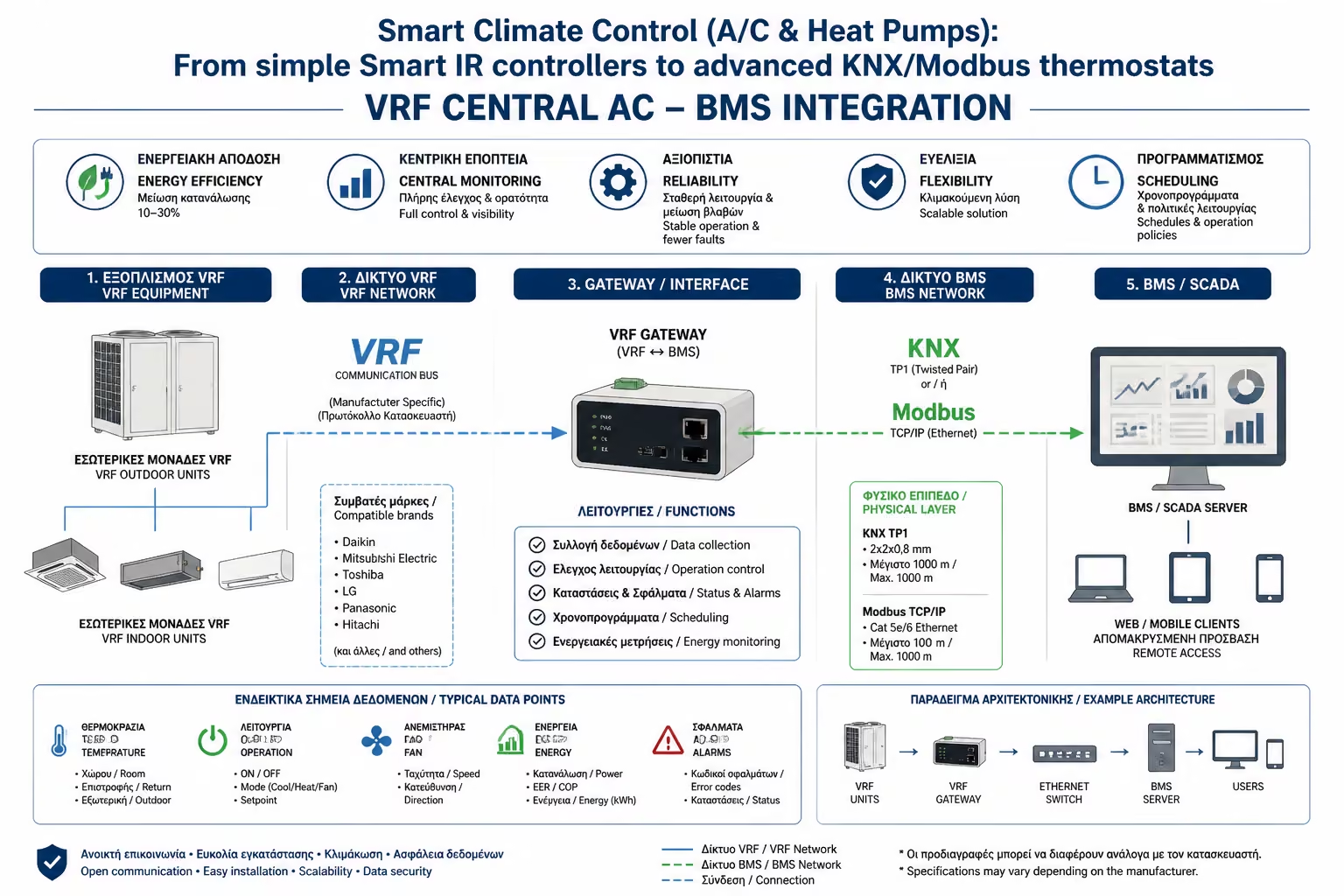
3. The Professional Level: Dry Contacts
When we move to centralized systems (Heat Pumps, Fan Coils, VRV/VRF
systems), the infrared remote control is often absent. There, the
control must be wired (Hardwired), through the central board of the
machine.
The simplest industrial way is to use dry contacts (Dry Contacts).
How it works
The heat pump board has special terminals. If you short-circuit
these terminals (with the help of a smart relay, eg Shelly Plus 1),
the machine turns on. If you open the circuit, it goes out.
The Use
It is the ultimate, foolproof method for On/Off control. Mostly used
in hotels (when you take the card out of the slot, a relay cuts the
dry contact and the A/C turns off instantly).
4. The Absolute Level (BMS/Smart Home): Modbus & KNX
But what if you don't just want to "On/Off" the Heat Pump,
but want to change the water temperature, read the Error Code if it
breaks, or drop the Inverter power to 50% because the Peak Shaving
system requires it? This is where we need digital chat.
Modbus/BACnet: As we mentioned in BMS systems, it is the language of
machines. By using special Gateways (such as Intesis products), your
air conditioner is connected by cable to the Smart Home's brain. The
system accesses the deepest parameters of the manufacturer's board.
KNX integration: If you have built your house with KNX wiring (as we
saw in Class A), you add a "KNX-to-AC Gateway" accessory (eg
from Zennio). The Magic Result: The elegant glass KNX switch you have
on the wall of your living room (which controls the lights and
blinds), now also has a thermostat display that controls the
Daikin/Mitsubishi heat pump, without having to have the manufacturer's
ugly plastic control on the wall!
5. The Role of Smart Thermostats (Nest, tado°)
Where do thermostats like Google Nest or tado° stack up in this
category? They act as the perfect "bridge" for home users.
They replace the old wall thermostat (which often uses dry contacts or
OpenTherm protocol with the gas boiler) and at the same time have
excellent mobile applications. They offer the level of control of
Modbus, but with the friendliness of Wi-Fi (and the PID algorithms we
discussed in a previous chapter).
Summarizing
Choosing the right control level depends on your equipment:
Got a 15 year old A/C at the cottage? The €20 Smart IR Controller is
more than enough.
Want to check your new A/C on the way home? The company's built-in
Wi-Fi has you covered.
Are you planning a Heat Pump for a new, state-of-the-art villa? Ask
your mechanic for a Modbus or KNX Gateway board to seamlessly connect
it to the home's central brain.
Next Step: We've adjusted the air temperature, but what about the main
source of heat (and heat) coming into our home? The Sun.
Moving on to the next critical guide for your comfort: Electric Roller
Blinds & Awnings: 4 Wire Motor Wiring (Standard) with Smart Shade
Switches and Limit Calibration.