UPS Installation Inside the Rack: Rackmount UPS vs. Tower – How to
protect your network core from power outages
All this state-of-the-art equipment (PoE Switches, Routers, Wi-Fi 7
Access Points, Security Cameras) we have installed in our cabin has one
common, huge vulnerability: It is completely dependent on power.
A simple power outage from the PPC, and your "smart" home is
"blinded" and "deaf" instantly. Cameras don't work
(since they draw power from the Switch), you don't have internet (since
the Router shuts down), and home servers like NAS are at risk of losing
data from the sudden shutdown.
This is where the Rack's guardian angel comes into play: the UPS
(Uninterruptible Power Supply). Let's look at why not just any UPS will
do the job, the differences between Rackmount and Tower, and how to
correctly calculate the power you need.
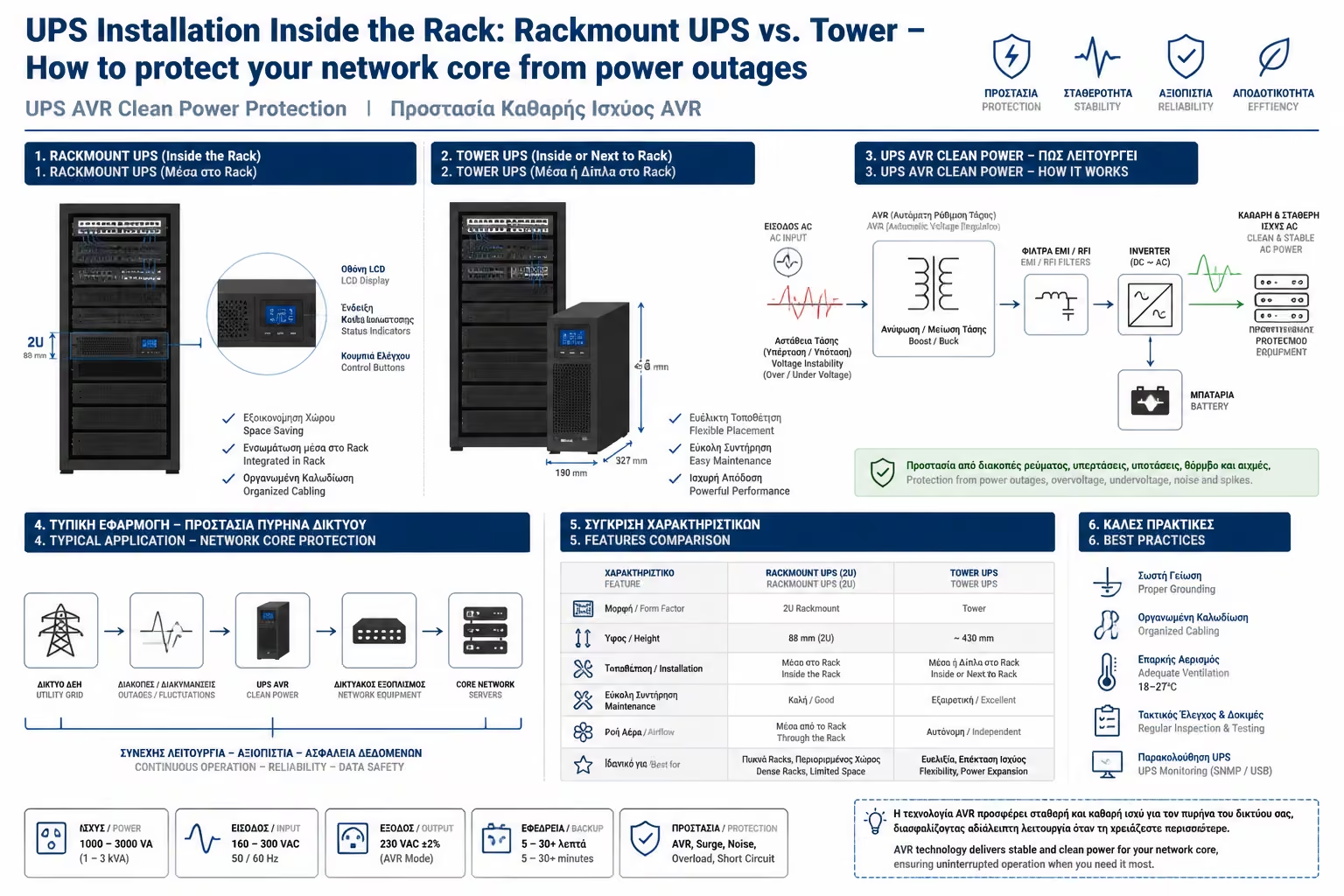
1. The Dual Role of UPS (It's Not Just a Battery)
Many people think that a UPS is just a big battery that keeps machines
running when the power goes out. In fact, its most important role is
to purify the current.
The mains voltage is never a constant 230V. It constantly makes
brownouts or spikes. The sensitive power supplies of IT equipment are
unimaginably strained by these fluctuations. A good UPS has AVR
(Automatic Voltage Regulation) technology: It works like a
"filter" that smooths out current irregularities, providing
your expensive equipment with absolutely clean and stable voltage,
extending its life.
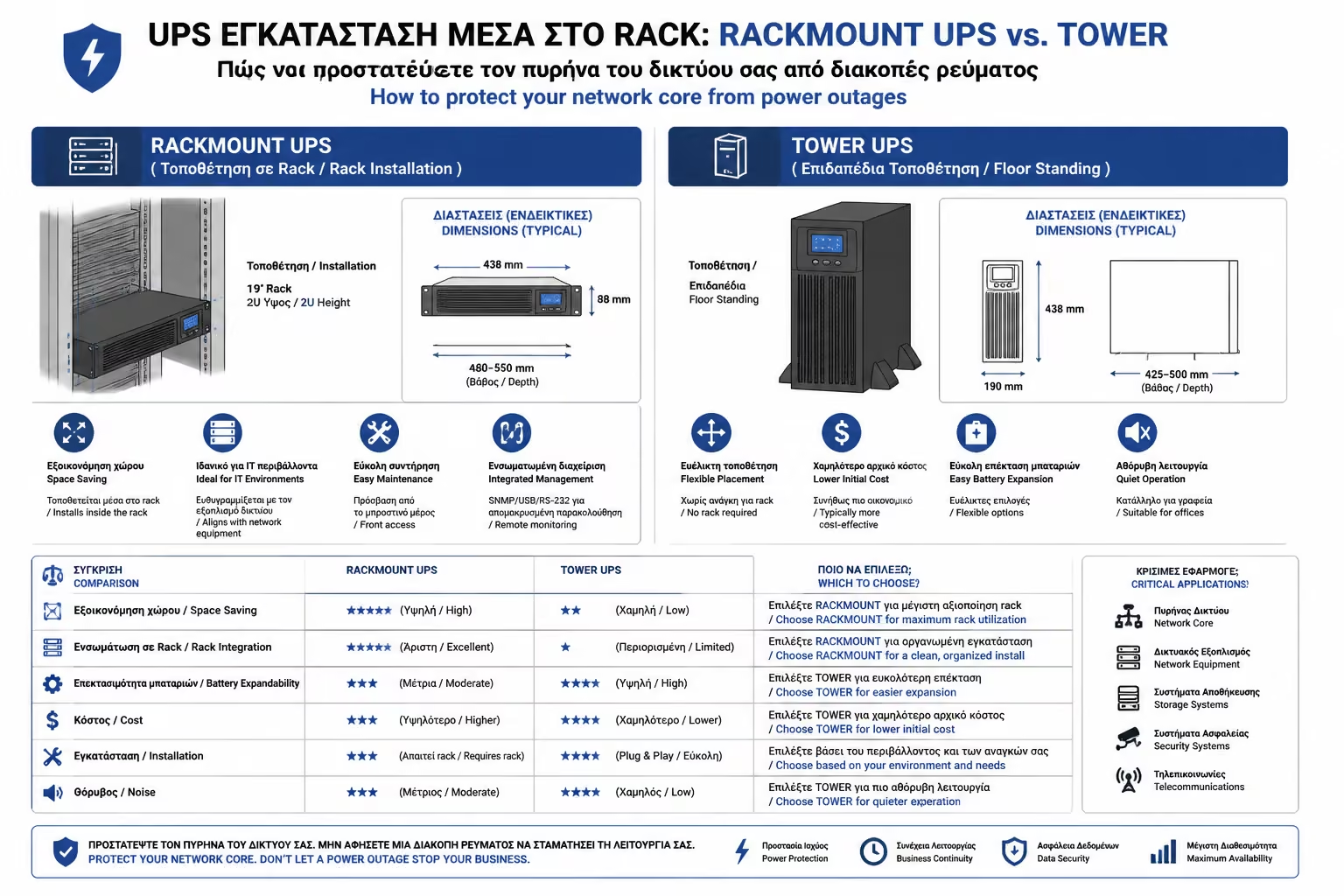
2. The Form Factor Dilemma: Rackmount vs. Tower
When you go to buy UPS, you will find two completely different plans:
A. Tower UPS ("The Tower")
They are the classic rectangular UPS that we usually put under
computer desks. Pros: They are much cheaper than their Rackmount
counterparts. Cons: They don't have "ears" to screw into
the 19 inch rails. If you want to put a Tower UPS inside the Rack,
you need to buy a heavy-duty metal rack and rest it on it. It takes
up huge, unused space (often 4U or 5U) and the cables coming out of
the back look extremely ugly.
B. Rackmount UPS (The Professional Solution)
They are designed specifically for cabins. They have the standard
width of 19 inches and height usually 1U, 2U or 3U. Pros: They
integrate perfectly into the cabin, screw onto the rails, have LCD
screens on the front and ensure perfect cable management and
airflow. Cons: They are considerably more expensive and require
racks with sufficient depth (at least 600mm or 800mm depending on
the VA).
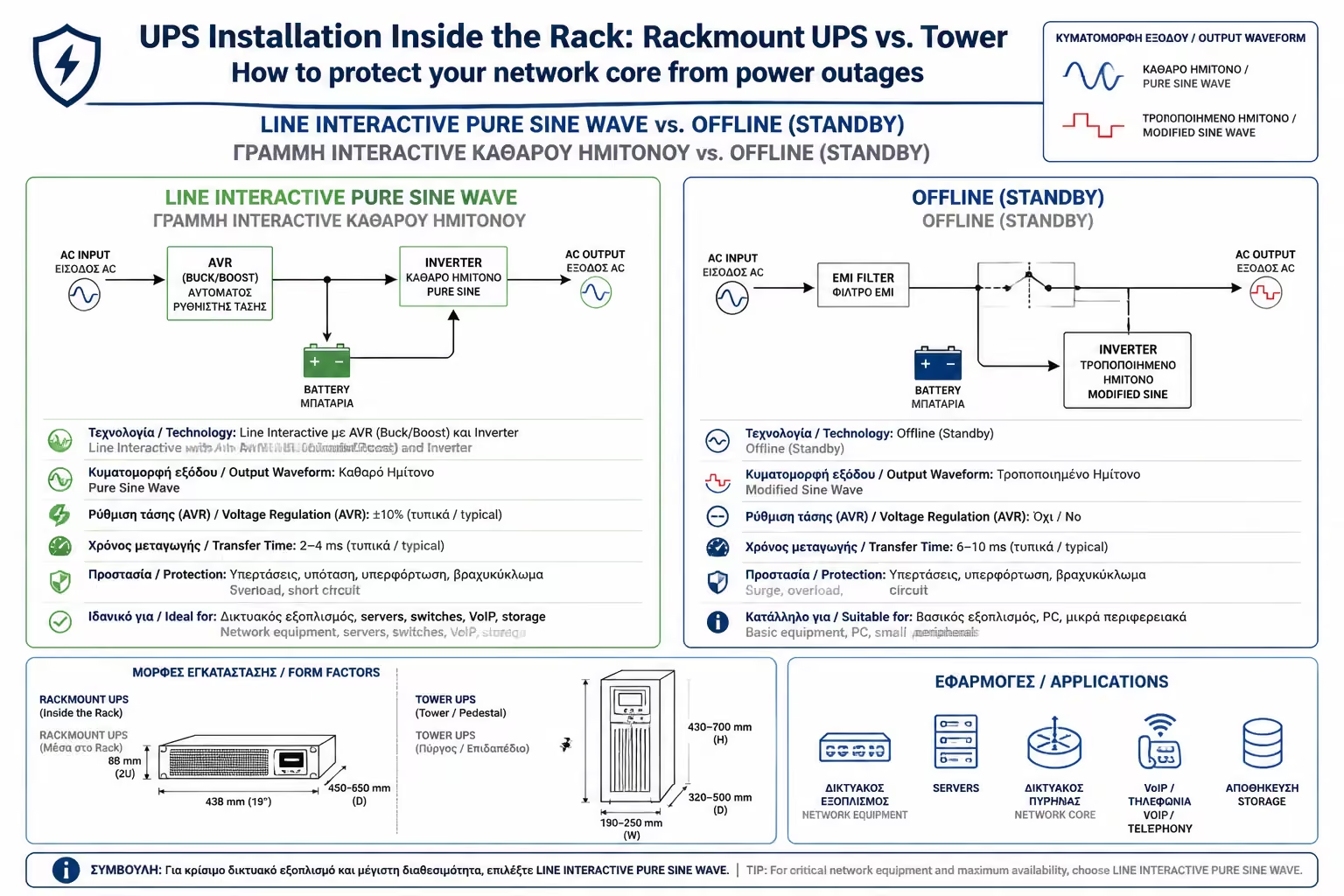
3. Technology: Which type to choose?
UPSs are divided into three categories based on how they manage power:
Standby / Offline (Avoid it): The cheapest technology. When the
power goes out, it makes a "click" (which takes a few
milliseconds) to go back to battery. It often outputs a low quality
current (Simulated Sine Wave) which can create a problem in modern
power supplies (Active PFC).
Line-Interactive (The Golden Ratio): The ideal choice for most Smart
Homes and small offices. It has an AVR system to correct the voltage
without draining the battery. Strictly choose models that state
"Pure Sine Wave" (Pure Sine Wave), so that your machines
are supplied with current of the exact same form as that of the PPC.
Online Double Conversion (The Ultimate): Here the UPS works
continuously from its battery, converting current from AC to DC and
back to AC. Zero switching time. They are very expensive, their fans
make a lot of noise and they are only intended for Data Centers and
critical medical Servers.
4. Power Calculation: VA vs. Watts
How big a UPS do you need? UPSs are measured in Volt-Amperes (VA), but
your machines consume Watts (W). Their relationship is not 1 to 1.
Depending on the Power Factor of the UPS, usually Watts is about 60%
to 90% of VA. For example, a 1000VA UPS can usually handle a maximum
of 600W with 700W of net load.
Your Calculation: Add up the maximum consumption (in Watts) of your
equipment. (eg PoE Switch 150W + Router 15W + NVR Recorder 50W + NAS
40W = 255 Watts).
Note on Autonomy: The purpose of UPS is not to give you 8 hours of
internet. Its purpose is to keep the system alive for 15-30 minutes
(so that the micro-interruptions pass) and, if the interruption is
prolonged, to instruct (via USB or network) your Server (NAS) to do a
Safe Shutdown so that the hard drives do not fail.
The Rule
Multiply the sum by 1.5 to have enough margin so that the UPS is not
running at 100% of its load. So 255W x 1.5 = ~380W. A 750VA or
1000VA UPS will comfortably cover you.
5. The Practical Secret: Weight and Support
Rackmount UPSs have heavy duty lead acid (SLA) batteries inside. A 2U
UPS can weigh from 20 to 35 kg!
Rule 1 (The Position)
The UPS ALWAYS goes into the lowest point of the cabinet (1U or 2U
from the floor). If you put it up, you change the center of gravity
of the Rack, which can become dangerously unstable and tip over.
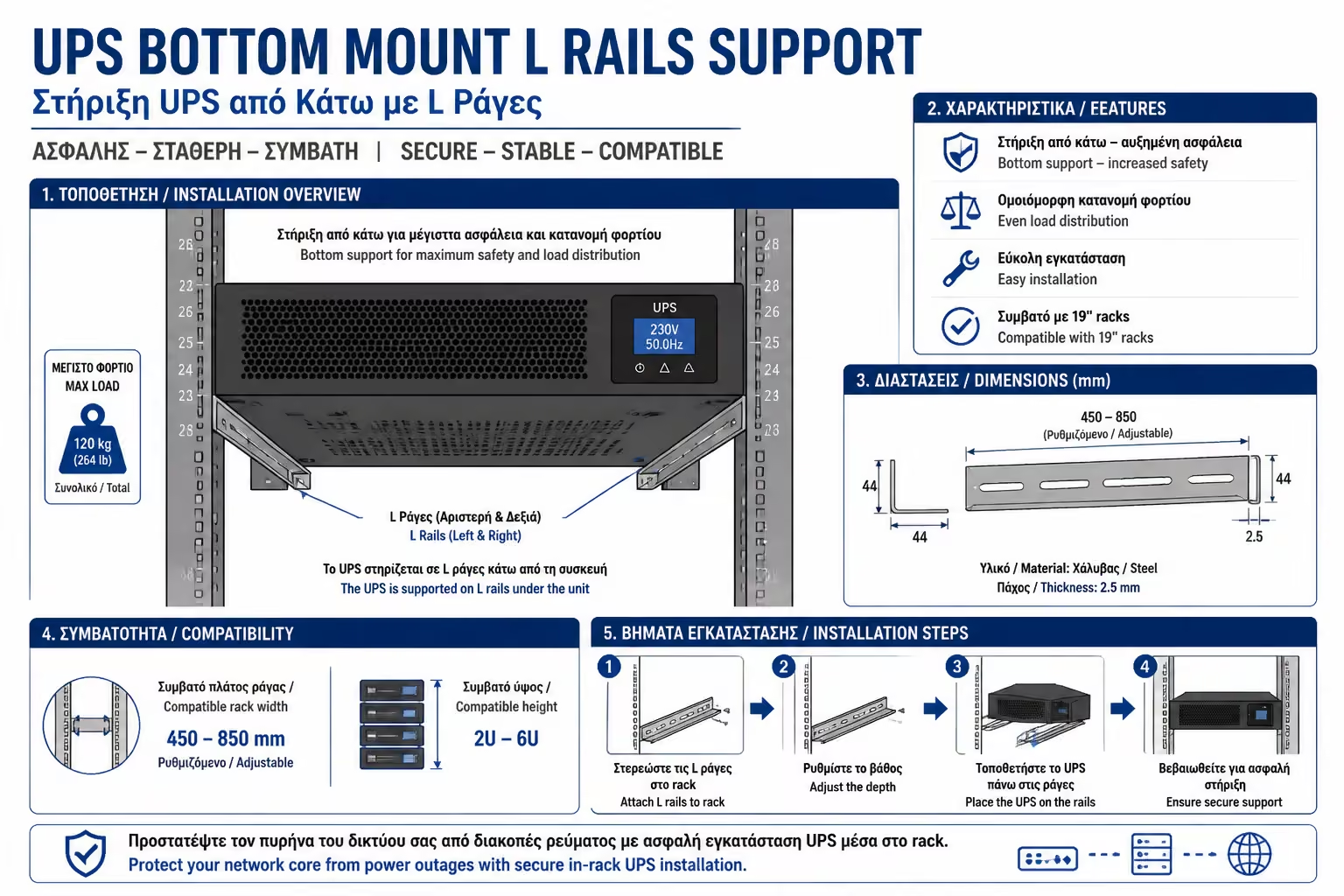
Rule 2 (The Support)
NEVER hang a heavy UPS by only its front "ears" on the
rails. The weight will bend the rack rails or break the aluminum
frame of the UPS itself. Purchase and install the special
"L-Rails" (side support rails) or a heavy-duty 4-point
rack so that the UPS sits securely at its full depth.
Summarizing
UPS is the "insurance policy" of your entire network. A
Rackmount, Line-Interactive UPS with "Pure Sine Wave", bolted
with sturdy rails to the bottom of the cabinet, guarantees that
micro-interruptions and power surges will never reach your sensitive
equipment, ensuring the 24/7 operation of your smart building.
Next Step: We have everything set up perfectly. But, all this cabin with
Switches, UPS and Servers has to go into a room. And if you make a
mistake in choosing the room, living with the Rack will become a
nightmare.
We move on to the next article of the guide: Electrical Provisions for a
Home Server / NAS (Home Lab): In which room should the Rack go (cooling,
noise and dedicated power line requirements).