What is a Patch Panel: Because no serious network ends up with
"bulk" plugs directly on the Switch
You have selected the correct Rack (Wall-mount or Floor-standing),
screwed it in place and the electrician has brought all the cables
(Cat6a) from the house sockets into the cabin.
Now it's time to connect to the Switch (the Internet hub). This is where
the most common and dangerous "crime" of amateur installers
occurs: They take the thick cable coming from the wall,
"press" a male plug (RJ45) on it with a pair of pliers, and
nail it directly onto the Switch.
This practice is strictly prohibited on Structured Cabling. Proper
networking requires the use of a Patch Panel. Let's see why
"bulk" cables kill the network and how the Patch Panel works
as the ultimate "shield" of your system.
1. The Problem: Why "bulk" cables are destructive
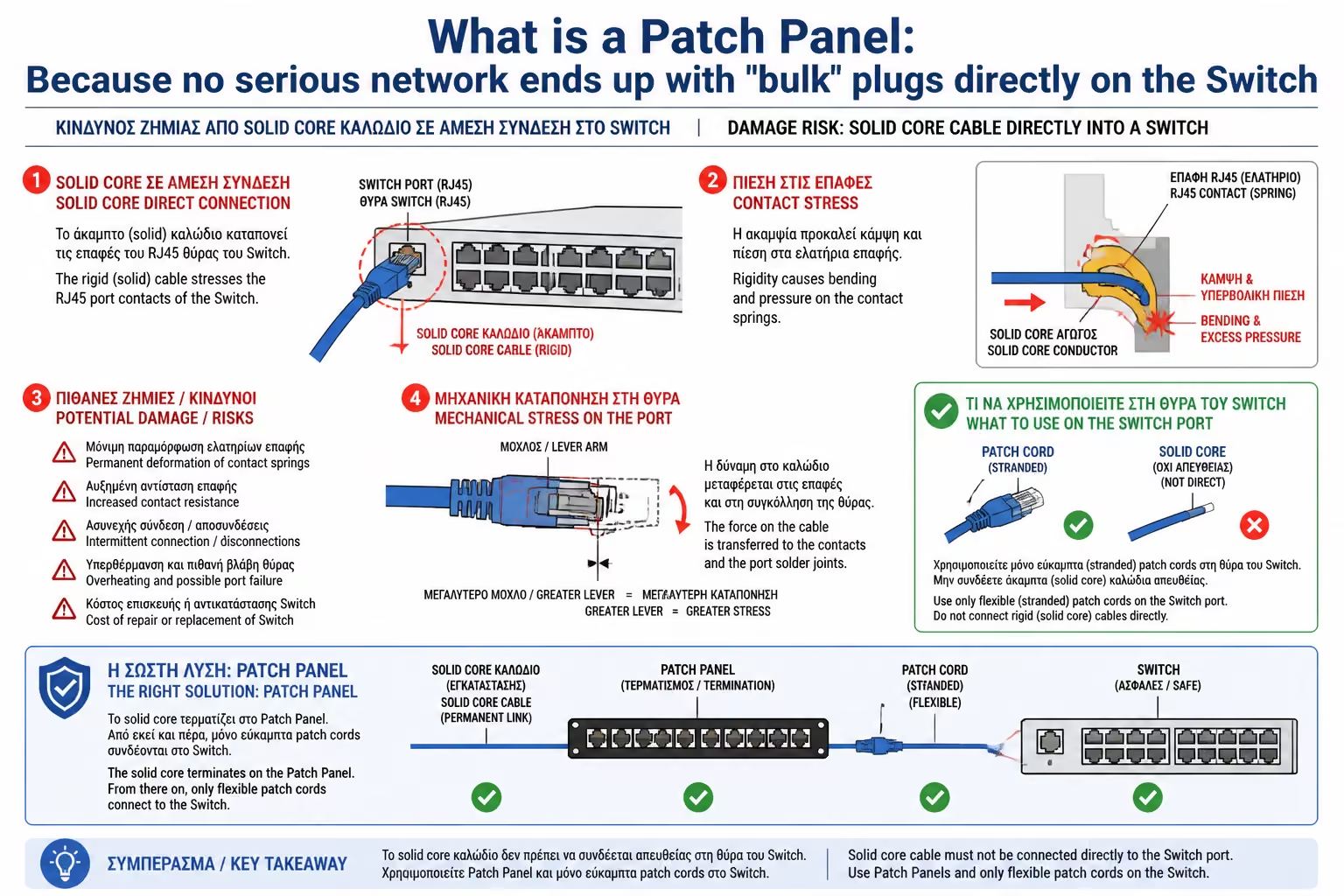
To understand the problem, you have to look at the copper itself.
The cable that we throw into the walls (Installation Cable) has a
Solid Core. Each of its 8 small wires is a single, thick piece of
copper.
The Downside
Solid copper is great for long distances, but it is stiff and
brittle. It is not designed to bend. If you put a male plug on it
and shake it 4-5 times left and right to clean the Rack, the copper
inside the plug will "fatigue" and break.
The Risk for the Switch
Because these cables are very hard, if you nail them directly to the
Switch, their natural tension will constantly pull on the device's
socket, risking breaking the delicate circuit board of your
expensive equipment.
2. What is Patch Panel? (The Bridge)
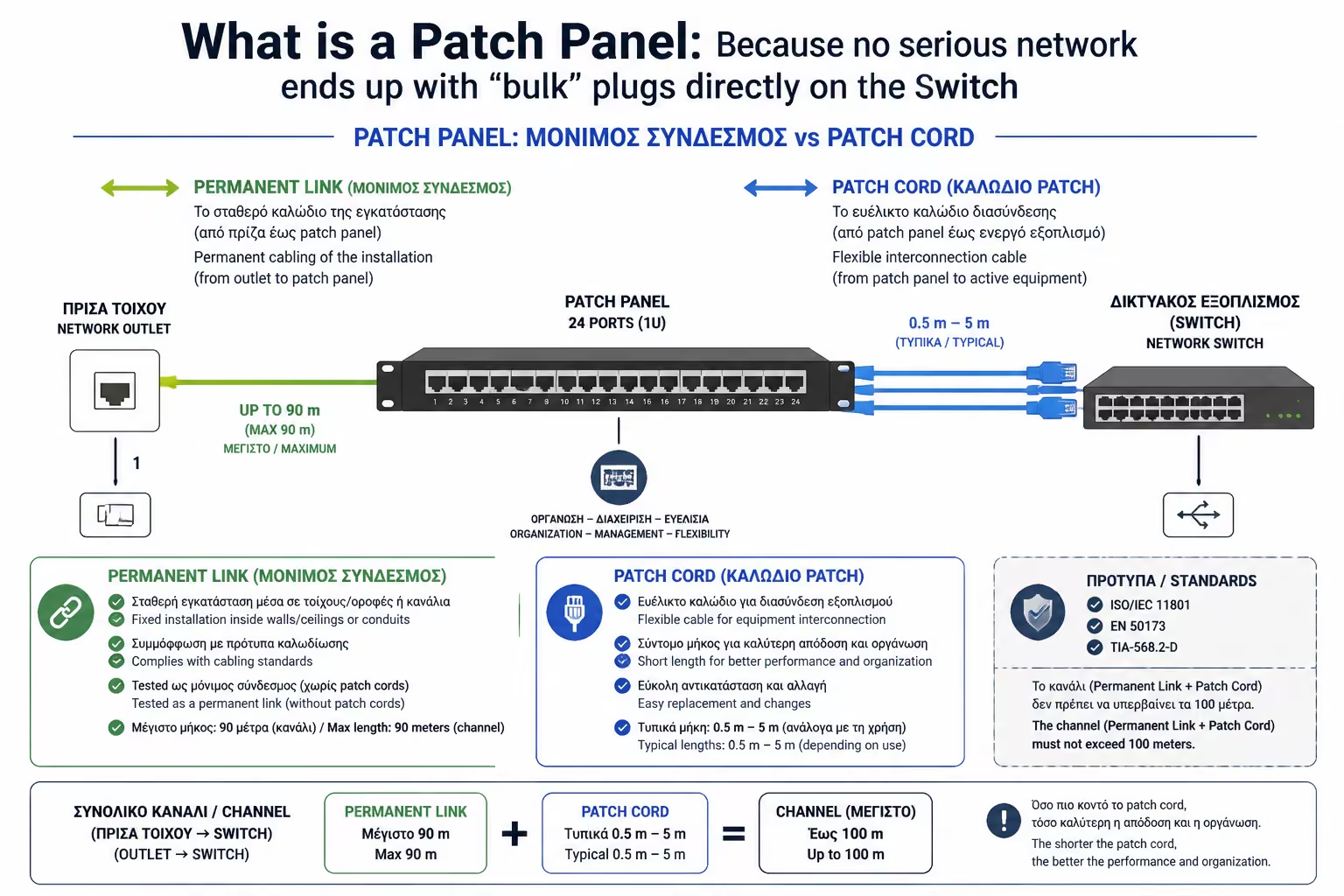
The Patch Panel is a passive, 19-inch (1U or 2U) metal frame that
screws into the Rack. It doesn't plug in, it doesn't have lights, it
doesn't have a "brain" and it doesn't provide internet by
itself. It works purely as a mechanical bridge.
The separation of the network is done in two stages:
The Back (Permanent Connection): All solid core cables coming from
the walls of the house are terminated and "locked"
permanently to the back of the Patch Panel. From that moment on,
they are never going to move again. The part from the living room
socket to the back of the Patch Panel is called the Permanent Link.
The Front (The Flexibility): On the front of the Patch Panel you see
only female connectors (like wall outlets). To give internet to an
outlet, you take a Patch Cord (a short, factory-made, super-flexible
cable) and connect the port on the Patch Panel to the port on the
Switch.
3. Why do Engineers require Patch Panels?
The interpolation of this passive array offers enormous advantages
that determine the viability of the network:
A. Equipment Protection
If you trip over a cable or pull it by mistake, only the cheap,
flexible €2 Patch Cord will break. Your expensive Switch and
permanent in-wall cable will remain completely intact.
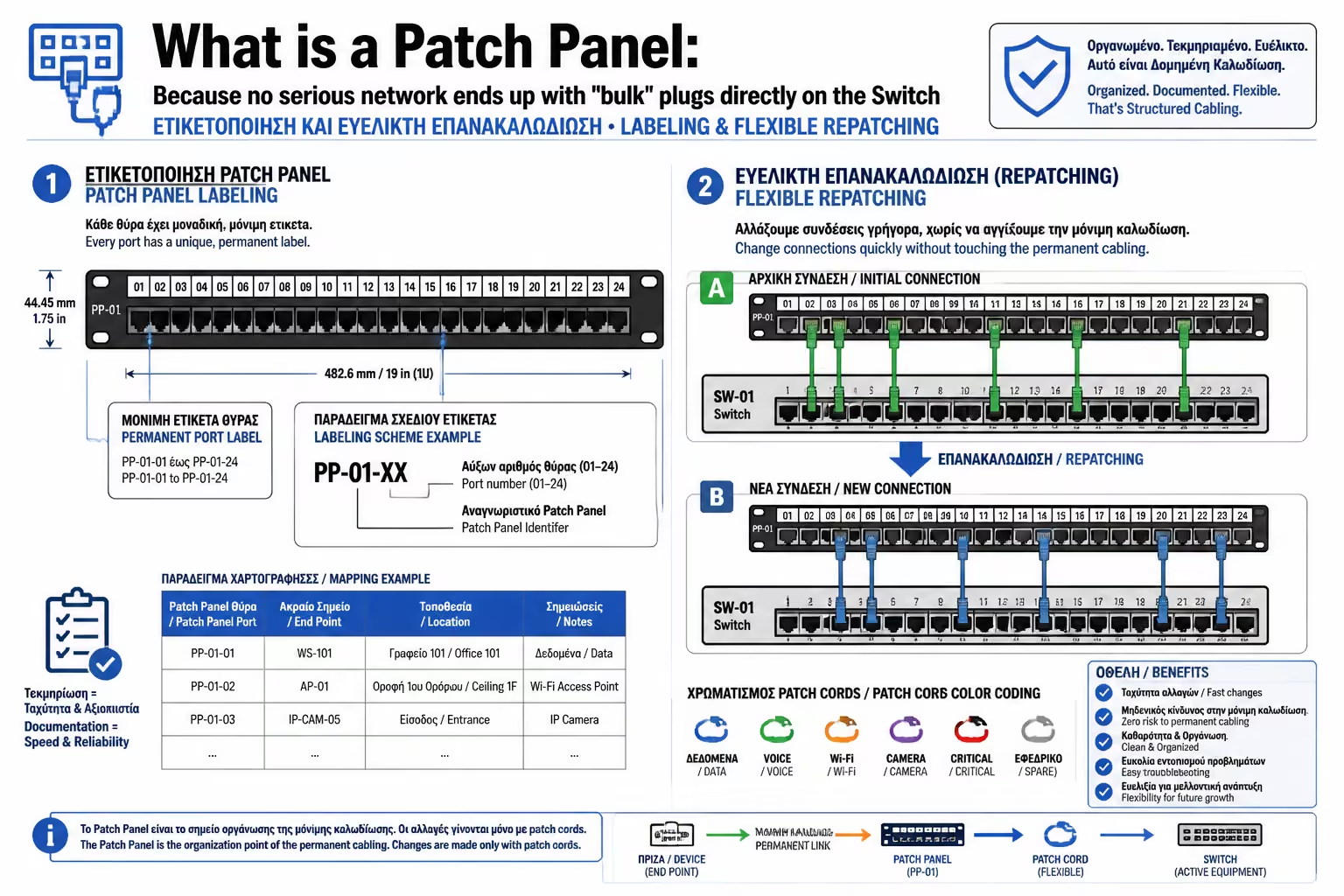
B. Flexibility
Suppose Socket No. 5 (in the living room) was getting internet from
the Switch. You decide that you now want this outlet to act as a
line for the landline. If you had "bulk" cables, you'd
have to cut and re-make plugs. With the Patch Panel, you simply
remove the front patch cord from the Switch and pin it to the phone
panel. 3 second process.
C. Mapping and Labeling
Each port on the Patch Panel has a number (eg 1 to 24) and a small
white box. There you can write exactly where the cable goes (eg
"Pool Camera" or "Living Room TV"). If you don't
put in a Patch Panel, you'll end up with 24 identical wires
dangling, trying to guess which is which.
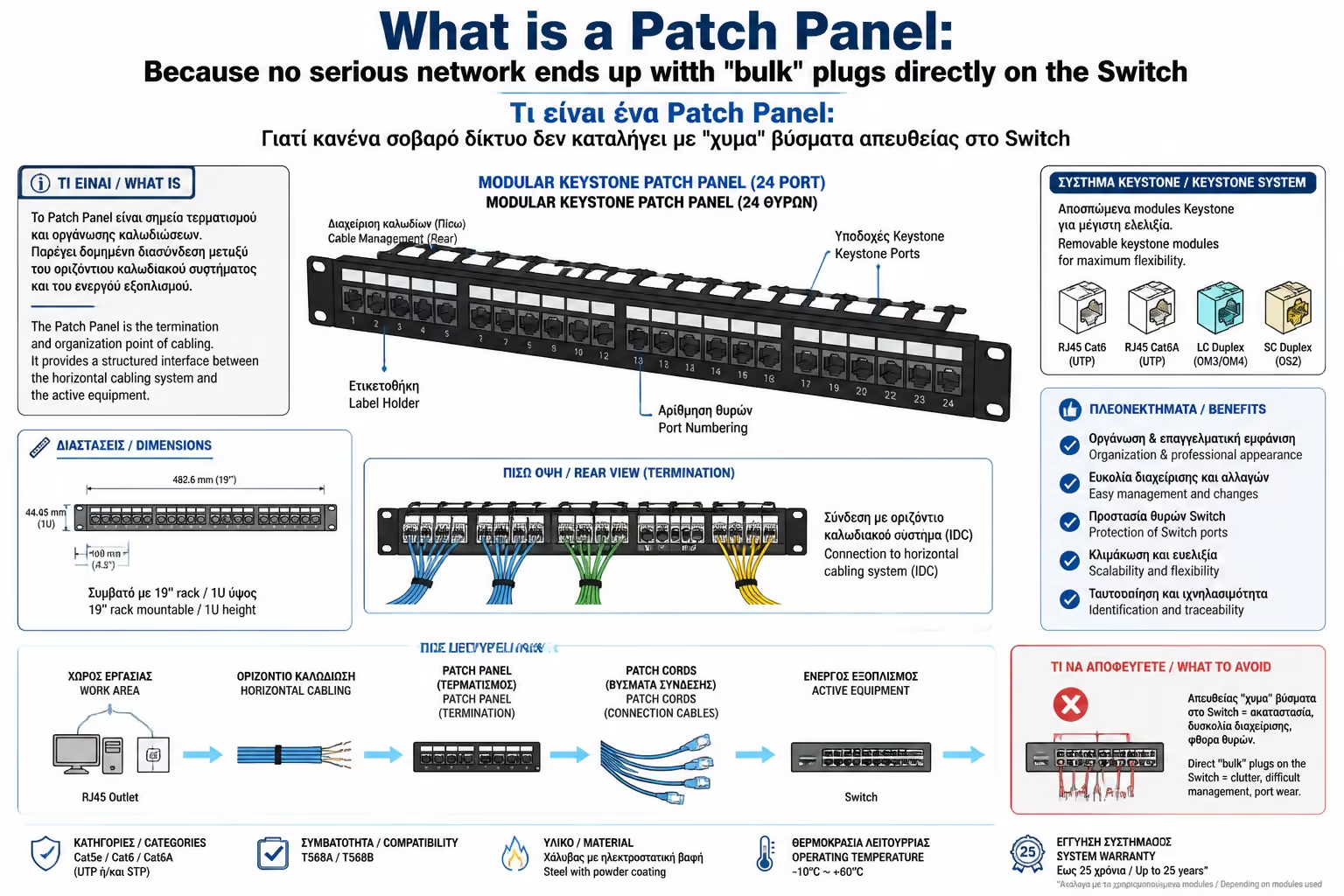
4. The Modern Standard: Modular Keystone Patch Panels
In the past, Patch Panels required a special tool ("nailer")
to push the wires onto their board (Punch-down technology). This was
difficult, and if a port broke, you had to throw away the whole Panel.
Today, we exclusively use Unloaded Modular Keystone Patch Panels.
How they work
You buy an empty metal frame with 24 square holes. Then you
terminate each wall wire to an individual "cube" (Keystone
Jack). Finally, you take this cube and "snap" (click) it
into the empty hole in the Panel.
The Advantage
If a port breaks, you only change that particular cube. Also, you
can mix technologies! On the same Patch Panel you can snap together
5 Network Keystones (Cat6a), 2 Keystones for TV cables
(Coaxial/F-Type), and 1 Keystone for optical fiber (LC).
Summarizing
The Patch Panel is the boundary that separates the static, unchanging
architecture of the building (the cables in the walls) from the dynamic,
ever-changing world of electronic devices (the Switch and the Router).
It doesn't add speed to the network, but it adds order, reliability and
security. A cab without a Patch Panel isn't a network, it's just a
collection of wires waiting to break.
Next Step: We have the Patch Panel and the Switch. Now we need to join
them using the Patch Cords. How are we going to do it without our cabin
looking like... spaghetti?
We continue in the art of tidying up: Cable Management in the Rack: How
to organize cables like a pro (Guides, Velcro, Ties, Patch cords of
precise length).