
Rack Cabinet (Wall-mount vs. Floor-standing) Buying Guide: How to choose the right dimensions and the "U" (Rack Units) you need

Welcome to Class D, the "heart" of your digital building. By now, we've pulled dozens of cables (Cat6a, fiber optic, alarms, cameras) from every corner of the house or business. All those wires have to end up somewhere.

If you let them hang freely from a hole in the wall, you will end up with spaghetti wiring, which is impossible to maintain, collects dust and is dangerous for short circuits. This is where the Rack Cabinet (Network Cabinet) comes in.

The Rack is not just a metal box. It's a tightly standardized ecosystem that protects, cools and organizes your gear. As engineers, choosing the right Rack is probably the most critical decision for the viability of the project, as a wrong size will force you to rip it all out in 2 years. Let's see how to decode the dimensions and what to look out for.

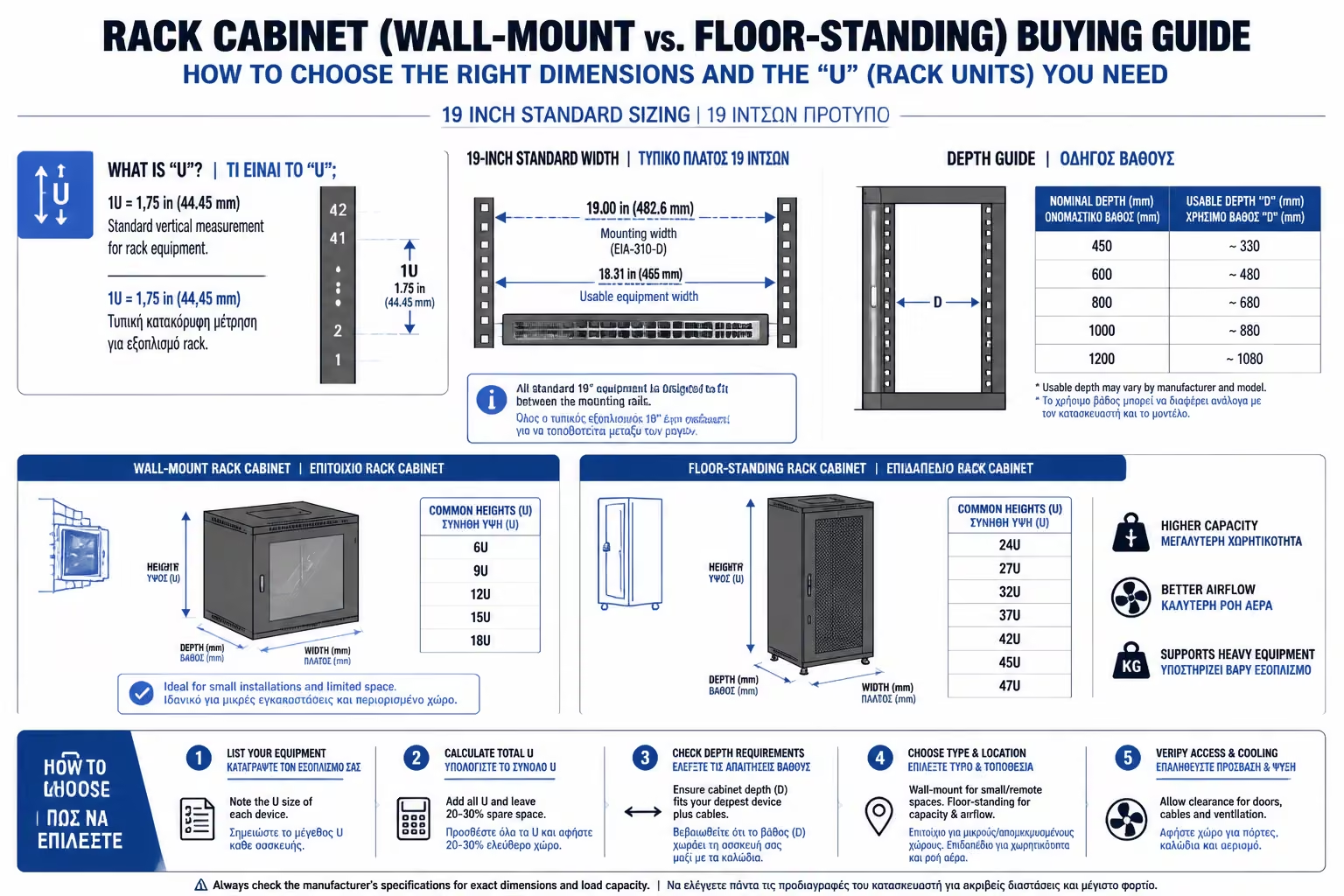
1. The 19-Inch Golden Rule and the Secret of the "U"

When you buy a Rack, the width of the inside frame (where the machines screw in) is globally standardized at 19 inches (482.6 mm). Whether you buy a Cisco Switch, a Patch Panel, or a Dell Server, if it says "19-inch rack-mountable", it will fit perfectly.

However, cabin height is not measured in centimeters, but in Rack Units (abbreviated "U" or "RU").

  • 1 Unit (1U) is exactly equal to 1.75 inches (44.45 millimeters).
  • Each machine you buy takes up a specific U.
  • A typical Switch or Patch Panel is 1U.
  • A large UPS or a Server can be 2U or 3U.

How do you figure out what you need? Add up! If you have 1 Router (1U), 1 Switch (1U), 2 Patch Panels (2U) and 1 UPS (2U), the sum is 6U. The IT Admins Rule: Calculate how many U you need today and multiply it by 1.5 or 2. If you got 6U, buy at least a 9U or 12U Rack. The empty space is filled surprisingly quickly in the future.

Illustration for 1. The 19-Inch Golden Rule and the Secret of the "U"

2. Wall-mount vs. Floor-standing

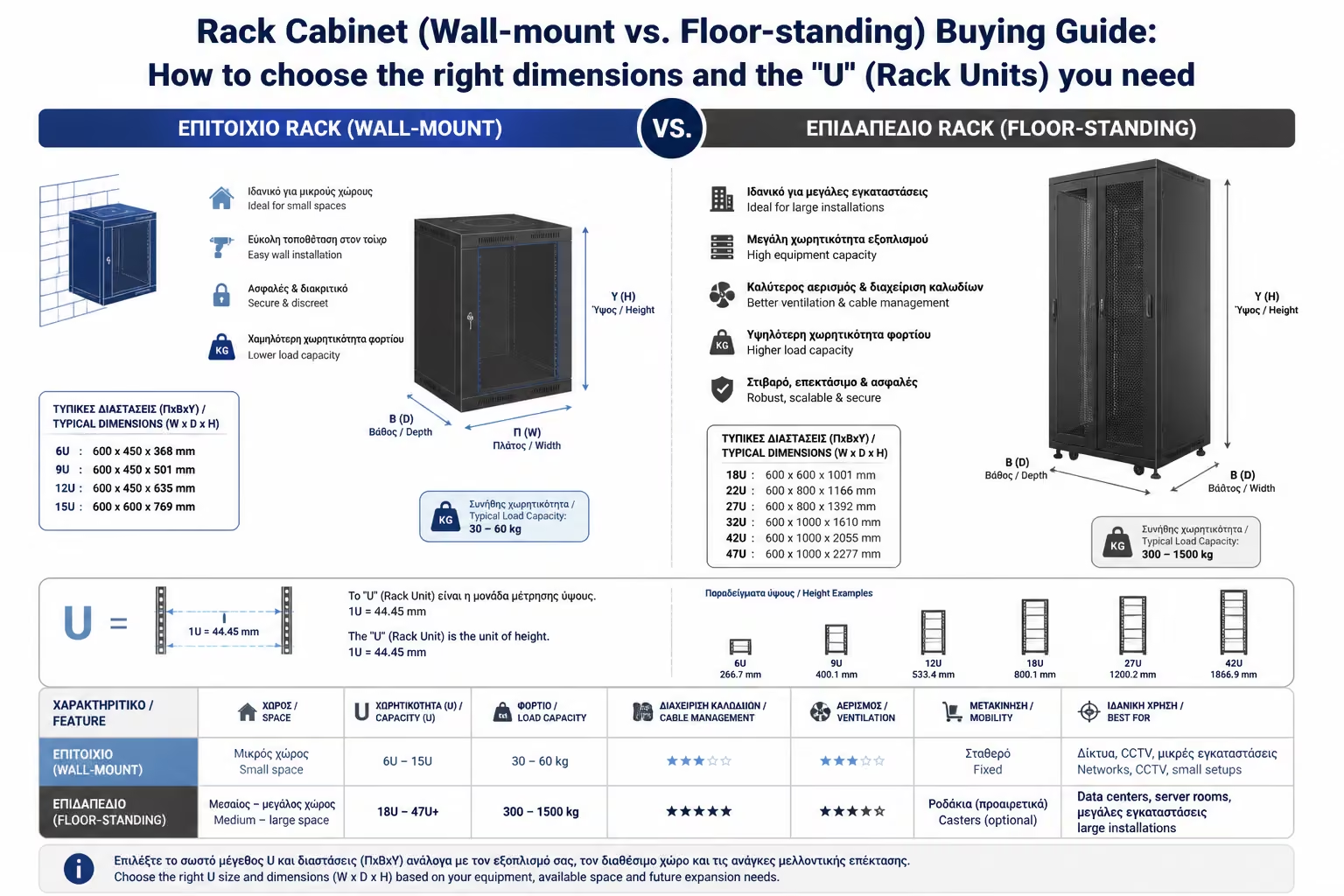
Illustration for 2. Wall-mount vs. Floor-standing

Depending on the space and weight of the equipment, the cabins are divided into two major categories:

A. Wall-mount Racks

They are screwed directly to the wall, high up so they don't take up floor space. Sizes: Typically range from 6U to 18U (and rarely up to 22U). Advantages: Ideal for home installations (Smart Homes), small offices or warehouses. They do not bind squares. * Disadvantages (The Weight): They have a strict endurance limit (usually 50 - 60 kg). If you plan to put heavy lead-acid battery UPS inside, the wall (especially if it's drywall) may not hold up.
B. Floor-standing Racks

They are large cabins that step on the floor with wheels and adjustable feet (Leveling feet). Sizes: They start from 22U and go up to 42U or 45U (height over 2 meters). Advantages: Huge weight resistance (often over 600-1000 kg). Ideal for serious Home Labs, Server Rooms, and buildings housing central CCTV systems (NVR recorders) and large Servers. * Disadvantages: They take up significant space in the room.

3. The Biggest Pitfall: The Depth of the Cabin

This is where most (and most costly) mistakes are made. You buy a 12U Rack, screw it to the wall, and when you go to put the Server or UPS inside, the door won't close because the machine is sticking out!

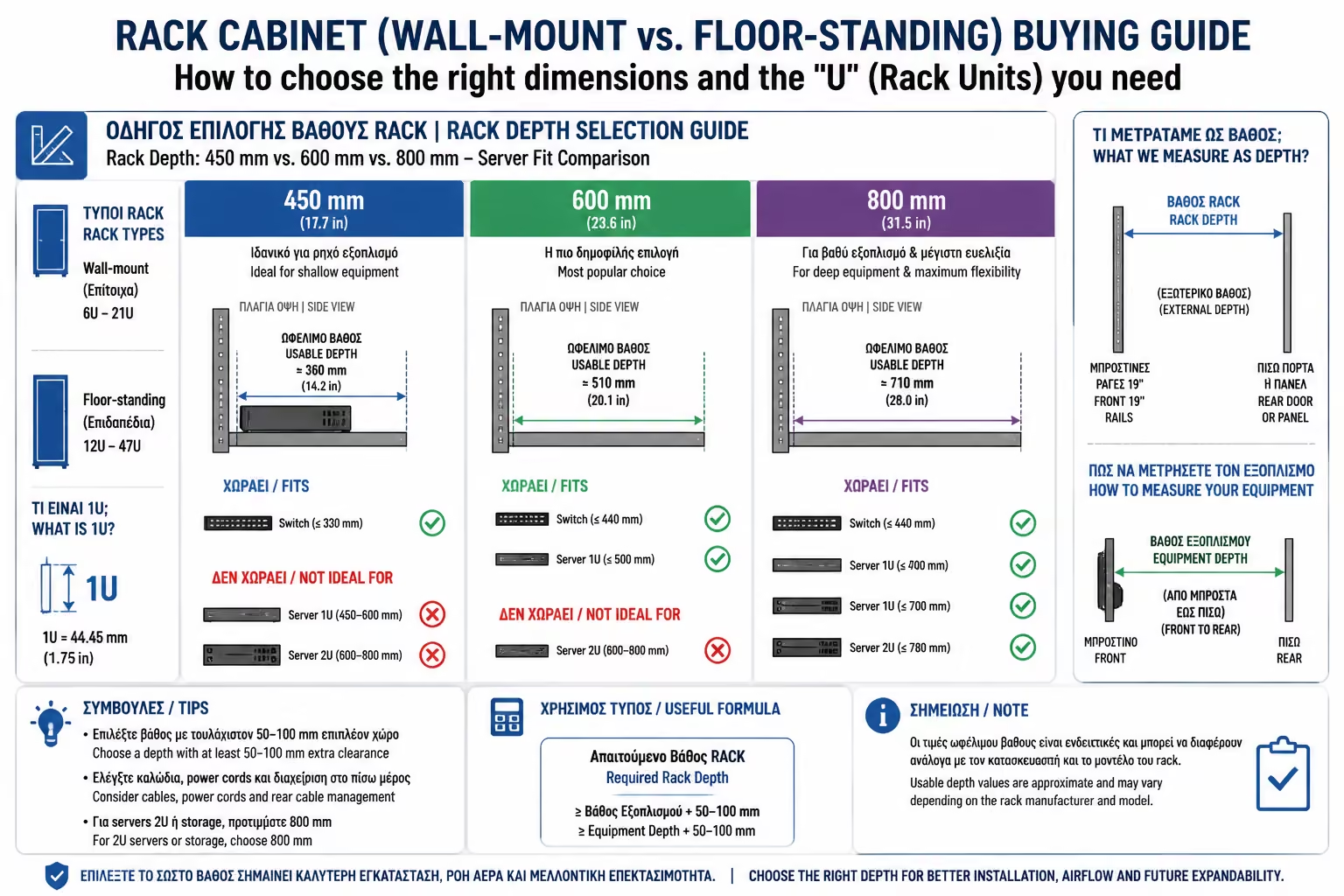
Racks have a specific outer and inner depth:

Pay attention to the "Useful Depth": If a Rack is 600mm outside, its useful inside is about 500mm. You should always leave at least 5-10cm of air at the back for the power cables to "twist" and 5cm at the front to keep the fiber optics from getting crushed in the door glass!

Illustration for 3. The Biggest Pitfall: The Depth of the Cabin

Depth 450mm

The absolute minimum (Usually on Wall-mounts). It only works for small switches, patch panels and recorders (NVRs) with a small depth.

Depth 600mm

The "standard" for walls and small floors. It comfortably fits most Switches, routers and home NAS (Synology/QNAP).

Depth 800mm

The golden ratio for Flooring. This is where Rackmount UPS and short Servers start to fit.

Depth 1000mm - 1200mm

Exclusively for Server Rooms. Professional Servers (eg Dell PowerEdge, HP ProLiant) are enormously long and require such depth to breathe.

4. Doors: Glass vs. Perforated (Mesh)

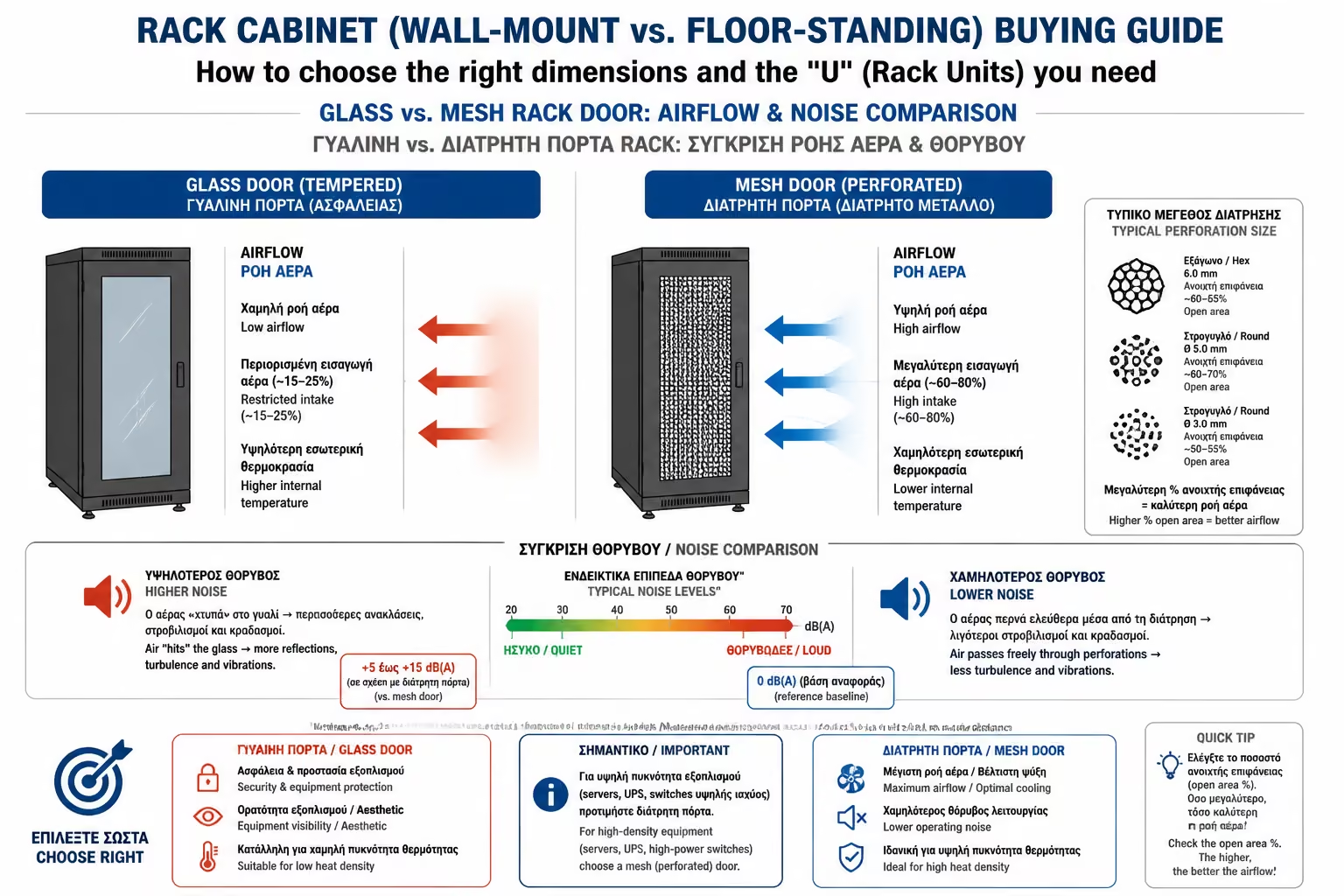
Illustration for 4. Doors: Glass vs. Perforated (Mesh)

The choice of the front door is not a matter of design, but of thermodynamics (airflow):

Glass Door (Securit)

The most common in small Racks. Significantly reduces fan noise and prevents dust. But, it does trap heat. Requires ceiling fans to be installed in Rack to exhaust hot air.

Mesh/Perforated Door

It is metal with thousands of small holes. It is used in Server cabins. It allows for natural ventilation as the Servers draw in cold air from the front and expel it from the back. The downside is that it lets the noise out into the room.

Summarizing

Buying a Rack Cabinet is an infrastructure investment. For a modern Smart Home, a 12U or 15U wall cabinet with a depth of 600mm is usually the "sweet spot". Accurately calculate the U's of your equipment, leave 30% empty space for future upgrades, and most importantly: measure the depth of the longest machine you plan to put in, before you hit the order button.

Related Articles

Preview