
UPS (Uninterruptible Power Supply) Buyer's Guide: Line-Interactive vs. Online – What to choose for PC, Server or router

We've all experienced that nightmare moment: You've been working for hours on an important document, playing a demanding game or watching a movie, and suddenly... the power goes out. The screen goes blank, work is lost, and worst of all, your sensitive equipment receives an electronic "shock" that can be fatal to the hard drive or power supply.

The solution to this problem is the UPS (Uninterruptible Power Supply System).

However, if you go into an online store to buy one, you'll get lost among terms like Line-Interactive, Online, VA, and Sine Wave. As engineers, we'll tell you the truth: Not everyone needs the most expensive UPS, and not all UPSs are for all jobs. Let's clear up the landscape so you can buy exactly what you need.

The Basic Rule: What UPS is NOT

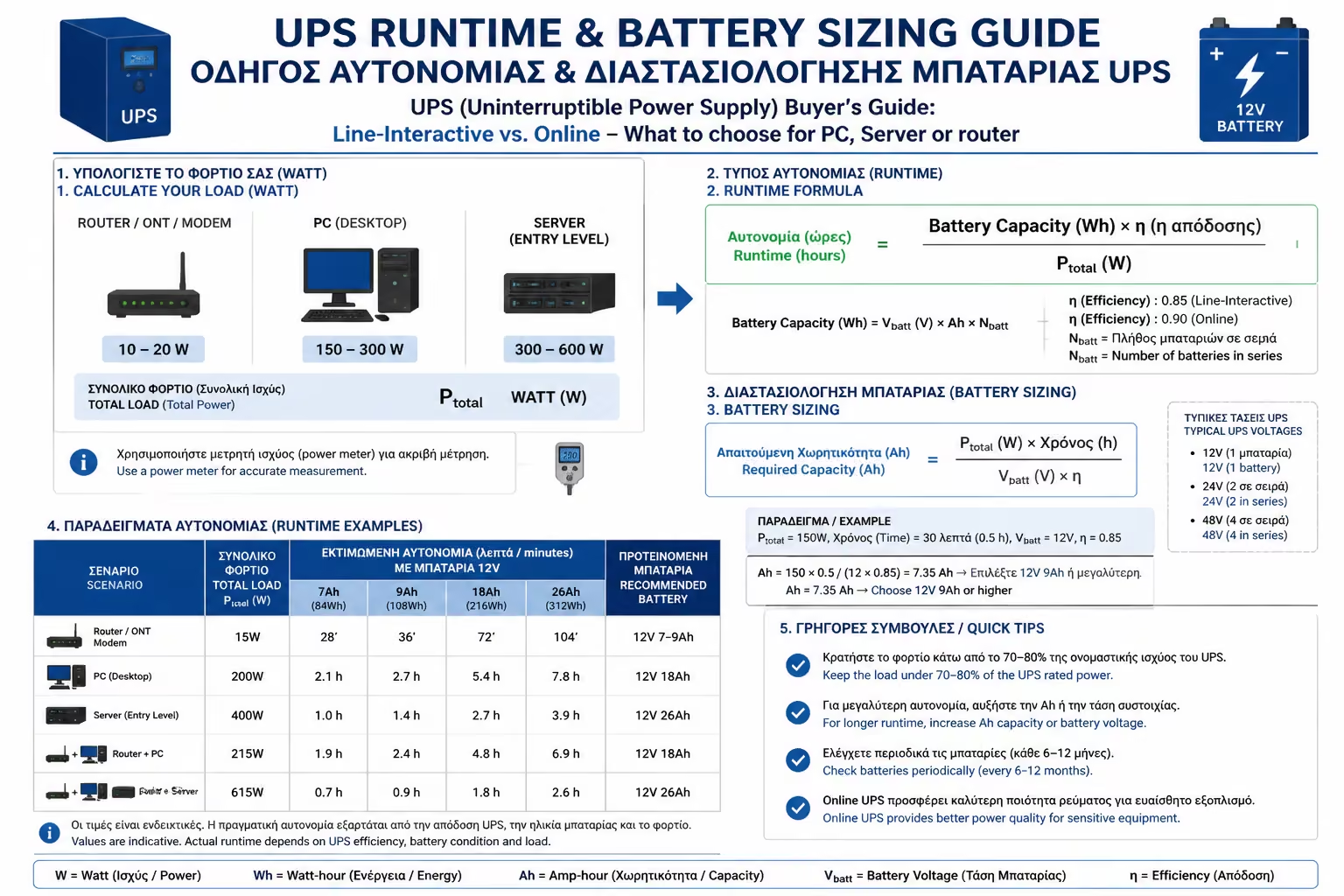
Before we begin, we need to dispel the biggest myth: A UPS is not a generator. A typical home UPS is not designed to let you continue your gaming or movie for the next 2 hours. It is designed to give you a 5 to 15 minute "window" to save your work and shut down the computer smoothly (Safe Shutdown). If you want hours of battery life, you need a generator or massive storage systems with external batteries.

Illustration for The Basic Rule: What UPS is NOT

The 3 Basic Technologies (Topologies) UPS

Illustration for The 3 Basic Technologies (Topologies) UPS

How well and quickly a UPS protects depends on how it's built internally.

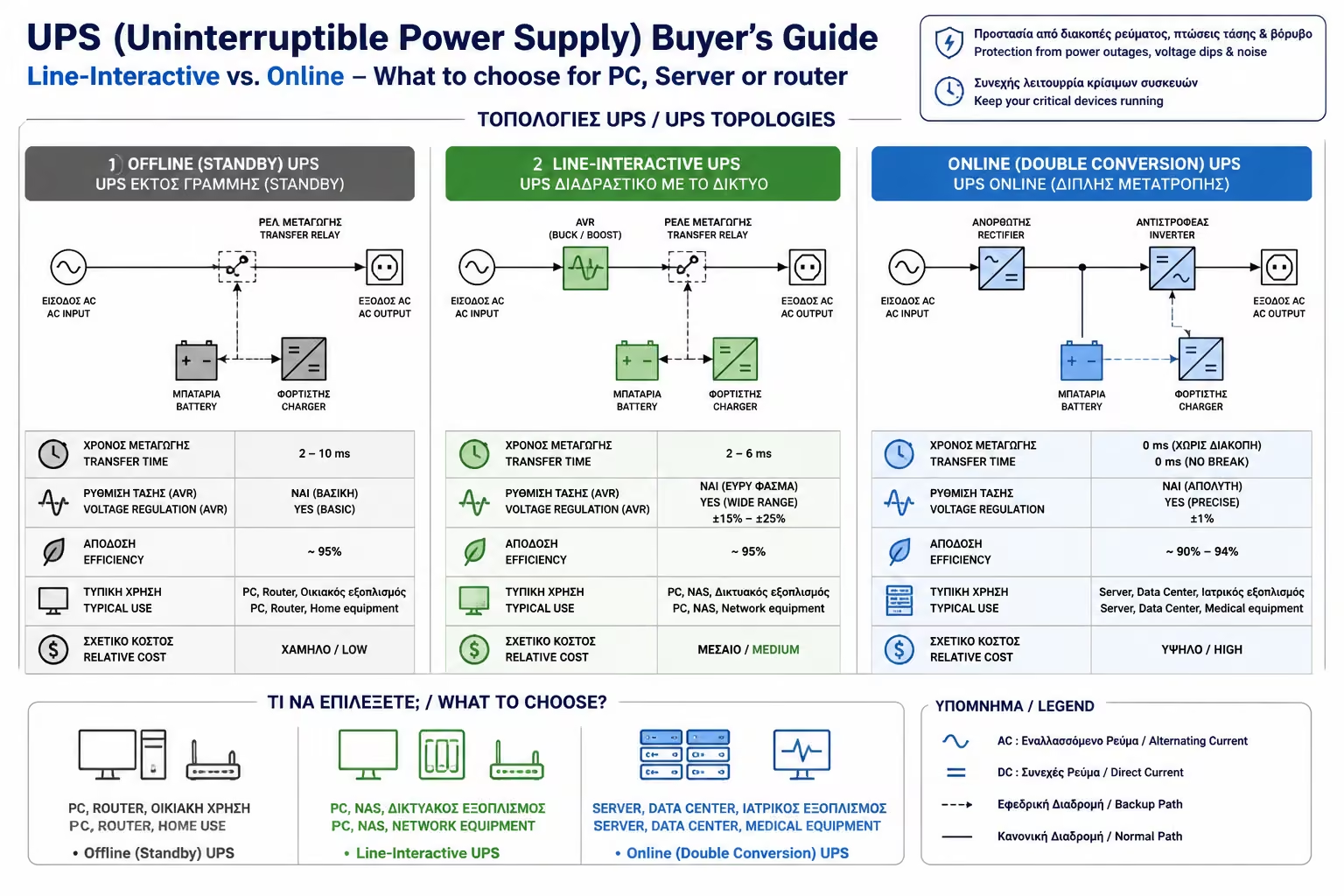
1. Standby (or Offline) UPS - The Absolute Essential

It is the oldest and cheapest technology. How it works: Under normal conditions, power from the outlet passes directly to your devices. Only when the power goes out (or the voltage drops dramatically) does an internal switch "turn" on the batteries. The Downside: This change takes some milliseconds (Transfer Time). Although it is a short time, some ultra-sensitive devices may have time to turn off. * Ideal for: Router/Modem, simple TVs, alarm systems and very simple office systems (not expensive PCs).
2. Line-Interactive UPS - The "Golden Ratio"

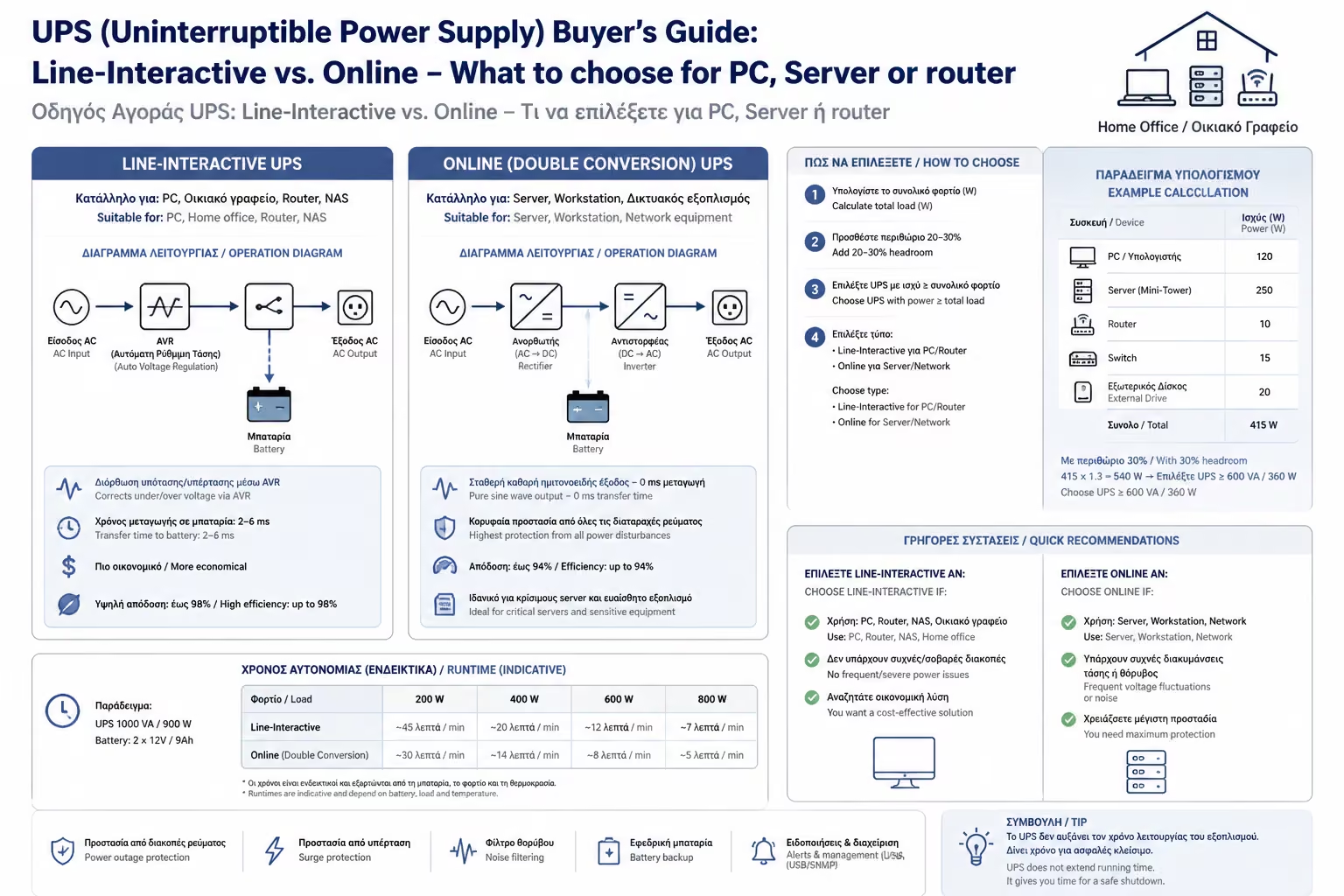
It is the most popular category for 90% of home and office needs. How it works: In addition to the battery, it has a built-in AVR (Automatic Voltage Regulator) transformer. If your PPC sends you less (eg 190V) or more current (eg 250V), the AVR corrects it to 230V, without using the battery. The Advantage: Protects devices from constant micro-surges in voltage (which wear out electronics) and dramatically extends battery life by only keeping it in case of a total power outage. * Ideal for: Gaming PCs, workstations, consoles (PS5, Xbox) and expensive home cinemas.

3. Online (Double Conversion) UPS - The Ultimate "Fortress"

This is the technology used in industries and Data Centers. How it works: PPC electricity NEVER reaches your devices! The UPS takes the alternating current from the wall, turns it into direct current to charge the batteries, and then double conversions it back to give it to your computer. Your devices are permanently powered by the batteries, having a perfectly clean and perfect supply. The Advantage: The transfer time (Transfer Time) in the event of an interruption is absolutely Zero (0 ms). They understand absolutely nothing. The Downside: They are expensive, use more electricity (due to double conversion) and have powerful fans that make quite a lot of noise, so they are not suitable for a quiet bedroom. Ideal for: Servers, medical devices, critical network equipment.

VA vs. Watts: How Big a UPS Do I Need?

This is where the biggest mistake is made by consumers. They see a UPS that says "1000 VA" and think it can handle devices with a total power of 1000 Watts. Error!

As we explained in the Power Factor article, Volt-Amperes (VA) are not equal to pure Watts. For most residential Line-Interactive UPS, their power factor is usually 0.6. So a 1000 VA UPS can handle about 600 Watts of real load. * The Purchase Rule: Calculate how many Watts your PC consumes together with its screen (eg 450W). Add a 20% margin (~550W total). Then divide this number by 0.6. You need a UPS of at least 900 VA with 1000 VA. Don't underestimate it!

Illustration for VA vs. Watts: How Big a UPS Do I Need?

The detail that "burns": The Pure Sine Wave

Illustration for The detail that "burns": The Pure Sine Wave

If you have a modern, expensive Gaming PC, its power supply (PSU) has a circuit called Active PFC (Active Power Factor Correction).

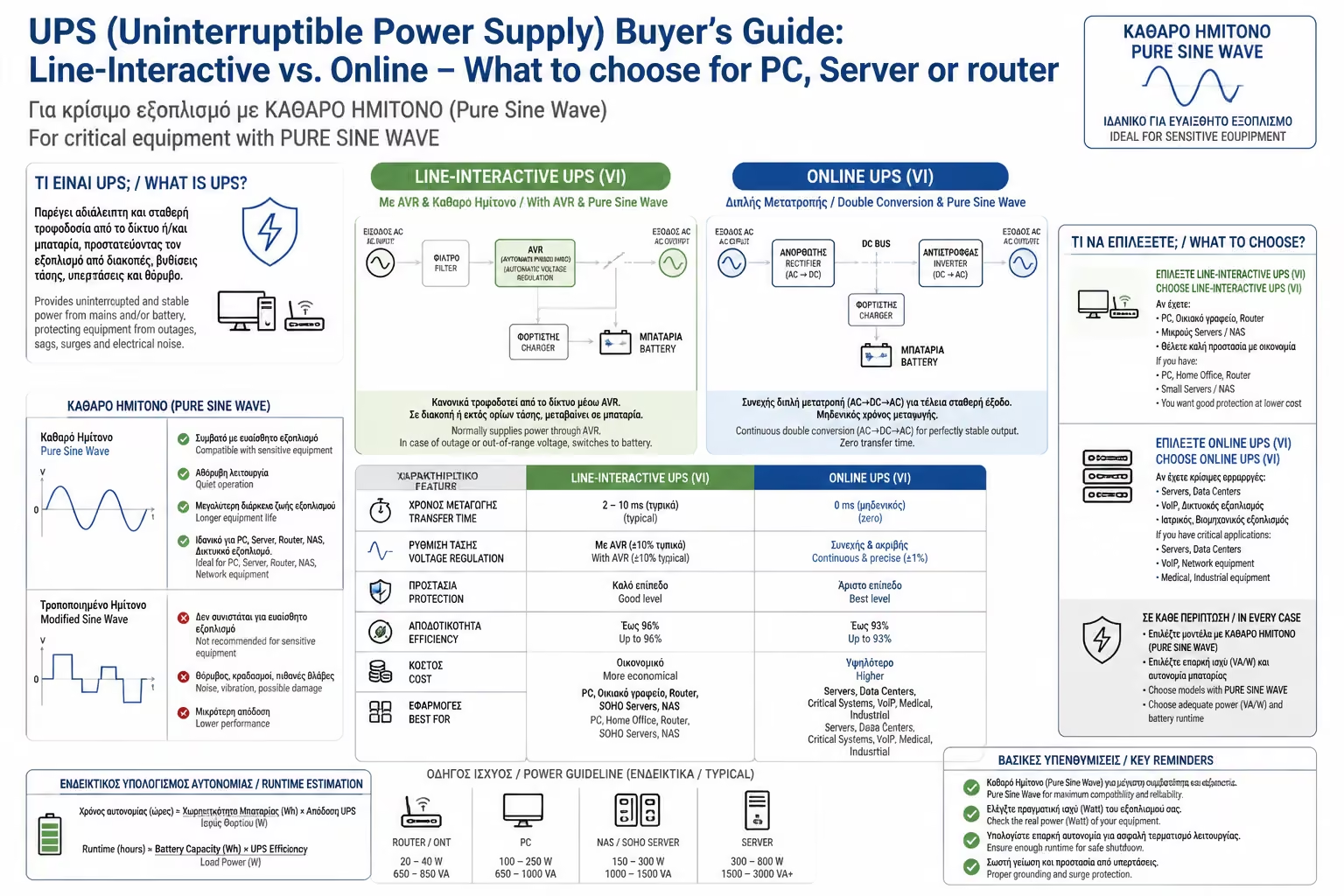
Cheap UPSs, when working with the battery, do not produce a "rounded" current like the PPC, but a squared one (Simulated / Stepped Sine Wave). Power supplies with Active PFC often detest these square waves. When the power goes out, the power supply may think the UPS power is "bad", shut down for protection, and your PC will shut down even though you have a UPS!

The solution

If your PC has a good power supply with Active PFC, you must choose a UPS that says "Pure Sine Wave" in its characteristics. They are a bit more expensive, but ensure 100% compatibility.

Summarizing

For the router and cordless phone, a cheap Standby UPS of 600VA is enough to not lose the internet in an outage. For your good PC, invest in a Line-Interactive Pure Sine Wave UPS (typically 1000VA - 1500VA). It is probably the most boring peripheral you will buy, but it will be the silent "bodyguard" of your work and digital entertainment.

Next Step: What if you don't care at all about autonomy (continuing to work when the power goes out), but you're only afraid of voltage fluctuations and lightning that "burns" the boards of devices? Then you don't need batteries! Continue to our guide: Voltage Regulators (AVRs): The Inexpensive Life Insurance for Your Sensitive Electronics.

Related Articles

Preview