
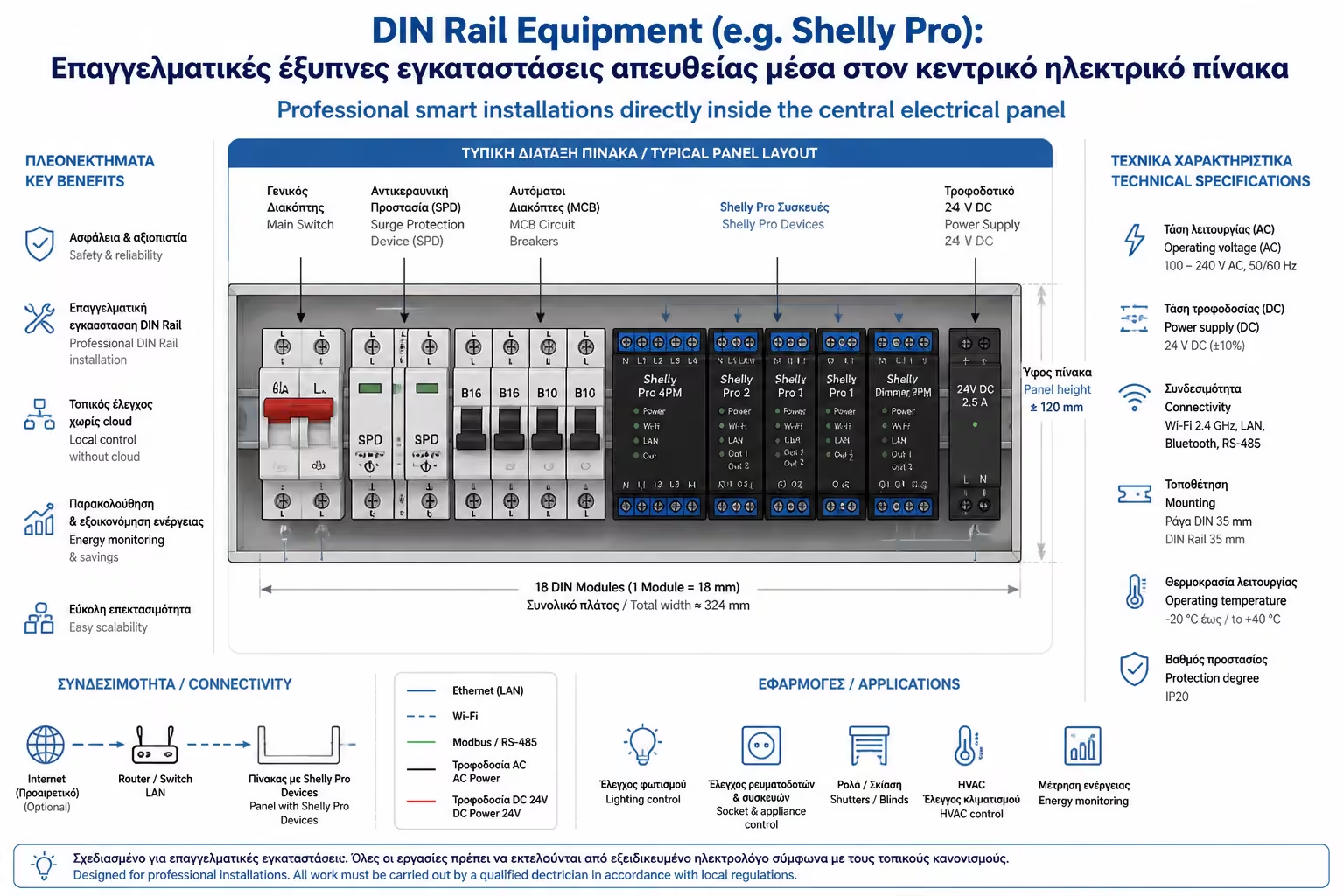
DIN Rail Equipment (e.g. Shelly Pro): Professional smart installations directly inside the central electrical panel

So far we've looked at how to "hide" tiny relays behind wall switches to control individual lamps. This is the perfect solution for small upgrades. But what about when we want to control the water heater (a huge 4000W load), the pool pump, or when we're doing a major renovation and want industrial reliability without "cramming" cables into narrow walls?

There, engineers and professional electricians leave the walls and are transported to the "heart" of the house: the Central Electrical Panel.

Smart Home companies (led by the Shelly Pro series and Sonoff's equivalent) have created equipment specifically designed to "snap" directly onto the panel's metal rails (DIN Rail). Let's see why this approach is the epitome of security and how it turns a simple home installation into a professional level Smart Home.

1. What is DIN Rail Equipment?

If you open the door of your electrical panel, you will see that all the fuses and relays are mounted on horizontal metal rails. These are called DIN Rails (from the German standard Deutsches Institut für Normung).

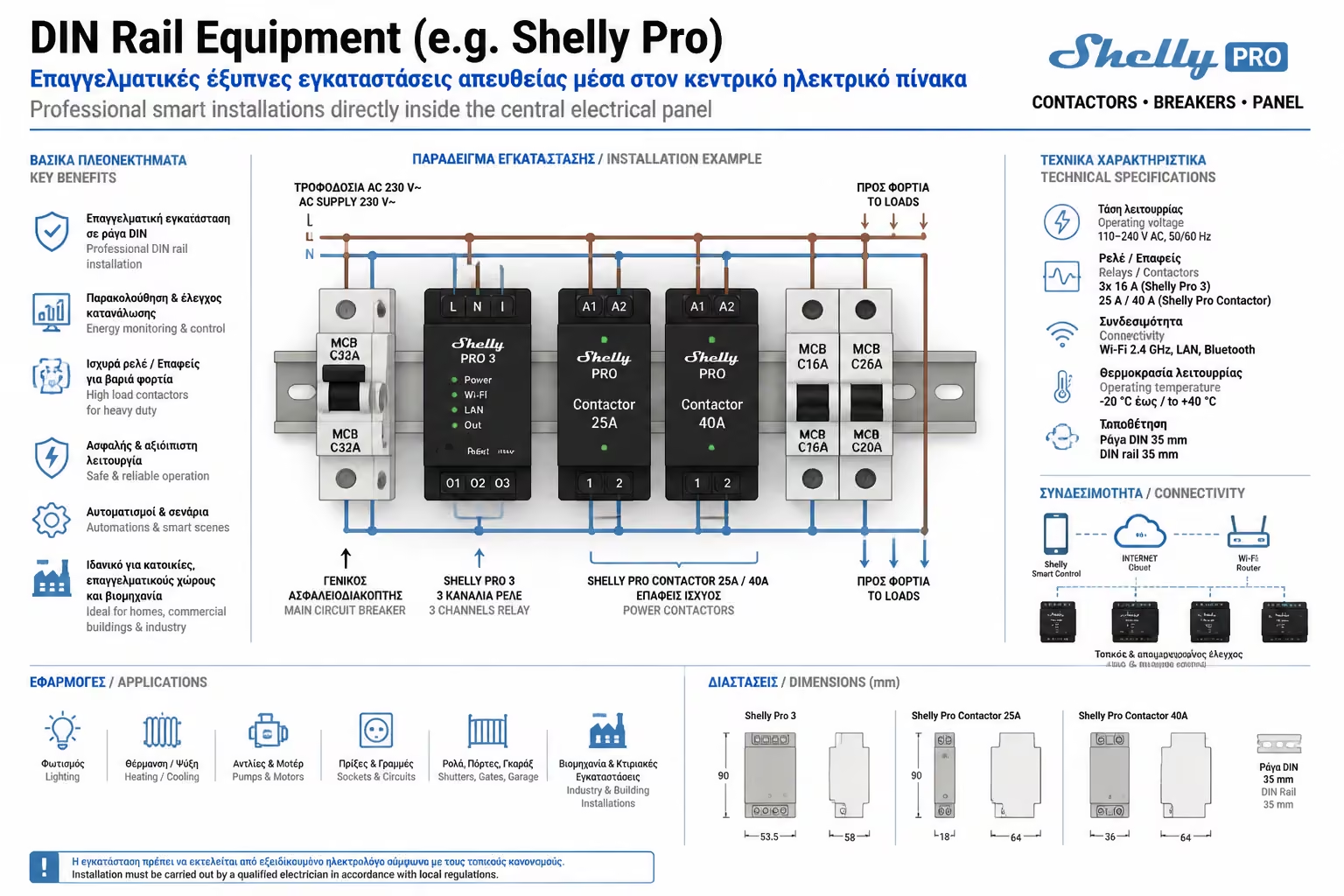
DIN Rail Smart Relays are exactly the same shape and size as a common fuse. The electrician simply "clicks" them onto the rail next to the other fuses. They have their own board, Wi-Fi/Bluetooth antenna and strong terminals (terminals) to accept thick cables.

Illustration for 1. What is DIN Rail Equipment?

2. Why move Smart Home to the Table? (The 3 big advantages)

Illustration for 2. Why move Smart Home to the Table? (The 3 big advantages)

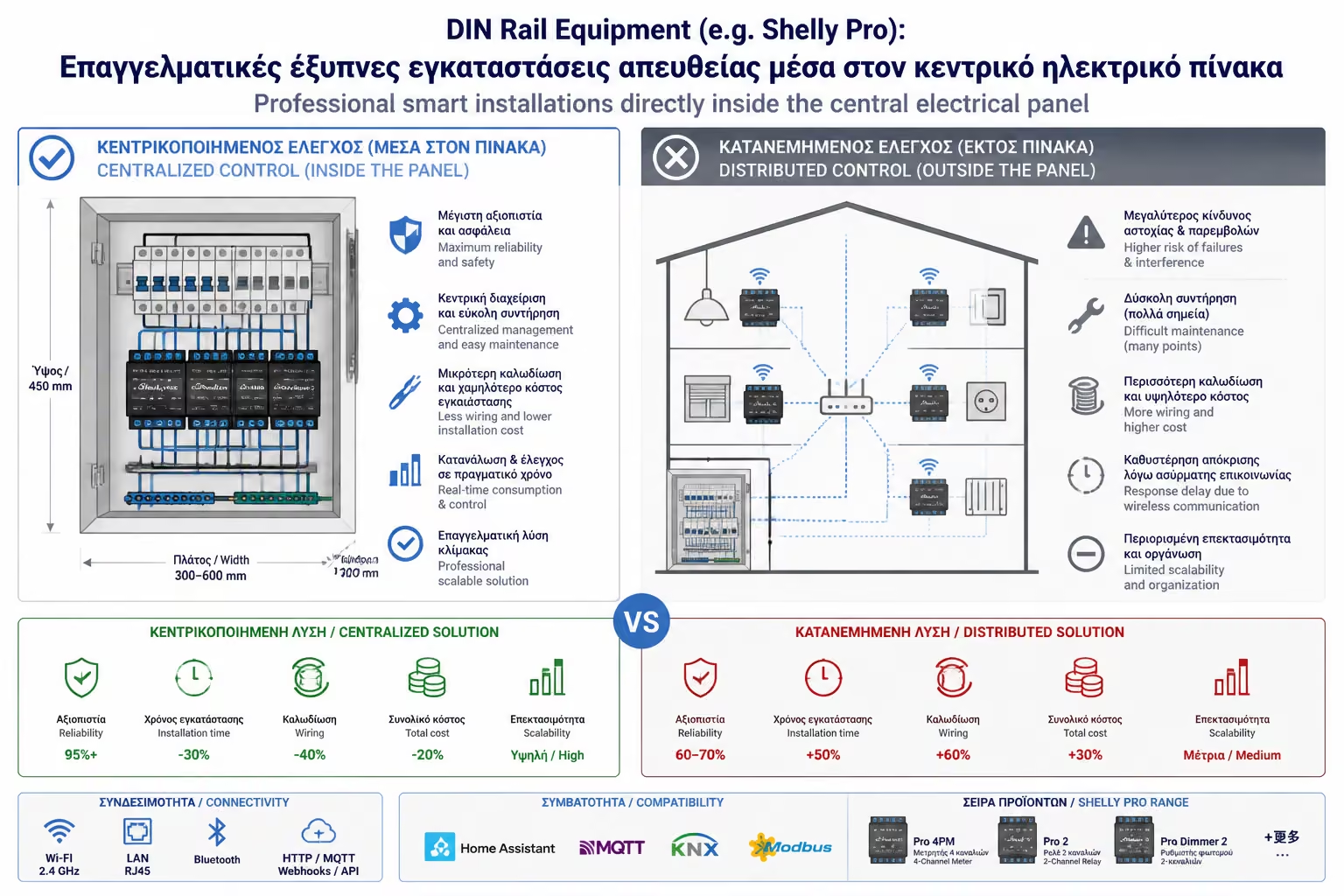
Centralizing your automation offers three huge benefits that hidden wall relays just can't compete with:

A. Heavy Duty Management & Safety

A small relay behind the wall switch is perfect for 5 LED bulbs. However, it cannot handle the 16 Amperes of a water heater or a large A/C. On the panel, we have the space to work properly. We connect the smart rail relay (eg a Shelly Pro 1) to a "hardneck", industrial Power Relay (Contactor) 25A or 40A. The smart relay gives the command, and the power relay "picks up" the huge current of the water heater. This guarantees that the plastics will never melt and there will be no risk of fire.
B. Wired Connection (LAN / Ethernet)

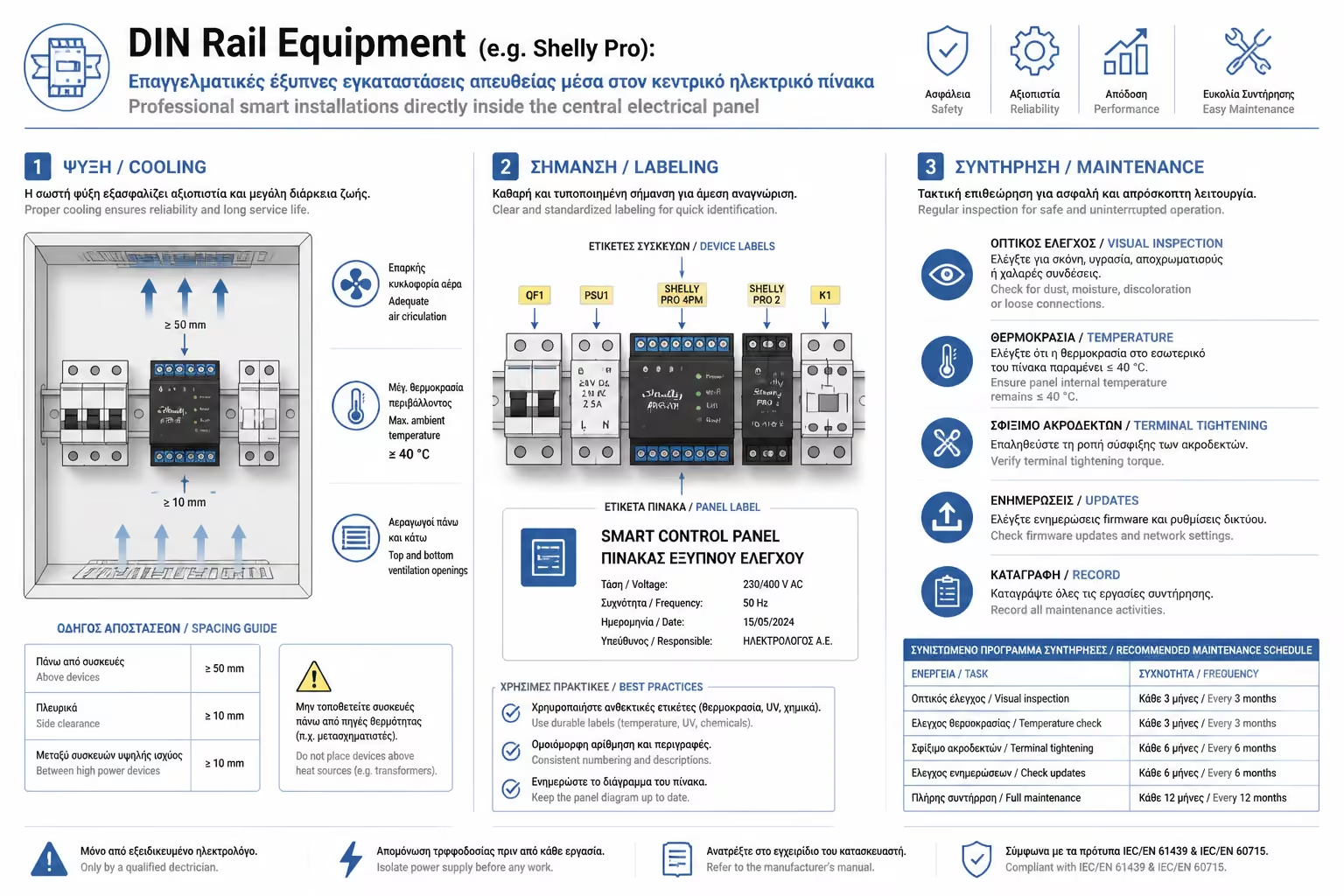
This is probably the most important feature of the pro series (like Shelly Pro). They have an RJ45 port for a network cable (Ethernet). Wi-Fi is convenient, but subject to interference. By snapping an internet cable directly from your Router onto the panel's smart relay, the system gains wired, impenetrable stability. You'll never see "Device Offline" again.

C. Easy Maintenance

Electronic boards (no matter how good they are) sometimes break down. If a relay built into a wallpapered wall burns out, the electrician must pry the switch off, risking staining or scratching the wall. If a rail relay burns out, he just opens the panel door, unclips it and puts in the new one in 2 minutes.

3. The Standard Applications (What's worth putting on the board?)

Even if you're not renovating, there are systems that have traditionally only been controlled by the panel and are prime candidates for automation:

  1. The Electric Water Heater: As we mentioned, it is the absolute "black hole" of electricity if it is forgotten. A smart rail relay set with an "Auto-Off" timer (so it always closes 40 minutes after you open it) pays for itself in a few months.
  2. Outdoor Lighting (Garden, Porches, Signs): Instead of having problematic photocells, a track relay takes over turning on the perimeter lights of the home or business based on sunrise and sunset (Astronomical Clock via Internet).
  3. Central Water Solenoid: Combined with wireless flood sensors, a relay in the panel can command a valve to shut off the home's central water supply if a pipe breaks while you're away.
  4. Energy Meters: Track devices with amperometric clamps (CT Clamps), such as the Shelly Pro 3EM, hug the central cables of the panel and show you live the total consumption of the house on your mobile.
Illustration for 3. The Standard Applications (What's worth putting on the board?)

4. The Ultimate Renovation: Centralized Wiring

Illustration for 4. The Ultimate Renovation: Centralized Wiring

If you are building a new house and don't have the huge KNX budget, you can make the following amazing "hybrid" system using DIN rail equipment:

The electrician runs ALL lamp wires and ALL switch wires (with low voltage) directly to the main panel. In other words, no 230V current circulates in the wall, only command cables. Inside the panel are arrays of Shelly Pro 4PM (rail relays controlling 4 lines each).

The Result: You have a house wired to industrial standards (all the "brain" and currents are gathered in the panel), without Wi-Fi signals trying to penetrate the walls (since the relays are connected by Ethernet), and at a fraction of the cost of a pure KNX installation! (Caution: A huge electrical panel is required, usually twice the size of a normal one).

Summarizing

When DIYers and homeowners want to play with living room lighting, they look behind the switches. When engineers want to ensure the backbone of a building (Heaters, Pumps, Central Lighting) with absolute security and uninterrupted LAN connectivity, they look exclusively to the electrical panel. DIN rail equipment is the ticket from "smart gadgets" to serious, professional building infrastructure.

Next Step: We solved how to give commands from the panel or hidden relays. But what if you want to add a new switch to a wall that has no wires at all, and you refuse to dig or pull unsightly plastic ducts?

We continue to a technology that looks like magic: Wireless Switches Without Battery (Kinetic/Piezo): How they work, where they solve hands and how they eliminate digging in walls.

Related Articles

Smart Home, Building Automation (BMS) & Security

Return to category.

Go to category

Preview